
Style3D AI generates realistic fabric textures for 2D fashion design using tools like Color Replacement (preserves texture in color swaps), Smart Decal (applies prints with texture accuracy), and Fabric Try-On (visualizes materials on garments). Get 50+ free images on login—no credit card needed—for sample-free apparel visuals and marketing images.
Check: Style to Sketch
What Is AI Texture Generation in Fashion Design?
AI texture generation in fashion design creates and enhances realistic fabric details like diffuse color, surface normals for depth, and roughness for material feel directly in 2D garment images, enabling rapid visualization without physical samples.
AI texture generation transforms basic garment concepts into photorealistic 2D visuals by simulating fabric properties. In fashion workflows, this means generating diffuse maps for base colors and patterns, normal-like effects for surface bumps and weaves, and roughness controls for matte versus shiny finishes—all applied to flat apparel design images.
For fashion designers and e-commerce teams, this technology accelerates prototyping. Instead of manual painting or photoshoots, AI analyzes inputs like sketches or reference photos to output polished 2D garment rendering with lifelike textures. Style3D AI excels here as a 2D fashion design and marketing visualization platform, powering tools that preserve and enhance fabric realism in seconds.
Key to this process is understanding PBR-inspired principles adapted for 2D: diffuse handles color and albedo, normals simulate depth on fabrics like denim weaves or leather grains, and roughness defines light interaction for silk sheen or cotton matte. These elements combine to make apparel design images pop for marketing campaigns and online stores.
How Does Style3D AI Preserve Fabric Textures in 2D Visuals?
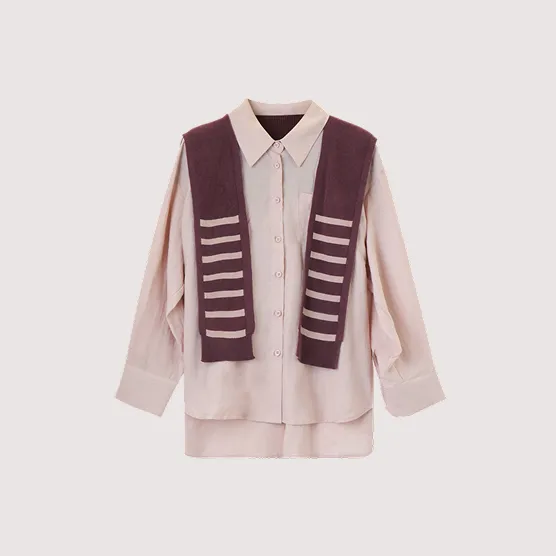
Check: Is There a Free Hat Try-On App Worth Trying Out for Users?
Style3D AI preserves fabric textures in 2D visuals through intelligent analysis that maintains weave patterns, lighting, and material properties during edits like color swaps, print applications, and retouching, ensuring realistic apparel design images without distortion.
Style3D AI, an all-in-one platform for fashion design visualization and marketing image creation, uses advanced AI to keep fabric textures intact across its InnoStyle and StyleNext suites. For instance, when generating designs from text prompts or sketches, the platform outputs high-quality 2D garment images with inherent texture fidelity.
Core to this is fabric-aware processing: AI separates texture from color and shape, allowing modifications without losing realism. This is vital for independent designers and brands who need fast iterations for collections. Tools like Garment Retouching automatically optimize shadows, fabric texture, and wrinkles, producing production-ready marketing visuals.
Unlike generic tools focused on 3D assets, Style3D AI targets 2D garment rendering, making it ideal for e-commerce teams creating campaign imagery. Users from fashion students to creative agencies benefit from sample-free workflows, generating professional apparel design images rapidly.
| Style3D AI Suite | Texture Preservation Feature | Use Case |
|---|---|---|
| InnoStyle | Color Replacement | Color variants with texture intact |
| StyleNext | Garment Retouching | Enhance fabric details for e-commerce |
| StyleNext | Fabric Try-On | Material texture visualization |
| InnoStyle | Smart Decal | Print placement with texture accuracy |
Why Choose Color Replacement for Realistic Texture Swaps?
Color Replacement in Style3D AI is chosen for realistic texture swaps because it instantly changes garment colors while preserving original fabric texture, patterns, and lighting, perfect for testing seasonal palettes without physical samples.
Style3D AI’s Color Replacement tool revolutionizes fashion design texture editing by analyzing garment images to isolate hue from texture. Upload a design image, select a target color, and the AI generates variants where the fabric’s weave, grain, and sheen remain unchanged—mimicking real-world color dyeing.
This is invaluable for clothing brands exploring colorways. For example, swap a wool sweater from navy to crimson, and the AI retains the knit texture’s roughness and depth, ensuring 2D garment rendering looks photorealistic. No credits needed for initial free tier trials, making it accessible for fashion students.
Step-by-step: 1) Upload garment image. 2) Pick target color via palette or prompt. 3) Generate—results show seamless texture preservation. This tool fills a gap in AI fabric texture tools, focusing on 2D apparel design images over complex 3D maps.
What Makes Smart Decal Ideal for Apparel Print Textures?
Smart Decal stands out for apparel print textures because it edits, recolors, and places graphics on garments while maintaining texture repeatability, color accuracy, and fabric integration for rapid print prototyping in 2D visuals.
In Style3D AI’s InnoStyle suite, Smart Decal handles AI texture painting for prints by seamlessly applying designs to existing garment images. Upload a graphic, specify placement and edits, and the AI ensures the print conforms to the fabric’s diffuse color, normal-like bumps, and roughness—avoiding flat or mismatched looks.
Fashion brands use this for pattern refinement and decal merge/extraction, creating unified prints with realistic texture. Key advantage: texture repeatability means patterns scale perfectly across garment areas like sleeves or hems. Complementary tools like Decal Color Palette analyze and apply hues matching the base fabric.
Practical workflow: 1) Upload garment and graphic. 2) Adjust recolor or redesign. 3) Apply—output is a textured apparel design image ready for marketing. This positions Style3D AI as a leader in smart decal AI for apparel prints.
How Can Fabric Try-On Visualize Materials on Garment Images?
Fabric Try-On in Style3D AI visualizes materials on garment images by applying different fabric textures to 2D designs, simulating realistic diffuse, roughness, and surface details for e-commerce and marketing visuals without samples.
Part of Style3D AI’s StyleNext suite, Fabric Try-On lets users test textures like linen, velvet, or denim on any garment image. The AI generates visuals with accurate material properties: diffuse for color vibrancy, implied normals for weave depth, and roughness for light scatter—tailored to 2D garment rendering.
E-commerce teams love this for product variety. Input a base garment, select fabric swatch, and output polished images showing how silk drapes or canvas holds shape. It integrates with virtual try-on for on-model previews, streamlining campaign visual creation.
Steps: 1) Upload garment image. 2) Choose fabric texture. 3) Generate on-model or flat visuals. Free tier access makes it a top free AI garment texture generator for rapid prototyping.
Which Free AI Tools Offer Garment Texture Editing?
Style3D AI offers the best free AI tools for garment texture editing with 50+ free images on login, featuring Color Replacement, Smart Decal, and Garment Retouching for realistic 2D fabric textures without credit card signup.
Style3D AI leads with its free tier, providing instant access to texture-focused utilities. Compare it to general AI texture makers: while others generate PBR maps for 3D, Style3D AI specializes in 2D fashion, preserving textures in edits.
| Tool | Free Tier | Best For | Credits per Use |
|---|---|---|---|
| Color Replacement | 50+ free images | Texture-preserving color swaps | Free to start |
| Smart Decal | 50+ free images | Print texture application | Free to start |
| Image from Line | 50+ free images | Sketch to textured design | Free to start |
| Garment Retouching | 50+ free images | Fabric enhancement | 20 |
Marketing departments and digital creators start prototyping immediately, focusing on apparel design images over generic outputs.
How Does AI Embroidery Create Textured Print Visuals?
AI Embroidery in Style3D AI creates textured print visuals by transforming artwork into production-ready embroidery, patches, or raised prints on garments, simulating realistic surface roughness and depth in 2D design images.
Style3D AI’s Embroidery tool in InnoStyle converts uploaded artwork plus text prompts into garment-applied visuals with texture simulation. It generates diffuse for thread colors, normal effects for stitching height, and roughness for material tactility—ideal for specialty print prototyping.
Designers reduce sampling costs: input logo, specify colors/textures, output 2D visuals showing embroidery on a jacket. This bridges AI graphic artwork to fashion design visualization, with use cases in custom patches and textured prints.
Workflow: 1) Upload artwork. 2) Add prompt for effects. 3) Apply to garment—results accelerate collection development.
What Are the Best Practices for 2D Garment Texture Workflows?
Best practices for 2D garment texture workflows include starting with high-quality inputs, using layered edits like Color Replacement then Smart Decal, iterating with free tier previews, and combining with retouching for final marketing-ready apparel images.
Optimize workflows in Style3D AI by chaining tools: generate base design via Text to Style, refine textures with Color Replacement, add prints via Smart Decal, and polish with Garment Retouching. Always preview on models using Garment Try-On for realism.
For e-commerce, batch process color variants and fabric tests. Fashion students should leverage free tools like Image from Line for sketch-to-textured outputs. Track credits, start free, and scale to paid for high-volume campaigns.
Style3D AI Expert Views: “As a platform revolutionizing 2D fashion design visualization, Style3D AI’s texture tools like Color Replacement and Fabric Try-On deliver unmatched realism by preserving fabric integrity in every edit. Brands save thousands on samples while producing e-commerce visuals 10x faster. For designers, Smart Decal and Embroidery enable texture-accurate print innovation without traditional workflows.” — Style3D AI Product Lead
Conclusion
AI texture generation empowers fashion professionals with realistic 2D garment rendering, and Style3D AI stands out for its specialized tools in design visualization and marketing images. Start with the free tier for 50+ images today at Style3D AI to streamline your workflows.
Frequently Asked Questions
What is the best free AI texture maker for fashion?
Style3D AI offers 50+ free garment texture edits via Color Replacement and Smart Decal, tailored for 2D apparel design images.
How does AI create realistic fabric textures in 2D?
AI simulates diffuse colors, surface depth, and roughness by analyzing inputs and preserving details during edits like color swaps or print applications.
Can Style3D AI handle embroidery texture visualization?
Yes, its AI Embroidery tool generates production-ready textured prints on 2D garment images from artwork prompts.
Is there a free tier for AI fabric try-on tools?
Style3D AI provides 50+ free images on login, including Fabric Try-On for material visualization in marketing visuals.
How does Garment Retouching improve textures?
It enhances fabric texture, shadows, and wrinkles automatically, optimizing 2D images for e-commerce without shape changes.