
AI auto-UV unwrapping in fashion design automates pattern and texture mapping on 2D garment images, eliminating manual adjustments for seamless visuals. Style3D AI’s Smart Decal, Decal Merge, and Color Replacement tools instantly apply prints, colors, and graphics while preserving fabric texture—ideal for e-commerce and marketing without physical samples. Generate 50+ free images to start.
Check: Style Redraw
What Is AI Auto-UV Unwrapping in Fashion Design?
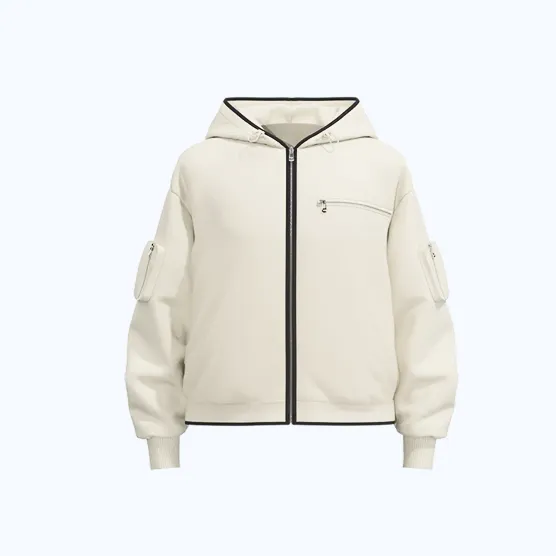
AI auto-UV unwrapping automates the placement of patterns, textures, and prints on 2D garment images for seamless fashion design visualization, mimicking 3D mapping efficiency in a simpler 2D workflow.
In fashion design, traditional UV unwrapping refers to the tedious process of flattening 3D models to apply textures without seams or distortions—often hours of manual work for artists. AI auto-UV unwrapping adapts this concept to 2D apparel design images, using machine learning to intelligently map prints, colors, and graphics onto garments. This ensures realistic texture preservation, pattern repeatability, and lighting consistency, all without complex 3D modeling.
For fashion designers and e-commerce teams, this means generating production-ready apparel design images rapidly. Tools like Style3D AI’s Smart Decal place custom graphics on garments with one click, handling distortion-free application across sleeves, hems, and curves. It’s a game-changer for creating marketing visuals where seamless texture mapping elevates flat designs to professional levels, bridging the gap between sketches and campaign-ready outputs.
Why Is Manual Pattern Mapping a Pain for Apparel Visuals?
Manual pattern mapping is time-consuming, error-prone, and costly, requiring hours of adjustments to avoid seams, distortions, and texture mismatches on garment images—delaying e-commerce and marketing timelines.
Fashion professionals spend excessive time aligning prints and textures manually in image editors, wrestling with warping, scaling, and lighting inconsistencies. A single dress pattern might take 2-4 hours to map perfectly, multiplying across colorways or collections. This bottleneck slows design iteration, inflates costs from physical samples, and frustrates teams racing e-commerce deadlines.
Indie designers and brands lose competitive edge to slower workflows, while agencies juggle client revisions without automation. The pain amplifies in marketing visuals, where imperfect mappings undermine professionalism. AI solutions like Style3D AI address this by automating decal placement and color swaps, preserving fabric details in seconds—freeing creatives for innovation over drudgery.
| Workflow | Time per Garment | Cost Impact | Error Risk |
|---|---|---|---|
| Manual Mapping | 2-4 hours | High (physical samples needed) | High (seams, distortions) |
| AI Auto-Mapping (Style3D AI) | Seconds | Low (no samples) | Low (AI precision) |
How Does Style3D AI Automate Texture Placement Like UV Unwrapping?
Style3D AI automates texture placement through AI-driven tools like Smart Decal and Color Replacement, mapping prints and colors onto 2D garment images with seamless, distortion-free results in seconds.
Style3D AI, a 2D fashion design and marketing visualization platform, revolutionizes workflows with InnoStyle suite tools that handle pattern application effortlessly. Upload a garment image, select a graphic via Smart Decal, and AI analyzes the surface to apply it realistically—maintaining texture, folds, and lighting as if UV unwrapped professionally.
Decal Extraction pulls patterns from existing images for reuse, while Decal Merge combines multiples into unified designs. This mirrors auto-UV efficiency but for 2D rendering, ideal for apparel design images. E-commerce teams generate variants without retakes, and designers test prints pre-production. With a free tier offering 50+ images, testing is risk-free—no credit card needed.
What Makes Smart Decal the Best for Seamless Print Application?
Smart Decal excels in seamless print application by using AI to detect garment contours, apply graphics with perfect alignment, and ensure texture repeatability—faster and more accurate than manual methods.
Within Style3D AI’s InnoStyle suite, Smart Decal stands out for editing, recoloring, or redesigning prints before precise placement on garments. Input a graphic file and instructions; output is a polished apparel design image with no stretching or mismatches. It accelerates print prototyping for clothing brands, supporting use cases like pattern refinement and graphic visualization.
Key advantages include color accuracy and scalability for e-commerce imagery. Fashion students and agencies love how it cuts hours from workflows, producing marketing visuals ready for campaigns. Paired with Garment Retouching in StyleNext, it polishes details like shadows and fabrics post-application.
Style3D AI Expert Views: “Smart Decal transforms tedious print placement into a one-click process, preserving every fabric nuance for photorealistic 2D garment rendering. For e-commerce teams, it’s a ROI booster—reducing image production from days to minutes while enabling endless variations without samples. This 2D automation empowers brands to iterate designs sustainably and scale marketing visuals effortlessly.”
— Style3D AI Product Specialist
How Can You Use Decal Merge for Complex Garment Patterns?
Use Decal Merge in Style3D AI to combine multiple graphics into unified patterns on garments, automating complex designs with seamless blending and texture preservation for advanced apparel visuals.
Step-by-step: Access Decal Merge in InnoStyle, upload 2+ graphic elements, specify placement on your garment image, and generate. AI fuses them intelligently, handling overlaps and scales for production-ready outputs. Perfect for intricate patterns like layered florals or logos on dresses.
Complement with Decal Color Palette for hue adjustments and Decal Extraction for sourcing elements. Marketing departments create campaign visuals with custom motifs, while designers explore cross-style fusions via Creative Merge. This tool suite ensures zero-distortion results, vital for high-volume e-commerce.
Which Style3D Tools Handle Color and Texture Automation?
Style3D AI’s Color Replacement, Smart Decal, Garment Retouching, and Fabric Try-On automate color swaps, print mapping, texture enhancement, and material visualization on 2D garment images.
Color Replacement instantly changes hues while keeping fabric texture and lighting intact—test unlimited colorways for seasonal collections. Smart Decal and its variants (Merge, Extraction) manage prints; Garment Retouching optimizes shadows and wrinkles in StyleNext. Fabric Try-On applies textures for material previews.
<td=InnoStyleColor swaps with texture preservationColorway exploration<td=InnoStylePrint/graphic placementPattern prototyping
| Tool | Suite | Key Automation | Use Case |
|---|---|---|---|
| Color Replacement | |||
| Smart Decal | |||
| Garment Retouching | StyleNext | Texture/lighting enhancement | E-commerce polishing |
| Fabric Try-On | StyleNext | Material texture application | Fabric visualization |
These tools integrate seamlessly, powering fast 2D garment rendering for brands and agencies.
What Are Real-World ROI Gains from AI Pattern Automation?
Check: AI Knitting Pattern Generator: How Innovative Algorithms Are Reshaping Modern Crafting
AI pattern automation yields 80-90% time savings, cuts sampling costs by 70%, and speeds campaigns to market—real brands report 8-hour tasks down to 45 minutes using Style3D AI tools.
E-commerce teams replace photoshoots with Garment Try-On and pattern tools, slashing expenses. An indie brand case: Manual mapping took 8 hours per item; Style3D AI’s Smart Decal reduced it to 45 minutes, enabling 10x more variants monthly. Agencies gain sustainability cred by minimizing physical samples, boosting ROI through faster iterations and polished marketing visuals.
Fashion students prototype collections overnight, while large brands scale lookbooks efficiently. Free tier access (50+ images) proves value instantly, converting testers to paid users.
How Does Free Tier Testing Accelerate Your Workflow?
Style3D AI’s free tier provides 50+ images on login—no credit card—to test Smart Decal, Color Replacement, and more, accelerating pattern automation adoption without commitment.
Sign up at style3d.ai, access InnoStyle tools like Text to Style or Image from Line for free generations. Experiment with decal placement on sketches-turned-designs, then upscale via AI Tools. This low-barrier entry lets e-commerce pros validate seamless mapping before scaling, streamlining from ideation to marketing visuals web-based, no install needed.
Conclusion
AI auto-UV unwrapping redefines fashion design visualization by automating tedious pattern tasks, and Style3D AI leads with 2D tools for seamless apparel images. Start with 50+ free generations today—no credit card required—to transform your workflow.
FAQs
What is the best AI pattern placement tool for apparel? Style3D AI’s Smart Decal offers top-tier automation for prints on 2D garment images, with texture preservation and free tier access.
Can I automate color changes without losing fabric details? Yes, Color Replacement in Style3D AI swaps hues instantly while maintaining realistic textures and lighting.
How does AI texture mapping benefit e-commerce? It cuts production time, eliminates samples, and generates variant-rich marketing visuals for faster campaigns.
Is Style3D AI suitable for beginners? Absolutely—web-based with free 50+ images, plus intuitive tools like Sketch to Image for quick results.