
AI Hat Application: Realistic Try-On in Seconds to Transform Headwear Sales
In sports fashion and accessories, traditional photoshoots often struggle with model head sizes, hairstyles, and brim angles, costing over $150 per hat and still falling short of representing diverse customers.
Style3D’s AI Hat Application changes the game with:
✅ Virtual Try-On: Upload any hat image to generate a realistic fit across different head shapes and hairstyles
✅ Multi-Angle Views: Instantly create front, side, and back shots to showcase brim curvature and coverage
✅ Comprehensive Hat Types: Supports 8 major styles, from baseball caps and bucket hats to berets and beyond
From reducing costs on international model shoots, to producing seasonal campaigns (sun hats in summer, beanies in winter), to ensuring global head-size compatibility, this feature improves content production efficiency by up to 95%.
Step-by-Step Guide
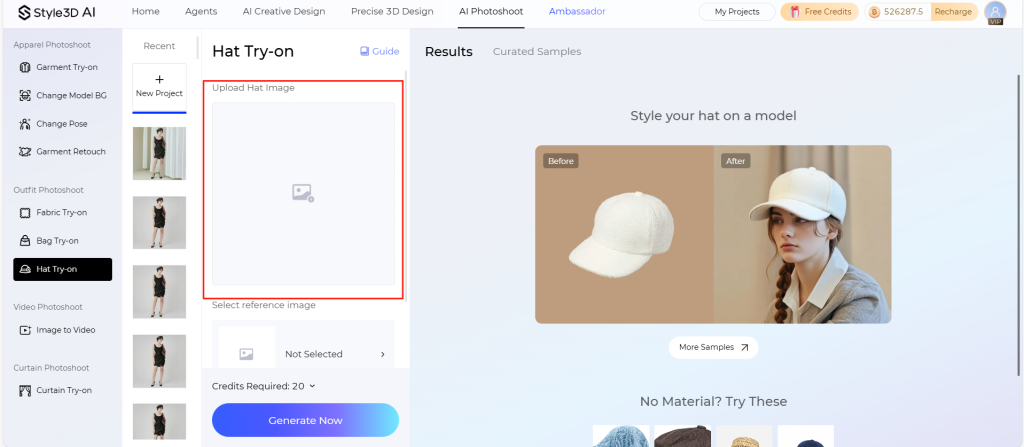
- Upload Hat Image
- Click “Upload Hat“
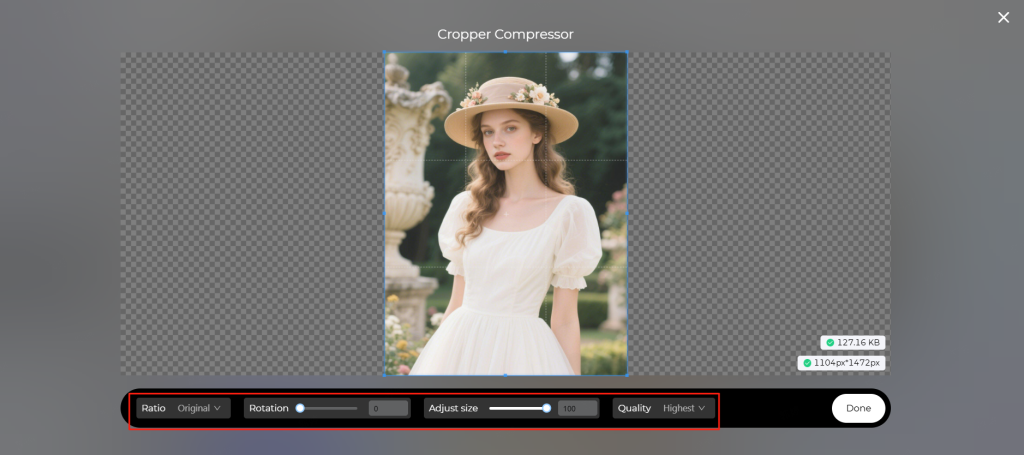
Adjust ratio, dimensions, quality, or rotation directly on the page
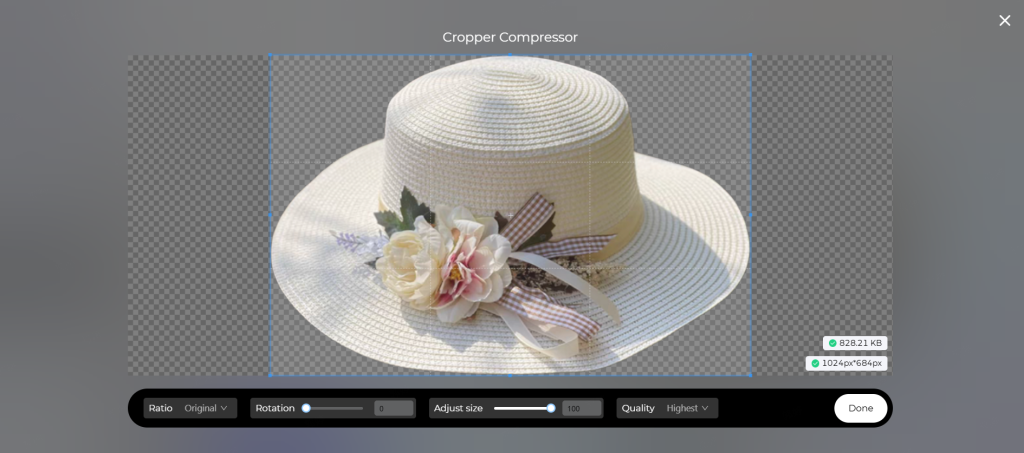
Image Requirements:
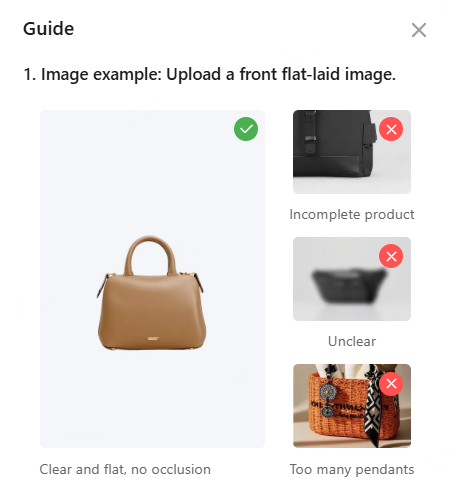
- ✅ Include a size reference (e.g., head model or scale)
- Formats: JPG/PNG/WEBP
- Dimensions: 400x400px ~ 4096x4096px
- File size: 20KB ~ 10MB
2.Select Model Base
- Option A: Reference Library
- Click “Select Reference Image” → “Reference Library“
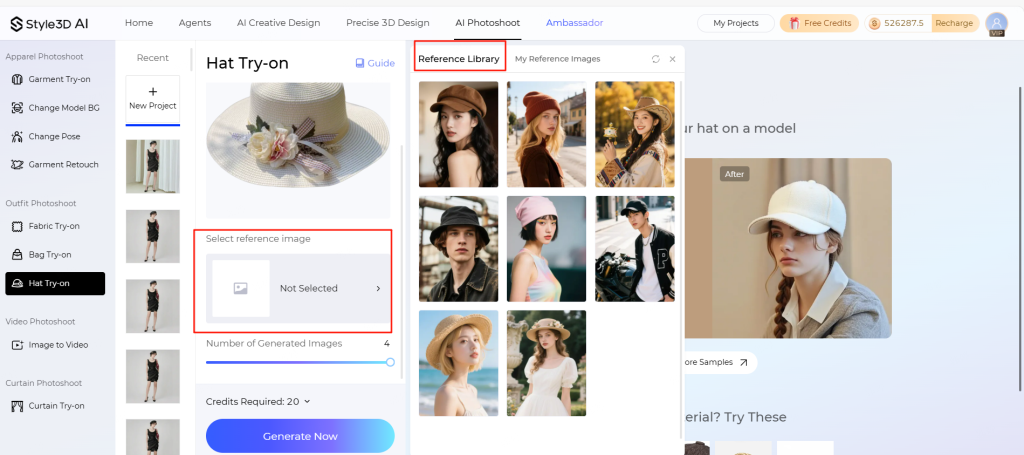
Option B: Custom Model
- Click “Select Reference” → “My References“
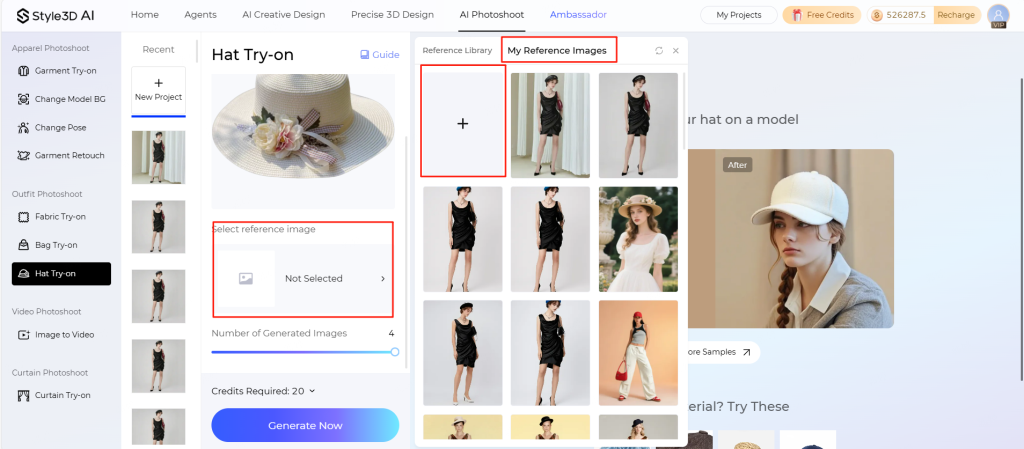
Adjust ratio, dimensions, quality, or rotation of the model image if needed
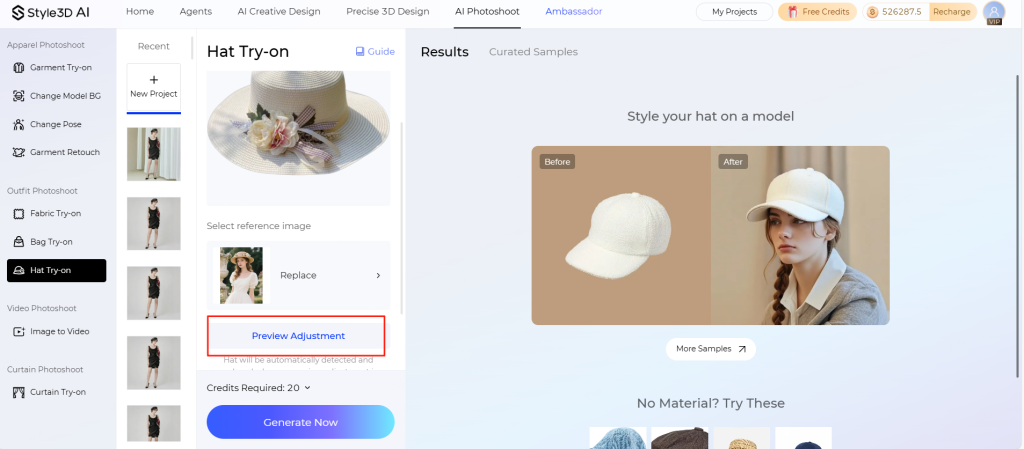
3.Preview & Adjust Placement
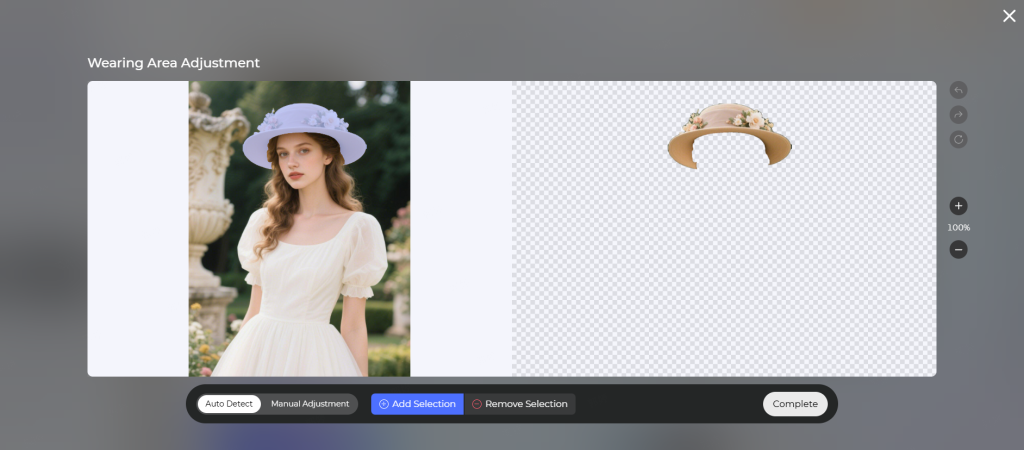
- After uploading both images, preview the virtual try-on
- Adjust hat placement automatically or manually
💡 Pro Tip: For the most realistic results, use model poses that match the intended wearing style of your hat.
4.Generate & Refine
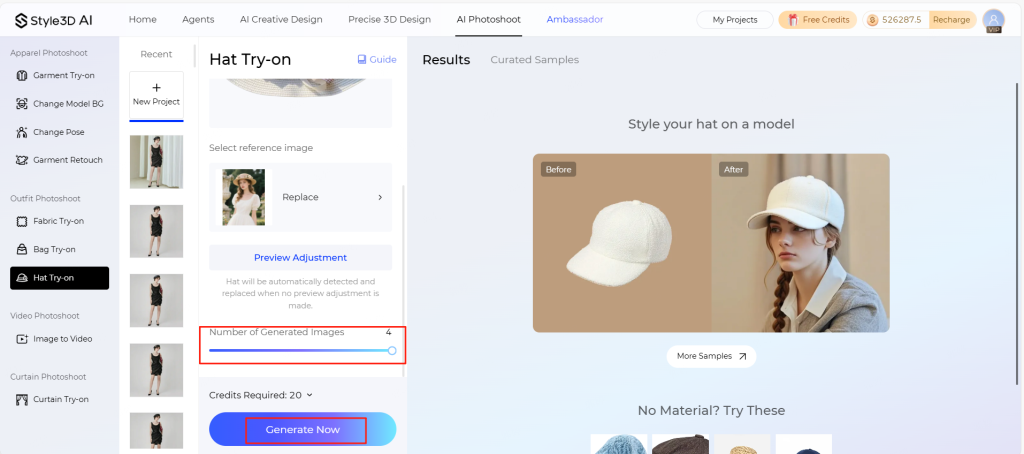
- Set the number of output variations
- Click “Generate Now”
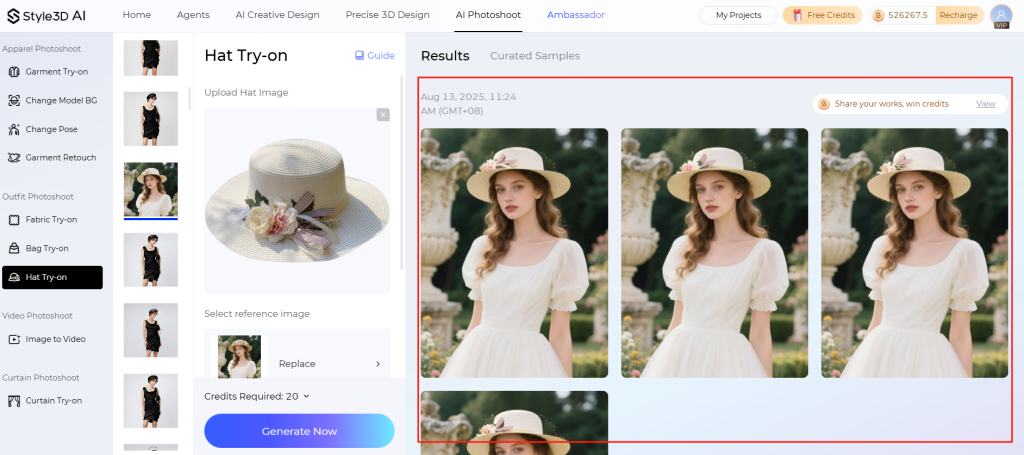
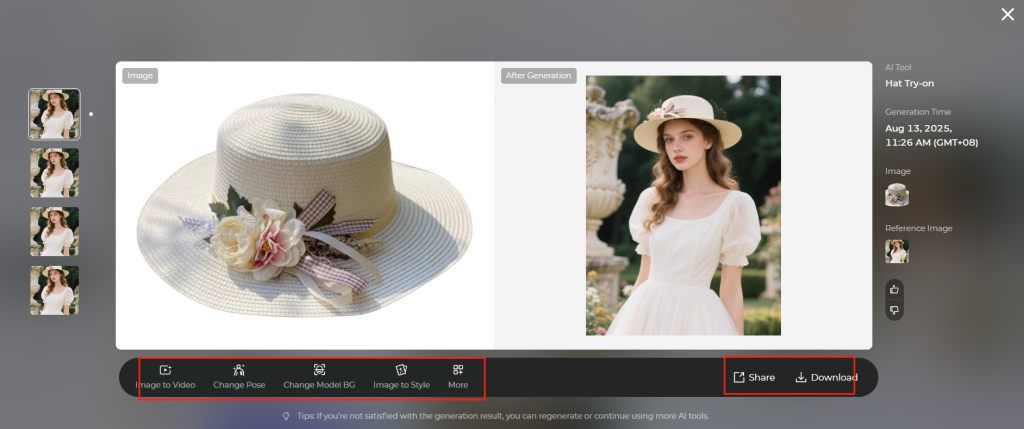
Download your results or continue refining with other functions.
💡 Pro Tips for Best Results – Hat Application
Hat Images
- Use clear, front-view shots with the full hat visible
- Include size references such as a head model or scale
- Avoid obstructed views or cluttered backgrounds
Custom Model Selection
- Choose models where the hat is the main focus and properly positioned
- Avoid images where the hat is missing, secondary, or poorly visible
- For better realism, select poses that match the hat style (e.g., tilted, straight, or relaxed)
Reference Images
- Use clean images with high contrast between the hat and background
- Minimize background distractions for accurate virtual try-on results
Technical Notes
- Certain materials (e.g., reflective, transparent) may render imperfectly
- Always ensure portrait rights for custom model images
Start using Style3D’s immersive fashion experiences today to transform your fashion workflow and revolutionize your customers’ experience!
What is a virtual hat try-on and how does it work?
A virtual hat try-on uses augmented reality to overlay hats on a user’s head via a webcam or uploaded photo. The technology maps facial features and head dimensions to ensure accurate fit. Style3D AI enhances this process with realistic 3D head models and fabric simulations, providing designers and shoppers a precise visualization before purchase.
Which platforms offer virtual hat try-on services?
Several brands provide virtual hat try-on, including Decorina Hats, Lock & Co. Hatters, Banuba, Perfect Corp., Hats.com, Carmi Hatters, Pic Copilot, and Style3D AI. These platforms use AR and AI to create immersive experiences, enabling users to try on multiple styles, adjust sizing, and preview textures in real time for both shopping and design applications.
Why is realistic fabric simulation important in virtual hat try-ons?
Fabric simulation affects how a hat drapes, holds shape, and reacts to movement, impacting perceived fit and style accuracy. Platforms like Style3D AI incorporate physics-based simulations to show correct stiffness, creases, and material behavior, ensuring that virtual previews reflect real-world wearability and reduce the need for excessive physical prototyping.
How can virtual try-on apps improve e-commerce performance?
Virtual try-on apps increase engagement by allowing customers to visualize hats before buying, boosting confidence and reducing returns. Integration with Style3D AI enables scalable 3D asset creation, ensuring consistent visuals across catalogs and marketing campaigns, which enhances user experience, drives conversions, and supports personalized online shopping journeys.
Can virtual hat try-on replace physical fittings entirely?
While AR and 3D simulations reduce the need for multiple prototypes, physical checks remain essential for comfort and final adjustments. Tools like Style3D AI streamline the design process by accurately previewing fit, fabric behavior, and styling on avatars, significantly minimizing sample production while maintaining high quality and design precision.
What should I consider when choosing a virtual hat try-on platform?
Key considerations include AR accuracy, head-tracking quality, hat style variety, material realism, and cross-platform compatibility. Platforms that integrate with Style3D AI offer additional benefits such as fabric simulations, 3D head models, and consistent asset templates, helping brands efficiently scale virtual try-on experiences for both customers and internal design workflows.