
Virtual try-on is technology that shows how a garment or accessory would look when worn, without anyone physically putting it on. It uses AI, and sometimes augmented reality, to place clothing, shoes, bags, hats or jewelry onto a person or a model in an image or a live camera view.
There are two very different kinds of virtual try-on, and they are often confused. The first is built for shoppers: it lets a customer see a product on themselves, through a phone camera or an uploaded photo. The second is built for brands and sellers: it turns product photos into realistic on-model images, so a store can show how clothes look when worn without organizing a photoshoot for every item. Both are called virtual try-on, but they solve different problems.
This guide covers both, with a focus on the second. It explains how AI virtual try-on works, the different types of try-on by product, why brands and sellers use it, and how to create try-on images from product photos step by step. It also covers models, poses, backgrounds and video, platform-ready images, AI clothes changers and outfit swapping, how to use them responsibly, how accurate virtual try-on really is, and how to choose a tool.
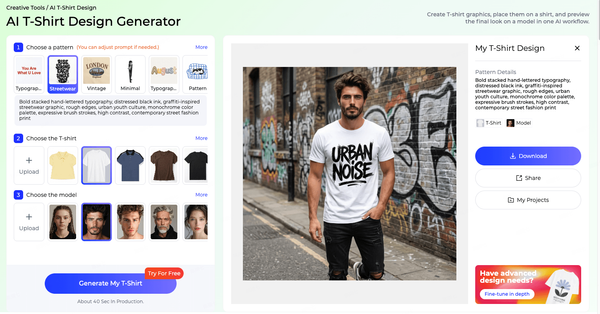
For brands and sellers, the practical question is simple: how do you get high-quality on-model images for every product, quickly and consistently? Style3D AI's Virtual Clothing Try-On is built for exactly that. You upload garment images, choose a model, and generate realistic try-on images formatted for the platform where they will be used.
Turn product photos into on-model images without a photoshoot. Try Style3D AI Virtual Try-On free.
What Is Virtual Try-On?
Virtual try-on is the use of AI or augmented reality to show how a product would look when worn, by digitally placing it on a person or model. It is used by shoppers to preview products before buying, and by brands and sellers to create on-model product imagery without traditional photoshoots.
Definition
At its core, virtual try-on combines two inputs, a product and a person, and produces an output that shows the person wearing the product. The product might be a T-shirt, a dress, a pair of sneakers, a handbag or a hat. The person might be the shopper, captured by a phone camera or a selfie, or a model, either a real photographed model or an AI-generated one. The output might be a live view, a still image or a short video.
What makes modern virtual try-on convincing is that it does not simply paste a flat product image on top of a body. It adapts the garment to the person's pose and shape, keeps the fabric's texture and pattern, adds realistic folds and shadows, and handles areas where arms, hair or other garments overlap the product.
Shopper Try-On vs Brand Try-On Imagery
Shopper-facing virtual try-on lets customers see products on themselves. Common formats include live augmented reality, which is especially popular for glasses, makeup, shoes and hats, and photo-based try-on, where a shopper uploads a picture and sees a garment applied to it. The goal is to help customers decide what to buy and to reduce uncertainty when shopping online.
Brand-facing virtual try-on creates product imagery. A brand or seller starts with product photos, such as flat lays, ghost mannequin shots or hanger shots, and generates images of models wearing those products. The goal is to produce on-model images at scale, for product pages, marketplaces, ads and social media, without booking a studio, models and photographers for every item.
Style3D AI's virtual try-on tools sit in the second category. They are designed for e-commerce sellers, fashion brands, product teams, designers and content creators who need model-worn images of their products. Teams can choose models from Style3D AI's built-in model library or upload their own model photos.
A Short History of Virtual Try-On
The idea of trying on clothes digitally is not new. Early experiments used webcams, simple overlays and 3D avatars, but results often looked flat or unconvincing. Augmented reality on smartphones made try-on far more accessible, first for glasses, makeup and shoes, where shapes are relatively predictable. Clothing remained harder, because fabrics fold, stretch and move. The breakthrough came with generative AI, especially diffusion models, which can render garments on people with realistic drape, texture and lighting. Today, virtual try-on is used both in shopper-facing apps and in professional tools that produce product imagery at scale.
Why Virtual Try-On Matters Now
Online fashion depends on images. Shoppers cannot touch fabric or try a garment on, so they rely on photos to judge style, color and fit. At the same time, brands release products more frequently, sell across more channels and face rising content costs. Virtual try-on sits where these pressures meet: it gives shoppers more confidence and gives brands a faster, more flexible way to produce the images that online fashion needs. As the quality of AI-generated imagery has improved, try-on has become practical for everyday product pages, not just experiments.
What Is a Virtual Dressing Room?
A virtual dressing room is a shopper-facing experience that lets customers try on several items virtually, often combining them into outfits, before buying. Some virtual dressing rooms use avatars based on a shopper's measurements; others use photos or live camera views. The term is mostly used in retail, where the aim is to recreate the experience of a fitting room online.
For brands, the closest equivalent is an outfit try-on workflow: showing complete outfits on models so customers can see how pieces work together.
How AI Virtual Try-On Works
AI virtual try-on works in three stages: it analyzes the garment, analyzes the person's body and pose, and then generates a new image in which the garment is fitted naturally onto the person. Modern systems typically use diffusion models, a type of generative AI that creates detailed, realistic images, guided by both the garment and the person.
You do not need to understand the technical details to use virtual try-on tools well, but knowing the basics helps you prepare better inputs and judge results more accurately.
Understanding the Garment
The first task is to understand the product. The system identifies the garment type, its outline, its key parts, such as collar, sleeves, hem and closures, and its visual details, including color, pattern, print, logo and texture. Clean product photos make this much easier. A garment photographed flat, on a plain background and in even light gives the system a clear view of every detail it needs to preserve.
Understanding the Body and Pose
The second task is to understand the person. The system estimates the body's pose, such as where the shoulders, elbows, hips and knees are, and works out which parts of the body the garment should cover. It also identifies what needs to stay unchanged, such as the face, hair, hands and skin, and where other garments or arms will overlap the new item. This is called handling occlusion, and it is one of the hardest parts of virtual try-on.
Generating the Final Image
The final step combines both. The system warps and fits the garment to the body, then generates a realistic image in which the fabric drapes naturally, folds where it should and responds to the lighting of the scene. Diffusion-based models are particularly good at this, because they generate the image gradually and can preserve fine details such as prints and stitching while making the overall result look photographic.
Because the garment and person are combined, not just overlaid, good systems can produce results that look like real photographs. They can also make mistakes, which is why reviewing results matters. The accuracy section later in this guide covers what to check.
Image-Based Try-On vs Live AR Try-On
Live AR try-on tracks a person through a camera in real time and overlays the product as they move. It works best for rigid or simple items, such as glasses, hats, shoes and makeup, where shape changes little. Image-based AI try-on generates a still image, which allows much more realistic rendering of fabric drape, folds and lighting, because the system has time to create a detailed result. That is why image-based try-on is the main approach for apparel product imagery, while live AR remains popular for accessories and beauty.
Research Models: VITON-HD, StableVITON and Beyond
Much of today's virtual try-on technology builds on academic research. Early research models such as VITON demonstrated that a garment image could be transferred onto a person image. VITON-HD extended this to higher resolutions. More recent diffusion-based approaches, such as StableVITON, IDM-VTON and OOTDiffusion, use large image-generation models to improve realism, texture preservation and handling of complex poses.
Research in this field relies on datasets of paired garment and person images. Well-known examples include the VITON-HD dataset and datasets derived from DeepFashion, a large fashion image collection created for research. These datasets let researchers train and compare models on consistent examples.
For brands, the main takeaway is that commercial virtual try-on tools build on this rapidly advancing research but add the features businesses need: model libraries, consistent quality, high-resolution output, multiple garment types, platform formatting and a simple workflow. Open-source research models are valuable for experimentation, but they usually require technical setup and do not include those production features. They are also typically trained and evaluated on specific datasets and garment types, so results on a real catalog, with varied fabrics, prints and categories, can differ from published examples. Licensing terms for research code and datasets can also restrict commercial use, which is another reason businesses usually choose commercial tools for production work.
Types of Virtual Try-On by Product
Virtual try-on applies to almost every fashion and lifestyle category, including clothing, shoes, bags, hats, jewelry and even home textiles. Each category has its own challenges, from fabric drape in clothing to scale and angle in footwear and accessories.
Clothing
Clothing is the most complex category, because garments drape, fold and stretch differently depending on fabric and fit, and because they interact with the body and with other garments. Tops, bottoms, dresses, suits and outerwear all behave differently. Fabric matters too: crisp cotton holds its shape, knits cling and stretch, and satin reflects light. Prints and logos add another challenge, because they must stay sharp and correctly placed as the garment follows the body. Style3D AI's Virtual Clothing Try-On supports tops, bottoms, dresses, suits, lingerie and multiple-item outfits.
Shoes and Bags
Footwear and bag try-on depend heavily on scale, angle and perspective. A shoe needs to sit naturally on the foot at the right size, and a bag needs to hang or be held realistically. Materials such as patent leather, suede and mesh also reflect light differently, and hardware such as buckles and zips needs to stay crisp and in proportion. Style3D AI includes dedicated Virtual Shoe Try-On and Bag Try-On tools for these categories.
Hats and Headwear
Hats need to sit correctly on the head and interact naturally with hair. Style3D AI's Virtual Hat Try-On places hats on models to preview realistic wearing effects for styling, campaigns and e-commerce product images.
Jewelry and Small Accessories
Jewelry try-on requires fine detail and accurate scale, because small differences in size or reflection are very noticeable. Earrings, necklaces and rings are popular in shopper-facing AR try-on, while brands also use AI imagery to show pieces on models.
Home Textiles
Try-on ideas also extend beyond fashion. Curtains, for example, can be visualized in a room before purchase. Style3D AI's Curtain Try-On applies the same principle to home textiles.
Eyewear, Beauty and Other Categories
Glasses and sunglasses were among the first products to use virtual try-on widely, because shoppers care about how frames suit their face shape. Beauty products, such as lipstick and hair color, also use live AR try-on extensively. These categories are mainly shopper-facing, while apparel and footwear brands increasingly use AI try-on for product imagery as well.
Why Brands and Sellers Use Virtual Try-On
Brands and sellers use virtual try-on to create on-model images faster and more flexibly than traditional photoshoots, to show products on a wider range of models, to produce content for several platforms from the same product photos, and to test new products visually before investing in full production and photography.
Speed and Flexibility
Traditional on-model photography requires planning, booking models and photographers, styling, shooting, retouching and selecting images. For brands that release new products frequently, this process can delay launches and limit how many products get on-model images at all. AI virtual try-on lets teams generate on-model images directly from product photos, so new products can go live with complete imagery sooner, and late additions to a collection do not have to wait for the next shoot. It also makes updates easier: when a product is restocked in a new color or a campaign needs fresh images, teams can generate new on-model images from product photos rather than reshooting.
With Style3D AI, a single session can produce up to four try-on images, in standard or 4K resolution, for e-commerce and marketing use.
Model Diversity and Brand Fit
Customers want to see products on people they can relate to. Showing the same garment on different models, with different body types, skin tones and ages, helps more customers picture themselves wearing it. Virtual try-on makes this practical, because changing the model does not require a reshoot. Style3D AI offers a built-in AI model library and also lets brands upload their own model photos, so imagery can stay consistent with an existing brand look.
Model choice also matters for brands selling in several markets. Customers in different regions often respond better to imagery that reflects their own communities and styles. Virtual try-on lets a brand adapt its product imagery for each market from the same product photos, instead of organizing separate shoots in every region. Combined with localized backgrounds and styling, this helps a global catalog feel relevant to local shoppers, while keeping production simple and the products themselves represented accurately.
Content for Every Platform
Each sales and marketing channel has its own visual conventions: marketplace product pages, brand websites, vertical short-video platforms and social feeds all favor different compositions and aspect ratios. Producing separate shoots for each channel is costly. Style3D AI lets users select a target platform, such as Amazon, Shopify, TikTok or Instagram, and automatically adapts composition and aspect ratio for that platform.
Consistency Across the Catalog
Inconsistent product imagery makes a store look less trustworthy. When products are photographed at different times, in different studios or by different teams, lighting, models and crops often vary. Virtual try-on makes it easier to apply the same models, poses and backgrounds across a whole catalog, including products that were added late or sourced from different suppliers. Using the same Style3D AI model selection and platform setting for every product in a category is a simple way to keep product pages uniform.
Supporting Pre-Orders and Made-to-Order
Some brands sell products before they are manufactured, through pre-orders, crowdfunding or made-to-order models. In these cases, there may be no finished garment to photograph on a model. Virtual try-on can show the design on a model using sample or product images, giving customers a clear picture of what they are ordering. Images should be labeled appropriately and updated once the final product is available.
Testing Products Before Full Production
Virtual try-on is also useful earlier in the product cycle. Brands can show new designs on models to test reactions internally, with buyers or with customers, before committing to full production and photography. Combined with AI design tools, this lets teams move from a design concept to an on-model visual quickly. For example, a designer can create a concept in Style3D AI's AI fashion design tools, then show it on a model with Virtual Clothing Try-On to gather feedback before ordering samples.
How to Create Virtual Try-On Images from Product Photos
To create virtual try-on images from product photos, prepare clean garment images, choose a generation model, select the garment type and a model, choose your target platform, generate and review the results, and export them at the resolution you need. The steps below use Style3D AI's Virtual Clothing Try-On.
Step 1: Prepare Your Garment Images
Good inputs produce good outputs. Use clear photos of the garment, ideally flat lays, ghost mannequin shots or clean hanger shots, on a plain background with even lighting. Make sure the whole garment is visible, colors are accurate and important details, such as prints, logos, buttons and pockets, are in focus. Avoid heavy shadows, wrinkles that hide details and busy backgrounds.
The three most common product photo formats each have strengths. Flat lays are easy to shoot and show the whole garment clearly, but they hide shape and depth. Ghost mannequin shots show the garment's three-dimensional form and are excellent inputs, though they take more effort to produce. Hanger shots are quick but can distort the garment's shape. If you are setting up product photography with try-on in mind, a consistent flat lay or ghost mannequin setup, with the same background and lighting for every product, will give the most reliable results.
If you have photos of the garment from several angles, keep them. Style3D AI's HQ3.0 model accepts front, side and back garment uploads, which helps it render the garment more completely.
Step 2: Choose a Generation Model
Style3D AI offers several AI generation models, FS1.0, HQ1.0 and HQ3.0, so you can choose the option that best suits your needs. HQ3.0 supports multi-angle garment uploads. Test each option with one or two products first, then standardize on the one that best fits your catalog and quality expectations. Record which option you use for each category, so results stay consistent when different team members process products.
Step 3: Select the Garment Type and a Model
Choose the garment type, for example top, bottom, dress, suit, lingerie or a multiple-item outfit, so the tool knows how the garment should be worn. Then choose a model from the built-in library, or upload your own model photo if you want to match an existing campaign or brand look.
Think about your customer when choosing models. Consistent models across a category make a store look cohesive, while varied models help more customers relate to the products. Many brands use a small, consistent group of models for each product line. Make sure the model choice suits the product category, the season and the platform, and that it reflects the range of customers who actually buy from you.
Step 4: Choose Your Target Platform
Select where the images will be used, such as Amazon, Shopify, TikTok or Instagram. Style3D AI adapts the composition and aspect ratio to suit that platform, which saves cropping and resizing later. If you sell on several channels, generate images for each platform separately rather than cropping one image for all of them, so each version is composed for its format.
Step 5: Generate and Review
Generate the try-on images. Style3D AI produces up to four images per session, so you can compare options and choose the best. Review each image carefully: check that the garment's color, print, logo and details match the real product, that the fit looks natural, and that hands, hair and overlapping areas look correct. Discard any image that misrepresents the product. It is normal to generate more images than you need and keep only the strongest. Selecting carefully at this stage is what separates professional-looking product pages from inconsistent ones.
Step 6: Export at the Right Resolution
Export the selected images in standard resolution or 4K, depending on whether they are for product pages, marketing campaigns or print. Name files consistently, for example by product code, color and view, so they are easy to upload and manage.
Tips for Better Results
Start with your best-selling or newest products, where on-model images will have the most impact. Build a simple style guide for try-on images, covering model choice, poses, backgrounds and crops, so images stay consistent across the catalog. Keep a few original product photos alongside on-model images, because shoppers often want to see details clearly. And review every image before publishing, because accurate product representation protects customer trust.
Building a Try-On Workflow for Your Catalog
For a whole catalog, treat virtual try-on as a repeatable production process rather than a one-off task. Agree on a standard for product photos, a short list of approved models for each product line, standard poses and backgrounds, file naming rules and a review checklist. Then process products in batches, for example by category or by delivery. In Style3D AI, keeping the same generation model, model selection and platform setting for each batch helps every product in a category look consistent. Finally, assign one person to approve images before publishing, so quality stays high as volume grows.
Create up to four try-on images in one session, ready for your store. Start with Style3D AI Virtual Try-On.
Models, Poses, Backgrounds and Video
Once you have try-on images, you can extend them by changing models, poses and backgrounds, or by turning them into short videos. This lets one set of product photos support many different uses, from product pages to campaigns and social media.
Changing Models and Backgrounds
Different channels and campaigns call for different settings: a clean studio background for product pages, a lifestyle setting for social media, or a seasonal backdrop for a campaign. Style3D AI's Change Model & BG tool lets teams change the model and background, so the same product can appear in different contexts without new photography.
Choosing Backgrounds That Sell
Backgrounds should support the product, not compete with it. Plain studio backgrounds keep attention on the garment and suit product pages. Lifestyle settings, such as a city street, a beach or a home interior, help customers imagine where they would wear a product and suit campaigns and social media. Match the setting to the product's use: outerwear in an outdoor scene, loungewear at home, eveningwear in a refined interior.
Changing Poses
A single pose rarely shows everything customers want to see. Side and back views, walking poses and relaxed poses each reveal different aspects of fit and movement. Change Pose in Style3D AI adjusts the model's pose, so brands can create a fuller set of product views from the same try-on result.
Turning Images into Video
Short videos are increasingly important on product pages and social platforms, because they show how garments move. Style3D AI's Image To Video turns still images into short video content, and Reference To Video creates video guided by a reference. A short clip of a model turning or walking can communicate drape and fit better than several static images.
Creating a Consistent Visual Identity
Models, poses, backgrounds and video together form a brand's visual identity. Decide early which elements stay fixed and which can change. Many brands keep backgrounds and lighting consistent on product pages, vary poses to show fit, and use more creative settings and video for social media and campaigns. Writing these choices down in a short visual guide makes it easy for new team members, agencies and freelancers to produce images that look like they belong to the same brand. Because Style3D AI's model, pose, background and video tools all work from the same try-on results, teams can produce a coherent set of images and clips for every channel from one starting point.
Platform-Ready Try-On Images
Platform-ready try-on images are formatted to suit the channel where they will appear, with the right composition, aspect ratio and style for each marketplace or social platform. Preparing images for each platform from the start avoids awkward crops and inconsistent product pages.
Marketplaces, brand stores and social platforms each have their own image conventions. Large marketplaces often have strict rules for main product images, such as background color and how much of the frame the product fills, while secondary images allow more lifestyle context. Brand websites usually favor a consistent look that reflects the brand's identity. Short-video and social platforms favor vertical formats and more dynamic, lifestyle-led imagery.
Practical differences to plan for include:
• Marketplaces: clean, consistent main images, with on-model and detail shots as secondary images.
• Brand stores: a consistent look across the catalog, with room for lifestyle images and outfit shots.
• Short-video platforms: vertical framing and motion, where image-to-video content works well.
• Social feeds: lifestyle-led, eye-catching images that show the product in context.
Image requirements change over time, so always check each platform's current guidelines before publishing. Selecting the target platform in Style3D AI, such as Amazon, Shopify, TikTok or Instagram, adapts composition and aspect ratio automatically, giving teams a strong starting point that can then be checked against the latest platform rules. Keeping a simple record of each platform's current requirements, updated whenever guidelines change, makes it easy for everyone on the team to prepare images correctly.
AI Clothes Changers and Outfit Swapping
An AI clothes changer is a tool that replaces the clothing in an existing image with different garments, while keeping the person, pose and background. It is closely related to virtual try-on: try-on starts from a product and adds it to a person, while a clothes changer starts from an image of a person and changes what they are wearing.
What an AI Clothes Changer Does
AI clothes changers, also called AI outfit changers or AI clothes swap tools, identify the garments in an image, remove them digitally and generate new clothing in their place, matched to the pose and lighting. They are popular for creative content, styling experiments and fashion marketing. Some tools work from a text description of the new outfit, others from an image of a specific garment. For brands, garment-based swapping is usually more useful, because it shows a real product rather than an invented one.
Note that "clothes swap" also has another meaning: an event where people exchange used clothing. If you are searching for a local clothing swap event, you are looking for community listings rather than AI tools.
Brand Uses for Outfit Swapping
For brands and sellers, outfit swapping is a way to get more value from existing, properly licensed model photography. A strong campaign image can be updated with new season products, a model shot can show several outfits for comparison, and styling ideas can be tested before a shoot. Style3D AI's Outfit Try-On supports this kind of workflow, letting teams show different outfits on models, and Change Model & BG adapts the setting for each use.
How to Get Realistic Outfit Swaps
Outfit swaps look most convincing when the new garment suits the original image. Choose garments with a similar silhouette and length to the original, so the model's pose still makes sense. Keep lighting in mind: a garment photographed in soft studio light will blend better into a similarly lit image. Pay attention to areas where hands, hair or bags overlap the clothing, and review details such as necklines and hems closely. If a swap looks wrong, it is usually faster to try a different source image than to fix a difficult one.
Free AI Clothes Changers: What to Expect
Many AI clothes changers offer free versions or trials. Free tools are useful for experimenting, but they often limit resolution, the number of images, commercial usage rights or privacy protections for uploaded photos. Before uploading images, check how a tool stores and uses them, and before publishing results, check whether commercial use is allowed. For business use, a tool with clear terms, high-resolution output and consistent quality is usually worth more than a free tool with uncertain limits.
Responsible Use
AI clothes changers must be used responsibly. Only edit images you own or have permission to use, such as your own photography or model images licensed for this purpose. Never alter images of real people without their consent, and never use these tools to create sexualized, degrading or misleading images of anyone. Follow the rules of the platforms where you publish, and disclose AI-generated or AI-edited imagery where platforms or local regulations require it. For product imagery, make sure edited images still represent the actual products customers will receive.
Responsible use is not only an ethical requirement; it also protects brands. Images that mislead customers lead to returns and complaints, and misuse of people's likeness can create legal and reputational risks.
Swap outfits on your own licensed model shots and create new looks from existing imagery. Explore Style3D AI's try-on tools.
Virtual Try-On in Practice: Three Scenarios
The following scenarios show how different businesses might use virtual try-on in their day-to-day work. They are illustrative examples rather than case studies, and can be adapted to your own situation.
A Small Online Store Launching New Products
A small store adds new tops and dresses every week but cannot afford a model shoot for each drop. The owner photographs every product as a flat lay on the same background, uses Style3D AI's Virtual Clothing Try-On with two consistent models from the built-in library, selects Shopify as the target platform and publishes on-model images on launch day. Product pages look complete from the start, and the store's look stays consistent from week to week.
A Brand Preparing a Seasonal Campaign
A brand has a strong campaign image from last season and a set of new products. The team uses Outfit Try-On on its own licensed campaign photography to show the new collection, Change Model & BG to create variations for different markets, and Image To Video to turn the strongest images into short clips for social media. The campaign reaches every channel faster, with consistent styling.
A Designer Testing New Styles
A designer wants feedback on three new jacket concepts before ordering samples. The designer generates the concepts with Style3D AI's design tools, shows each one on a model with Virtual Clothing Try-On, and shares the images with buyers and a small group of customers. The feedback guides which jacket moves forward to sampling.
How Accurate Is Virtual Try-On?
Virtual try-on is accurate enough to show how a garment looks when worn, including its color, pattern, style and general drape, but it is less reliable for exact fit and sizing. Results depend on input quality, garment complexity and the tool used, so every image should be reviewed before publishing.
What Virtual Try-On Shows Well
Modern AI try-on is strong at showing style, color, print and overall silhouette. It can show how a dress falls, how a shirt looks tucked or untucked, and how a jacket's color works with a model's styling. For most product pages and marketing uses, this is exactly what customers need to see. It is also effective at showing how pieces work together in an outfit, which single product photos cannot do.
Where Results Can Go Wrong
Common issues include changes to small details, such as logos, text or buttons; distorted prints, especially large or geometric patterns; unnatural drape for unusual fabrics; and errors where arms, hands or hair overlap the garment. Very complex garments, such as heavily layered or asymmetric designs, are also harder to render accurately. Most of these issues can be reduced with better inputs: clear, well-lit product photos, multiple angles where supported and garment types selected correctly. Where a problem persists, choose a different model pose or regenerate rather than publishing a flawed image.
Fit and Sizing
AI try-on images show how a garment looks on a particular model; they do not guarantee how it will fit a specific customer. For fit information, combine try-on images with clear size charts, model measurements and size worn, fit notes and customer reviews. Being clear about this protects customer trust.
Better Imagery and Customer Expectations
Many online fashion returns happen because a product looks different from what customers expected. Clear, accurate on-model images help set the right expectations, especially when combined with detail shots, size information and honest product descriptions. The goal is not to make products look better than they are, but to show them as they really are, on people customers can relate to.
Disclosure and Transparency
Some platforms and jurisdictions require AI-generated or AI-edited imagery to be labeled, and expectations are evolving. Even where it is not required, being transparent about how images were created can strengthen trust. The most important principle is accuracy: whatever method created an image, it should show the product as customers will receive it.
How to Check Results
Compare every generated image against the real product: color, print placement, logo, details and length. Check hands, hair and overlapping areas. Make sure the garment looks plausible for its fabric. If something is wrong, regenerate, adjust the input photo or choose a different image from the set.
How to Choose a Virtual Try-On Tool
Choose a virtual try-on tool based on who it is for, what products it supports, the quality and resolution of its output, its model options, and how well it fits your workflow and platforms. Shopper-facing AR tools and brand-facing image tools serve different purposes, so start by deciding which you need. It also helps to test any shortlisted tool with your own products rather than the examples on its website. Choose a few items that are typical of your catalog, including at least one difficult garment, such as a bold print or a complex silhouette, and compare the results side by side.
For brand and e-commerce use, check:
• Garment types: does it support the categories you sell, such as tops, bottoms, dresses, suits, lingerie and full outfits?
• Accessories: can it handle shoes, bags, hats or jewelry if you sell them?
• Model options: does it offer a model library, and can you use your own model photos?
• Input flexibility: can you upload several angles of a garment?
• Output: what resolution does it produce, and how many images per session?
• Platform formats: can it prepare images for the marketplaces and social channels you use?
• Extensions: can you change poses and backgrounds or create video from the same results?
• Terms: are commercial usage rights clear?
For shopper-facing try-on, the priorities are different: ease of use on mobile, speed, realistic results on a wide range of people, privacy protection for uploaded photos and smooth integration with your store. Some brands use both: a shopper-facing tool on product pages and a brand-facing tool to create the images on those pages.
Style3D AI's try-on tools cover each of these points: multiple garment types and accessories, a built-in model library plus custom model uploads, multi-angle input with HQ3.0, up to four images per session in standard or 4K resolution, platform targeting for Amazon, Shopify, TikTok and Instagram, and related tools for poses, backgrounds and video.
FAQ
What is virtual try-on?
Virtual try-on uses AI or augmented reality to show how clothing or accessories would look when worn, without physically trying them on. Shoppers use it to preview products, and brands use it to create on-model product images from product photos.
How does AI virtual try-on work?
AI virtual try-on analyzes the garment, analyzes the person's body and pose, and then generates a new image in which the garment is fitted naturally onto the person, preserving its color, pattern and texture while adding realistic folds and shadows.
Can I create on-model photos without a photoshoot?
Yes. AI virtual try-on tools generate on-model images from product photos. With Style3D AI's Virtual Clothing Try-On, you upload garment images, choose a model and target platform, and generate up to four try-on images in standard or 4K resolution.
What is a virtual dressing room?
A virtual dressing room is an online experience that lets shoppers try on clothes virtually, often combining items into outfits, before buying. It aims to recreate the fitting room experience in online shopping.
What is an AI clothes changer?
An AI clothes changer replaces the clothing in an existing image with different garments while keeping the person, pose and background. It should only be used on images you own or have permission to edit, and never to alter real people without consent.
Is virtual try-on accurate for fit?
Virtual try-on accurately shows style, color, pattern and general drape, but it does not guarantee how a garment will fit a specific person. Combine try-on images with size charts, model measurements and fit notes.
Can I use my own models for virtual try-on?
Many brand-focused tools allow this. Style3D AI lets you choose from its built-in model library or upload your own model photos, which helps keep imagery consistent with your brand.
Is there a free virtual try-on tool?
Many virtual try-on tools offer free trials or limited free plans. Style3D AI offers a free trial, so you can test Virtual Clothing Try-On on your own product photos before choosing a plan. Check output resolution and commercial usage terms when comparing free options.
Does virtual try-on work for different body types?
Good virtual try-on tools can show garments on a wide range of models. Using diverse models, including your own model photos where supported, helps more customers picture how a product looks on someone like them.
Can virtual try-on images be used on marketplaces?
Yes, as long as they accurately represent the product and follow each marketplace's current image guidelines. Many sellers use try-on images as secondary on-model images alongside clean main product photos.
What is StableVITON?
StableVITON is a research model for virtual try-on that uses diffusion-based image generation to transfer a garment onto a person image while preserving garment details. It is one of several academic approaches that have advanced virtual try-on realism.
Conclusion
Virtual try-on has moved from novelty to everyday tool. For shoppers, it reduces uncertainty when buying online. For brands and sellers, it turns product photos into realistic on-model images, supports more diverse models, adapts content for every platform and frees teams from organizing a photoshoot for every product. The key is to start with good product photos, review every result carefully and use the technology responsibly. Begin with a handful of your most important products, set clear standards for models, poses and backgrounds, and build from there. As the technology continues to improve, the brands that benefit most will be those that combine its speed with careful review and honest representation of their products. Whether you are a small store launching weekly drops or a brand planning a global campaign, virtual try-on can help you show every product on a model, in every channel, at the moment it matters.
See your products on models today. Try Style3D AI Virtual Try-On
Written by