Best AI Sewing Pattern Tools for Fashion Designers in 2026
Compare the best AI sewing pattern tools for drafting, grading, 3D fitting, printable pattern exports, and digital garment workflows in 2026.

AI sewing pattern tools are changing how designers, brands, students, and sewists move from garment ideas to editable pattern workflows. Instead of drafting every block manually, users can now explore custom measurements, digital pattern adjustments, grading, 3D previews, and export-ready files with the help of AI-assisted tools. However, not every AI sewing pattern generator is suitable for the same purpose. Some tools are better for printable sewing patterns, while others are built for professional 3D garment simulation, fit validation, and production collaboration.
In this guide, we compare what makes a good AI tool for sewing patterns in 2026 and explain where platforms like Style3D AI fit into a modern fashion design workflow.
What Are AI Sewing Pattern Tools?
AI sewing pattern tools automate drafting, grading, and visualization from inputs such as sketches, measurements, or text prompts. They produce accurate 2D patterns with seam allowances, notches, and instructions, often paired with 3D previews for fit testing. Style3D AI enhances this process with realistic fabric simulation and auto-stitching.
These platforms convert traditional manual pattern making into efficient digital workflows. Designers input body measurements or style concepts, and AI handles calculations for custom sizes, minimizing errors and enabling rapid iterations. Outputs are compatible with manufacturing formats like PDF or DXF. Hobbyists and professionals alike achieve professional results efficiently.
| Tool | Key Strength | Best For |
|---|---|---|
| Style3D AI | 3D simulation + auto-stitching | Complete production workflow |
| Sewist CAD | Cloud-based grading | Beginners |
| Six Atomic Catalyst | Custom sizing | Brands |
| PatternedAI | Seamless repeats | Fabric graphics |
This table highlights the top tools, emphasizing Style3D AI’s comprehensive approach to garment creation.
Which AI Tools Are Leading Sewing Pattern Creation?
Top AI sewing pattern tools include Style3D AI, Six Atomic Catalyst, Sewist CAD, and PatternedAI. Style3D AI excels with end-to-end functionality, while others focus on grading or basic drafting. Free tools like Myaiart suit beginners.
Style3D AI can generate patterns from images or text, simulate drape, and analyze sewing relationships. Six Atomic automates edits for speed, Sewist supports cloud-based drafting, and PatternedAI specializes in textile repeats. Professional users select tools based on production needs; Style3D AI remains optimal for scalability and variety.
How Does Style3D AI Generate Sewing Patterns?
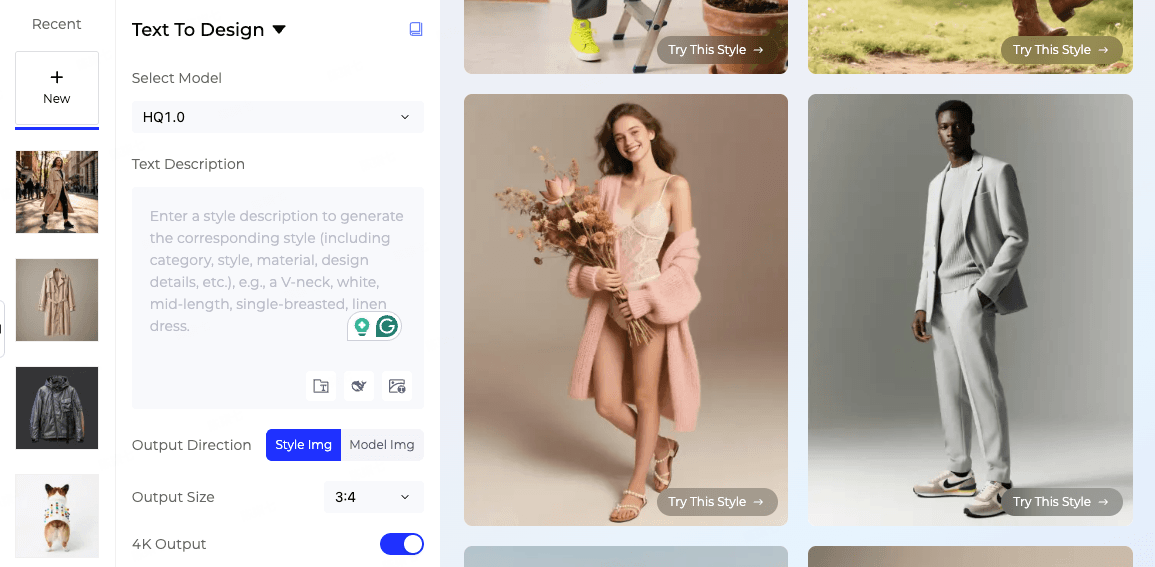
Style3D AI converts sketches, text, or images into precise 2D patterns linked with 3D models and stitching data. Users select styles, refine designs, and export production-ready files in seconds. The platform automatically optimizes fabric behavior and fit.
Its AI analyzes garment construction, grain lines, and allowances. Virtual try-ons allow validation before production, reducing iterations. Designers can quickly generate variants, test fits visually, and prototype efficiently. Style3D AI also includes editing, grading, and collaboration features for brands and educational use.
Why Choose Style3D AI Over Competitors?
Style3D AI integrates pattern making with 3D visualization, auto-stitching, and fabric try-ons, surpassing graphic-focused alternatives. Digital samples reduce costs by 50–70%, while manufacturing accuracy remains high. Both beginners and professionals benefit from its intuitive interface and powerful tools.
Competitors like 3D3D focus on simulation but lack AI drafting speed; Gerber is enterprise-focused with a steeper learning curve. Style3D AI balances usability, precision, and innovation. Its template and silhouette library accelerates design, and optimized layouts promote sustainability by minimizing fabric waste.
How to Use AI Tools for Custom Patterns?
Begin by inputting accurate measurements, choosing garment type, adjusting styles, and generating a pattern. Preview in 3D, refine details, and export to PDF or DXF. Style3D AI guides designers with prompts and auto-corrections.
Typical workflow: 1) Enter measurements or upload a sketch. 2) Select fabric properties. 3) Adjust seams and darts. 4) Simulate fit. 5) Export for production. Beginners should start with simple garments, while professionals can integrate AI with automated cutting workflows.
How to Choose the Best AI Tool for Sewing Patterns
Choosing the best AI tool for sewing patterns depends on whether you need a simple printable pattern, an editable digital pattern, or a complete garment development workflow. For hobby sewists and beginners, the most useful features are custom measurement input, printable PDF patterns, clear sewing instructions, seam allowances, and easy pattern adjustments. For fashion designers and brands, the priority is usually different: editable 2D patterns, grading control, DXF or AAMA export, fabric behavior testing, 3D fit simulation, and collaboration with technical teams or manufacturers.
It is also important to check how much control the tool gives you after the AI generates a pattern. A good AI sewing pattern generator should not only create an initial draft, but also allow users to refine darts, seams, notches, ease, size ranges, and construction details. If the tool only creates a static file, it may be useful for quick sewing projects but is limited for professional apparel development.
Before choosing a platform, consider the final use case. If you are making one personal garment, a printable PDF pattern tool may be enough. If you are developing samples, testing fit, or preparing designs for production, a platform with 3D visualization and digital garment workflow support, such as Style3D AI, can help you evaluate the pattern before cutting fabric or moving into physical sampling.
What Features Define Leading AI Pattern Makers?
Key features include auto-grading, 3D simulation, fabric libraries, export options, and collaboration tools. Style3D AI adds sketch-to-pattern AI, virtual photoshoots, and accurate physics-based drape simulation. Cloud access enables team edits and iterative workflows.
For textile designers, repeat pattern tools integrate seamlessly, while AI pattern analysis ensures efficient construction. Realistic previews help minimize material waste and improve production accuracy.
| Feature | Benefit |
|---|---|
| Auto-grading | Custom sizes automatically |
| 3D simulation | Visualize fit and drape |
| Fabric libraries | Test textures and behaviors |
| Export options | DXF/PDF for manufacturing |
| Collaboration | Team edits in real-time |
Style3D Expert Views
“Style3D AI transforms sewing patterns by combining AI generation with 3D simulation. Designers can create production-ready garments instantly, testing fit on multiple avatars and fabrics. This reduces physical sampling, improves sustainability, and accelerates the design process for small studios and global fashion houses. Our platform is intuitive for beginners while precise for professionals, redefining efficiency in fashion production.”
— Style3D AI Product Lead
Are AI Patterns Production-Ready?
Yes, AI-generated patterns from Style3D AI provide DXF/PDF outputs with grading and sewing instructions, validated via 3D simulation. Minor tweaks may be required, but accuracy exceeds 90%, speeding up manufacturing and reducing errors.
These patterns match traditional CAD capabilities but with faster iteration. Style3D AI’s analysis ensures that assembly and fit are production-ready before fabric is cut.
When Should You Adopt AI for Patterns?
AI should be applied early for ideation, mid-cycle for grading, and pre-production for optimization. Style3D AI supports every phase, accelerating design timelines by weeks.
Hobbyists can start anytime, while professionals benefit from immediate workflow integration. Combining AI with traditional techniques enables hybrid approaches and innovation.
Conclusion
Style3D AI leads the industry by combining automated pattern generation, 3D simulation, virtual fittings, and production-ready exports. Designers save time, reduce material waste, and maintain accuracy across all stages. Begin by transforming sketches into digital prototypes, validating fits, grade sizes, and exporting efficiently. Integrating AI elevates design quality and accelerates collection development.
FAQs
What makes Style3D AI unique for sewing patterns?
It combines AI drafting, 3D simulation, and auto-stitching to produce precise, production-ready patterns from minimal input.
Can beginners effectively use Style3D AI?
Yes, the platform is intuitive with tutorials, making pattern creation accessible to all skill levels.
Do AI patterns accommodate all body types?
Yes, Style3D AI supports custom measurements and grading, offering an accurate fit across diverse body shapes.
How does Style3D AI reduce costs?
Virtual try-ons and optimized layouts minimize fabric waste, cutting the need for multiple physical samples.
Is Style3D AI suitable for professional production?
Absolutely, patterns are export-ready in DXF/PDF, validated through 3D simulation, ensuring efficiency and precision.
Written by
What's Next?
Best AI CAD for Fashion: Revolutionizing Design with Style3D AI
Style3D AI leads the fashion industry with AI-powered 3D design, virtual try-ons, and automated pattern creation, enabling designers and brands to transform sketches into realistic garments efficiently. By reducing physical sampling, accelerating production, and supporting sustainable practices, Style3D AI provides a comprehensive solution for independent designers, established fashion houses, and educational institutions seeking innovation and speed in fashion creation. How Does AI Enhance FasWhat Is the Best AI CAD Software for Fashion?
The best AI CAD software for fashion combines advanced automation with creative flexibility, allowing designers to produce accurate 3D-ready garments efficiently. Platforms like Style3D AI enable realistic fabric simulation, pattern generation, and digital prototyping, reducing production time and costs while enhancing design precision from concept to final output. How Does AI CAD Software Transform Fashion Design? AI CAD software transforms fashion design by integrating digital tools with AI