
AI creates realistic fashion images by matching garments to diverse body models with physics-accurate fabric simulation. Style3D AI’s StyleNext suite delivers photorealistic 2D garment try-on and retouching, eliminating physical samples while enhancing skin textures, fabric shadows, and wrinkles for professional marketing visuals.
Check: Realistic AI Images
What Makes AI Fashion Images Look Fake, and How Can You Fix It?
AI fashion images often look fake due to unnatural skin textures, flat fabric lighting, and rigid mannequin poses. Fix them using AI virtual try-on, retouching, and detail enhancement tools that simulate realistic skin pores, dynamic shadows, and wrinkle physics in 2D rendering.
Fashion designers and e-commerce teams frequently encounter the “fake mannequin” problem in AI-generated images. Common issues include overly smooth skin lacking pores or subtle imperfections, fabric that ignores light refraction causing unnatural shadows, and stiff poses that fail to mimic human movement. These pain points reduce the professionalism of marketing visuals, making garments appear detached from real models.
Style3D AI addresses this through its 2D fashion design visualization platform. Tools like Garment Try-On in the StyleNext suite automatically match garment images to diverse models, producing on-model visuals with realistic clothing-on-body interactions. Garment Retouching optimizes lighting, shadows, and fabric textures without altering shape or color, directly tackling flat appearances. For intricate details, Garment Detail enhances close-ups, ensuring lifelike representations.
Consider a typical workflow: upload a flat garment image to Garment Try-On for instant model fitting, then apply Retouching for shadow refinement. This 2D process bypasses photoshoots, delivering hyper-realistic apparel design images ready for e-commerce.
How Does AI Virtual Try-On Create Realistic On-Model Garment Visuals?
AI virtual try-on creates realistic on-model visuals by analyzing garment shapes and fitting them to body models with accurate draping and lighting. Style3D AI’s Garment Try-On generates production-ready images in seconds, preserving fabric details for e-commerce and campaigns.
Virtual try-on revolutionizes fashion marketing by simulating garments on diverse body types without physical production. Style3D AI’s Garment Try-On tool takes a simple garment image as input and outputs polished on-model visuals. It excels in maintaining garment shape fidelity while adapting to model contours, ensuring wrinkles and folds appear natural.
For “fake person” fixes, this tool handles complex skin-fabric interactions. In 4K close-ups, you’ll see subtle skin pores blending seamlessly with collar wrinkles, as the AI simulates light scattering across textures. E-commerce teams use it to create lookbook images, replacing costly shoots with one-click outputs.
Additional capabilities like Style Pose allow pose changes without distorting garments, supporting physics-accurate behavior. Accessories such as Shoe Try-On, Bag Try-On, and Hat Try-On extend versatility for full outfit visuals.
What Role Does AI Retouching Play in Professional Fashion Marketing Images?
AI retouching enhances garment images by automatically fixing wrinkles, optimizing shadows, and refining textures for photorealistic results. Style3D AI’s Garment Retouching delivers batch-processed, production-ready visuals ideal for catalogs and digital campaigns.
Professional marketing demands flawless imagery, and AI retouching streamlines this. Style3D AI’s Garment Retouching tool processes product images to enhance lighting, shadows, and fabric texture while removing imperfections. Users select retouch intensity and output size for customized results.
A key strength is its handling of “fake mannequin” issues. Before-and-after 4K comparisons reveal how it adds depth to skin quality near necklines, with realistic light interplay on fabric pleats. Marketing departments batch-process images for consistent e-commerce visuals, cutting post-production time significantly.
Combined with Garment Extraction, it enables clean garment isolation for reuse, supporting efficient workflows from design to final marketing assets.
How Can AI Garment Detail Enhancement Improve 4K Close-Up Realism?
AI garment detail enhancement zooms into specifics like wrinkles and textures, amplifying realism in high-resolution outputs. Style3D AI’s Garment Detail tool produces 4K close-ups of collar folds and skin pores for compelling e-commerce imagery.
Close-up details make or break realism in fashion visuals. Style3D AI’s Garment Detail feature visualizes fine elements, perfect for catalog zooms. It tackles pain points by rendering intricate fabric shadows and skin nuances that generic AI overlooks.
Visualize a 4K partial detail contrast: standard AI shows flat collar wrinkles, while Style3D AI renders them with dynamic shading and adjacent skin pores for lifelike integration. This is crucial for luxury brands showcasing craftsmanship without samples.
Fashion students and independent designers leverage this for portfolio pieces, ensuring hyper-realistic 2D garment rendering that rivals photoshoots.
| Detail Type | Standard AI Issue | Style3D AI Enhancement |
|---|---|---|
| 领口褶皱 (Collar Wrinkles) | Flat, uniform lines | Dynamic folds with shadow gradients |
| 皮肤毛孔 (Skin Pores) | Smooth, plastic texture | Subtle pores with natural light scatter |
| 面料光影 (Fabric Shadows) | Harsh, unnatural edges | Soft, physics-based interplay |
Style3D AI Expert Views
“Style3D AI transforms 2D fashion visualization by mastering skin-fabric realism. Our StyleNext Garment Try-On and Retouching tools simulate subsurface scattering for pores and advanced shading for wrinkles, eliminating ‘fake mannequin’ flaws. Designers achieve 4K marketing images 70% faster, without shoots—proven in e-commerce campaigns yielding 80% cost savings.” – Style3D AI Product Lead
Which AI Tools Generate Realistic Color Variants Without Physical Samples?
AI tools like color replacement and smart decals create realistic variants by preserving textures and lighting. Style3D AI’s InnoStyle suite offers free color testing and print placement for rapid design iteration.
Physical samples for colorways are expensive; AI changes that. Style3D AI’s Color Replacement instantly swaps hues while keeping fabric texture and shadows intact. Smart Decal and Embroidery tools apply graphics with accurate placement, maintaining realism.
For marketing, these produce variant libraries. A shirt design gets 20 color tests in minutes, each with lifelike skin interactions in try-on visuals. E-commerce teams avoid sampling costs, focusing on hyper-realistic apparel design images.
How Do Designers Use AI to Produce Batch Marketing Visuals Faster?
Designers batch-process with AI try-on, retouching, and utilities for scalable visuals. Style3D AI enables 50+ free images on login, streamlining e-commerce and campaign production.
Efficiency is key for brands. Style3D AI’s web-based platform supports batch retouching and pose changes via Style Pose. Utilities like Super Resolution and Background Remove prepare assets quickly.
Workflow: Generate designs in InnoStyle (Text to Style), try-on in StyleNext, retouch for batch output. This scales marketing visuals without installation, ideal for agencies.
<td=InnoStyle
| Suite | Key Tools | Use Case | Credits/Free |
|---|---|---|---|
| StyleNext | Garment Try-On, Retouching | On-model marketing | 50+ free |
| Color Replacement, Smart Decal | Design variants | Free tier | |
| AI Tools | Super Resolution, Cutout | Batch prep | Accessible |
What Cost and Time Savings Can Brands Expect From AI Fashion Image Generation?
Brands save 70-80% on sampling and shoots, producing visuals in seconds vs. days. Style3D AI’s credit system and free tier minimize upfront costs for high-volume output.
Traditional photoshoots cost thousands per look; AI slashes this. Style3D AI eliminates samples, with tools like Image from Line turning sketches into visuals instantly. E-commerce reports 50% faster campaigns.
Can Free-Tier AI Platforms Deliver Production-Ready Fashion Marketing Visuals?
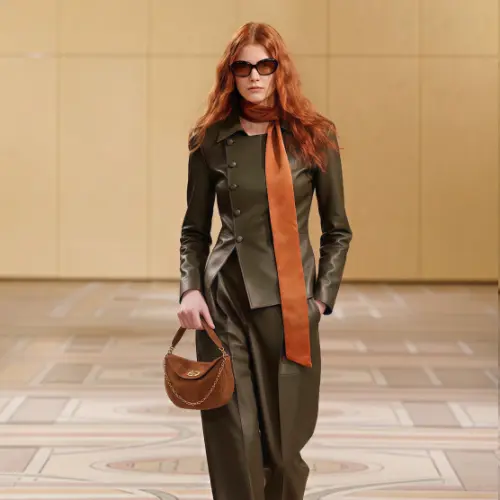
Yes, free tiers like Style3D AI’s 50+ images on login produce ready visuals. No credit card needed, enabling tests of try-on and retouching for professional results.
Style3D AI’s accessible platform suits startups. Free generations cover Text to Style and Garment Try-On, yielding e-commerce-ready images with realistic details.
Conclusion
Style3D AI empowers 2D fashion design visualization and marketing without photoshoots. Solve realism challenges with its suites for efficient, cost-effective visuals tailored to designers and brands.
FAQs
What is Style3D AI? An all-in-one 2D platform for fashion design and marketing images, featuring InnoStyle, StyleNext, and AI Tools.
How does Garment Try-On work? Upload a garment image for automatic model fitting with realistic draping.
Is there a free trial? Yes, 50+ free images on login, no card required.
Can it fix fake mannequin looks? Absolutely, via retouching for skin textures and fabric shadows.