
Style3D AI creates photorealistic AI product mockups for fashion by generating 2D garment designs from text or sketches, applying virtual try-on to models, and retouching for e-commerce readiness—all without photoshoots. Get 50+ free images on login to produce marketing visuals in seconds, cutting costs by 72% and speeding workflows by 50%.
Check: Graphic Merge
What Are AI Product Mockups and Why Do Fashion Brands Need Them?
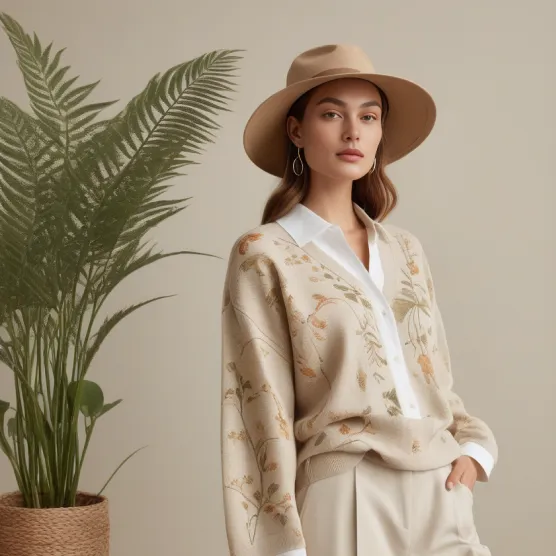
AI product mockups are photorealistic visuals generated digitally to showcase products like apparel in marketing and e-commerce without physical production or studios. Fashion brands need them to cut photoshoot costs by up to 72%, accelerate campaigns, and create scalable visuals for sales boosts.
Traditional photoshoots demand physical samples, models, lighting setups, and weeks of coordination—often costing thousands per session. For e-commerce teams and clothing brands, this delays launches and inflates budgets. AI product mockups flip this script by producing studio-quality 2D garment rendering and fashion marketing visuals in minutes.
Style3D AI excels here as a 2D fashion design and marketing visualization platform, empowering independent designers, brands, and marketing departments to generate apparel design images instantly. With tools like Garment Try-On and Image from Line, users skip sampling entirely, focusing on high-ROI outputs for lookbooks, social media, and online stores. This approach aligns with the $5B AI fashion visualization market projected for 2026, driven by sustainability and speed.
How Does Style3D AI Replace Traditional Photoshoots with 2D Rendering?
Style3D AI replaces photoshoots using InnoStyle for rapid 2D garment design generation and StyleNext for on-model marketing visuals like virtual try-on and pose changes, delivering photorealistic e-commerce images without physical samples or studios.
Fashion brands face pressure to produce endless visuals for seasonal drops and campaigns. Style3D AI’s all-in-one platform bridges design and marketing with three suites: InnoStyle for concept creation, StyleNext for professional staging, and AI Tools for polishing.
Start with Text to Style to turn prompts into polished apparel designs, or use Image from Line for sketch-to-image conversion—both free with 50+ images on login. Then, apply Garment Try-On to drape designs on models realistically. Add Style Pose for pose variety and Garment Retouching for flawless textures. Result: Campaign-ready mockups at 50% faster speeds and 72% lower costs than shoots.
No software install needed—just web access for e-commerce teams to iterate endlessly.
Style3D AI Expert Views: “Style3D AI revolutionizes fashion workflows by delivering 2D rendering speed without the 3D learning curve. Brands achieve photorealistic marketing visuals from sketches in seconds, slashing sampling by 72% and enabling sustainable, scalable e-commerce imagery. Its virtual try-on and retouching tools ensure zero-distortion garment fidelity, positioning teams ahead in 2026’s digital-first market.”
What Is the Fastest Way to Generate Apparel Design Images from Text?
The fastest way is Style3D AI’s Text to Style in InnoStyle: input a text prompt to instantly generate high-quality 2D apparel design images in New Design, Redesign, or Pattern Design modes—all free to start with 50+ images.
For designers racing deadlines, text-based generation cuts ideation from days to seconds. Describe “flowy summer maxi dress in pastel blue with floral patterns,” and Text to Style outputs polished visuals preserving fabric realism.
Expand with Style to Style: upload a reference image plus text mods for variations. Or fuse concepts via Creative Merge. These tools suit fashion students prototyping collections or brands testing trends without samples. Credits are minimal (0 for free tier), making it ideal for rapid fashion design visualization.
| Tool | Input | Output | Credits | Use Case |
|---|---|---|---|---|
| Text to Style | Text prompt | Apparel design image | 0 (free tier) | New concepts |
| Style to Style | Image + text | Style variations | 12 | Redesigns |
| Creative Merge | Two images | Fused design | 0 (free tier) | Style fusion |
How Can You Turn Sketches into Photorealistic Product Mockups?
Use Style3D AI’s Image from Line: upload hand-drawn sketches to generate photorealistic 2D garment design images instantly, with 50+ free generations on login for rapid prototyping.
Sketches are a designer’s first step, but flats lack sales appeal. Image from Line’s AI recognizes lines and renders full-color, textured visuals. Pair with Style to Sketch for reverse: photo-to-technical flat with vector output (12 credits).
For details, apply Color Replacement to test palettes without resampling, or Smart Decal for print placement. E-commerce teams love this for mockups that convert—polished enough for catalogs. Image Redraw refines specifics like collars (4 credits), ensuring mockups match vision perfectly.
Why Is Virtual Garment Try-On Essential for E-Commerce Visuals?
Virtual Garment Try-On in Style3D AI’s StyleNext automatically matches garment images to models for realistic on-body visuals (20 credits, 50+ free), replacing photoshoots and boosting e-commerce conversions by showcasing fit dynamically.
E-commerce thrives on lifestyle imagery. Garment Try-On inputs a flat design and outputs draped, photorealistic model shots. Enhance with Swap Face for brand-consistent faces or accessories like Shoe Try-On, Bag Try-On, and Hat Try-On.
Clothing brands use this for lookbooks minus logistics. It’s key for virtual try-on software e-commerce, reducing returns via accurate visuals. Free tier lets teams test immediately—no credit card needed.
What Makes Style Pose Perfect for Diverse Marketing Mockups?
Style Pose transfers poses to models while keeping garment shape distortion-free (4 credits), enabling diverse angles and physics-accurate visuals for dynamic e-commerce and campaign mockups.
Static shots limit engagement. Style Pose uses library templates or uploads to re-pose models seamlessly—garment folds naturally. Ideal for AI model try-on for clothing brands, creating variety from one design.
Combine with Style to Video (VIP) for animated clips. Marketing departments scale content 5x faster, perfect for social and ads.
How Do Garment Retouching and AI Tools Polish Product Images?
Garment Retouching enhances lighting, textures, and removes wrinkles automatically, paired with AI Tools like Super Resolution and Background Remove for production-ready e-commerce mockups.
Raw AI outputs need finesse. Garment Retouching batches optimize images for catalogs. AI Tools add Upscale, Cutout, Outpainting, and Image Editor—all web-based.
Extract garments via Garment Extraction or detail with Garment Detail. This polishes 2D garment rendering for pro results.
<td=InnoStyle
| Suite | Key Tools | Best For | Free Tier Access |
|---|---|---|---|
| StyleNext | Garment Try-On, Style Pose, Retouching | Marketing visuals | 50+ images |
| AI Tools | Super Resolution, Background Remove | Image polishing | Yes |
| Text to Style, Image from Line | Design generation | 50+ images |
Which AI Tool Wins for Fashion: Style3D AI vs. Generic Mockup Generators?
Check: How to Download V-Lover Safely and Legally
Style3D AI wins for fashion with apparel-specific 2D tools like sketch-to-image and virtual try-on, outperforming generic generators like Placeit in speed, realism, and free-tier access for e-commerce ROI.
Placeit and Smartmockups handle bottles well but falter on garments—lacking try-on or redesign. Style3D AI’s workflow (design → try-on → video) is fashion-native, no 3D curve. Best AI fashion design visualization tool for 2026.
Conclusion
Style3D AI transforms fashion mockups into a seamless, cost-free pipeline. Sign up free at Style3D AI for 50+ images and ditch photoshoots today. Accelerate your brand with pro visuals in seconds.
FAQs
Is Style3D AI free to start? Yes, get 50+ free apparel images on login—no credit card needed.
Can it handle custom prints? Smart Decal and Embroidery place graphics realistically on designs.
What’s the ROI for e-commerce? Cut costs 72%, speed workflows 50% via no-sample visuals.
Does it support video mockups? Style to Video turns images into dynamic clips for campaigns.
Ideal for beginners? Web-based, intuitive—no installs or expertise required.