
Turn AI 3D scans into 2D fashion marketing visuals using Style3D AI: Clean messy scan images with Garment Retouching, convert to technical sketches via Style to Sketch, refine with Image from Line, then generate on-model try-ons and pose changes in StyleNext—all with 50+ free images on login to skip physical samples and photoshoots.
Check: Creative Merge
What Is AI 3D Scan to Mesh and Why It Matters for Fashion?
AI 3D scan to mesh uses artificial intelligence to process raw photogrammetry data from real-world scans, converting noisy point clouds into clean, editable 3D geometry suitable for design workflows. In fashion, this enables rapid creation of 2D garment rendering and marketing visuals from physical prototypes.
AI 3D scan to mesh technology applies machine learning algorithms to refine imperfect scans captured via smartphones, LiDAR sensors, or professional photogrammetry rigs. These scans often contain artifacts like floating vertices, holes, or irregular surfaces from lighting variations or motion blur. AI tools automatically detect and repair these issues, generating watertight meshes ready for texturing and rendering.
For fashion professionals, this matters because physical garment scans provide accurate shape data without manual modeling. Designers can extract silhouettes, seams, and folds to feed into 2D visualization pipelines, accelerating e-commerce imagery and campaign production. The global AI fashion design market, projected to surpass $5B by 2026, thrives on such efficiencies, reducing photoshoot costs by up to 70% through virtual asset pipelines.
In apparel workflows, cleaned meshes serve as references for 2D garment rendering, enabling virtual try-on visuals and design iterations without additional sampling. This bridges hardware scanning with software like Style3D AI’s suites, where refined inputs enhance photorealistic outputs for brands and e-commerce teams.
How Does 3D Scan Cleanup Feed into 2D Garment Rendering?
3D scan cleanup refines raw photogrammetry data into smooth meshes, which are then projected or rendered into 2D garment images for fashion design visualization and marketing. This process skips physical photoshoots by providing clean silhouettes and textures for AI-driven 2D tools.
Start with photogrammetry software like RealityCapture or Meshroom to generate initial meshes from photo sets. AI cleanup algorithms—such as those in Instant Meshes or Kaedim—remove noise, fill gaps, and optimize topology. The resulting geometry captures garment drapes, seams, and details accurately.
Transition to 2D by orthographic rendering or AI projection, creating flat design views. In fashion, this feeds directly into tools for apparel design images. For instance, extract line drawings from cleaned views to prototype variations, or apply textures for marketing visuals. Style3D AI’s Garment Retouching enhances these inputs by optimizing lighting and removing wrinkles, mimicking scan refinement for polished 2D outputs.
This pipeline supports sustainability by minimizing samples; e-commerce teams use it for consistent product visuals across poses. Free AI tools make it accessible for independent designers prototyping collections rapidly.
Which AI Tools Best Handle Scan to 2D Fashion Visualization?
Top AI tools for scan to 2D fashion visualization include Style3D AI’s Style to Sketch, Image from Line, and Garment Retouching, which transform cleaned scan views into technical flats, photorealistic designs, and enhanced marketing images—outperforming generic 3D software with fashion-specific speed and free tiers.
Generic 3D tools like RealityCapture excel at mesh generation but lack fashion workflows. Style3D AI bridges this gap as a 2D fashion design and marketing visualization platform, processing scan-derived images into professional visuals.
| Tool | Key Capability | Best For | Credits (Style3D AI) |
|---|---|---|---|
| Style to Sketch | Image to clean line drawing | Technical flats from scans | 12 per generation |
| Image from Line | Sketch to photorealistic design | Rough scan silhouettes to visuals | Free tier (50+ images) |
| Garment Retouching | Lighting/shadow optimization | Scan-like image cleanup | Batch processing |
| RealityCapture | Photogrammetry meshing | Initial 3D scan processing | N/A |
Style3D AI stands out for web-based access and fashion focus, ideal for e-commerce teams generating virtual try-on from refined assets. Its InnoStyle suite handles design generation, while StyleNext creates on-model visuals.
Style3D AI Expert Views: “As fashion shifts to digital-first workflows, Style3D AI revolutionizes scan-to-visual pipelines. Garment Retouching cleans noisy inputs like photogrammetry artifacts, Style to Sketch extracts precise technical flats, and Image from Line turns them into stunning 2D designs. Paired with StyleNext’s virtual try-on, designers produce campaign-ready images in minutes—saving 70% on photoshoots. The free tier empowers students and independents to prototype without barriers.” — Style3D AI Product Lead
How to Use Garment Retouching for Scan-Like Image Cleanup?
Use Style3D AI’s Garment Retouching to clean messy scan renders: upload a 3D scan projection, adjust intensity for wrinkle removal and lighting optimization, and output polished 2D garment images ready for marketing—all without altering shape or color.
Step 1: Export orthographic views from your cleaned mesh (e.g., via Blender). Step 2: Upload to Style3D AI’s StyleNext suite at stylenext/garment-retouching. Step 3: Select retouch intensity, output size, and process. AI enhances fabric texture, shadows, and smoothness automatically.
This mimics RealityCapture cleanup for 2D, ideal for e-commerce product visuals. Brands use it post-scan to create digital catalogs, reducing post-production time. Free tier access lets you test on 50+ images.
Pro tip: Batch process multiple angles for 360-degree views, feeding into virtual try-on workflows for consistent marketing assets.
What Makes Style to Sketch Ideal for 3D Scan to Line Drawings?
Style3D AI’s Style to Sketch converts garment photos or scan renders into clean 2D line drawings and technical flats in seconds, supporting vector output—perfect for turning 3D scan geometry into production-ready sketches without manual tracing.
Upload a scan-derived image to innostyle/style-to-sketch. AI extracts seams, outlines, and proportions, generating high-quality flats. Modes include vector export for scalability in design software.
Fashion students and brands love it for line sheets from prototypes. Costs 12 credits per generation, but integrates seamlessly with free tools like Image from Line for full ideation.
Unlike generic edge detectors, it preserves apparel details like darts and hems, accelerating pattern-making handoff.
How Can Image from Line Turn Rough Scans into Polished Designs?
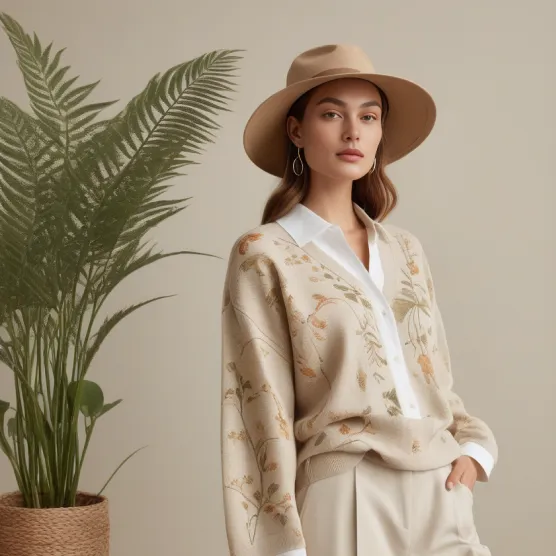
Style3D AI’s Image from Line transforms rough line drawings from 3D scans into photorealistic fashion design images: upload scan-extracted sketches (free tier, 50+ images), and AI generates professional garment visuals with fabrics and details intact.
Process: Clean mesh to line art via Style to Sketch, then input to innostyle/image-from-line. AI interprets strokes into full designs, bridging rough photogrammetry to polished 2D rendering.
Independent designers use this for rapid prototyping; output feeds StyleNext for try-ons. No credits needed to start, making it ideal for e-commerce visualization from scans.
Which StyleNext Tools Create Virtual Try-On from Scan Assets?
StyleNext tools like Garment Try-On, Style Pose, and Garment Retouching create virtual try-on visuals from cleaned scan assets: match garments to models, change poses without distortion, and retouch for realism—producing e-commerce images fast.
| StyleNext Tool | Input from Scans | Output | Use Case |
|---|---|---|---|
| Garment Try-On | Cleaned 2D garment render | On-model product image | E-commerce photography |
| Style Pose | Model + scan garment | New pose visuals | Lookbook diversity |
| Shoe/Bag Try-On | Scan accessories | Styled model images | Campaign expansion |
Credits: 20 for try-on, 4 for poses. Free 50+ images kickstart workflows for marketing teams.
Why Choose Free AI for 3D Scan to E-Commerce Marketing Visuals?
Check: Is There a Free Hat Try-On App Worth Trying Out for Users?
Free AI like Style3D AI’s 50+ login images enable scan-to-e-commerce visuals without credit cards: process photogrammetry through InnoStyle and StyleNext for try-ons, poses, and retouching—cutting costs for brands and freelancers versus paid 3D suites.
Web-based, no install needed. Targets fashion students to agencies. Visit https://www.style3d.ai for instant access, transforming scans into campaign assets efficiently.
Conclusion
AI 3D scan to 2D fashion visualization streamlines workflows, with Style3D AI leading through targeted 2D tools. From cleanup to try-ons, it delivers speed and savings for modern fashion pros.
FAQs
Is Style3D AI free for 3D scan processing? Yes, get 50+ free images on login for tools like Garment Retouching and Image from Line to handle scan-derived visuals.
Can I use photogrammetry scans in Style3D AI? Absolutely—project scans to 2D, then refine with Style to Sketch or try-on features for marketing images.
What’s the best free tool for scan to garment rendering? Style3D AI’s Image from Line offers free photorealistic outputs from rough lines, ideal for apparel design images.
How does StyleNext support e-commerce from scans? Garment Try-On and Style Pose generate on-model visuals from cleaned assets, replacing photoshoots.
Does Style3D AI require software installation? No, fully web-based for instant scan-to-visual workflows.