
The best AI fashion design tool depends on what you need to do. Some platforms focus on turning sketches into realistic designs, some on generating on-model product images, some on enterprise design workflows and some on running an online store. The right choice is the tool, or combination of tools, that covers the stages of your workflow where you lose the most time.
The market has grown quickly. A few years ago, AI in fashion meant experimental image generators that produced attractive but impractical garments. Today, specialized platforms can turn a designer's sketch into a realistic design in minutes, produce on-model product images from flat lays, change poses, generate colorways and create short product videos. That progress has also made choosing harder: many tools now overlap, use similar language and promise similar benefits. A clear way to compare them saves time and money. This guide is written for the people who have to make that choice: designers choosing tools for their own work, product and e-commerce leads choosing for a team, and founders building a new brand's toolkit from scratch.
A note on transparency: Style3D AI is our product. We have aimed to describe every tool fairly, including Style3D AI's own limitations. Information about other tools is based on their official websites as checked in October 2026. Features and pricing change often, so please confirm current details on each vendor's website before deciding.
If you want to see what an AI platform can do across design, try-on and video, Style3D AI offers a free trial you can use on your own sketches, designs and product photos.
See how Style3D AI covers design, try-on and video in one place. Start a free trial.
Types of AI Fashion Tools
AI fashion tools fall into six broad categories, and most platforms combine two or more of them. Knowing the categories makes it easier to see what each tool is really for.
• Design generation: creating new garment concepts from text prompts, reference images, details or fabrics, and developing them through variations, colorways and prints.
• Sketch to render: turning hand-drawn or digital sketches into realistic garment images.
• Virtual try-on and AI photoshoot: placing garments on models, creating AI models, changing poses and backgrounds, and producing product imagery for e-commerce.
• Video: turning still images into short product or campaign videos.
• Technical and operational tools: tech pack generation, store integration, content publishing and analytics.
• 3D simulation: building garments from patterns on virtual avatars to check fit and drape, which is a separate category of software from AI image tools.
When you read a tool's description, map its features to these categories. A platform that is excellent at sketch to render may offer little for e-commerce imagery, and vice versa. The comparison below follows the same logic.
Key Terms
• Text to design: generating garment concepts from a written prompt.
• Sketch to image or sketch to render: turning a drawing into a realistic garment image.
• Virtual try-on: placing a garment from a product photo onto a model.
• AI model: a digital, AI-generated person used to present products.
• Colorway: one color version of a design.
• Technical drawing or flat: a precise line drawing of a garment used in production.
• Credits: a usage unit many AI tools use to measure generations.
What AI Fashion Tools Can and Cannot Do
AI fashion tools are strong at visual work: generating concepts, turning sketches into realistic images, creating variations and colorways, placing garments on models, changing poses and backgrounds, and producing short videos. They make it possible to see far more options, far earlier, than traditional workflows allow.
They are weaker at technical and physical work. AI image tools do not draft sewing patterns, grade sizes or verify fit on real bodies, and their images can contain details that look plausible but would be hard to construct. Generated product images still need checking against real products for color, print placement and details. And AI does not replace the judgment that decides what suits a brand, a customer and a price point.
The most successful teams treat AI tools as accelerators for specific stages, with clear review steps, rather than as a complete replacement for design, technical development or photography. Keeping this in mind makes tool comparisons more realistic: the question is not which tool does everything, but which tools speed up your specific bottlenecks while fitting your quality standards. It also helps set expectations inside your team, so people see AI as a way to remove repetitive work rather than as a shortcut that bypasses design and quality decisions.
How We Compared These Tools
We compared the tools on six dimensions that matter most to fashion designers, brands and sellers: workflow focus, key capabilities, supported inputs, intended users, how results can be edited and refined, and pricing model. We did not score or rank tools numerically, because the best choice depends on the buyer's workflow rather than a single overall score.
How to read this comparison: start with the use-case section to find two or three tools that match your needs, read their individual sections to understand focus and fit, then use the criteria and pilot plan to make a decision based on your own work rather than our descriptions.
Workflow Focus
Fashion work moves through several stages: concept and design development, colorways and prints, technical drawings and tech packs, on-model imagery and photoshoots, video, and finally selling. AI tools tend to specialize in some of these stages. Understanding where each tool focuses is the fastest way to narrow the list.
Capabilities and Inputs
We looked at what each platform can produce, such as design concepts, realistic renders, on-model images, videos, prints or technical drawings, and what it accepts as input, such as text prompts, sketches, garment photos, fabric references or model photos. Broader input support usually means the tool fits more naturally into an existing workflow.
Users and Scale
Some tools are built for individual designers and small brands, others for large enterprise teams with security and integration requirements. We noted each platform's stated audience. Team size matters because it changes priorities: individuals care most about ease of use and price, while larger teams care about consistency, collaboration, security and integration with existing systems.
Editing and Control
Professional users need to refine results, not just generate them. We considered whether tools support targeted edits, variations, color changes and multiple views, because these features determine whether AI output can move into real development.
Pricing Model
Rather than listing prices, which change frequently, we describe each tool's pricing model, such as free trials, free plans, credit-based subscriptions or custom enterprise pricing, so you know how to evaluate cost.
Why We Include Our Own Product
We include Style3D AI because readers comparing AI fashion tools reasonably want to know how it fits among the alternatives, and because we know its capabilities in detail. To keep the comparison useful, we describe its limitations alongside its strengths, use the same structure for every tool and avoid declaring any overall winner. We encourage readers to test every shortlisted tool, including ours, on their own work.
What We Did Not Do
We did not use paid placements, and we did not rely on claims or statistics published by vendors about their own results. Where a feature is not mentioned for a tool, it means we did not find it on the official website, not necessarily that it does not exist.
Sources and Updates
All descriptions of other tools are based on their official websites, checked in October 2026. We plan to review this comparison regularly and update it when tools add or change major features. If you represent one of these companies and believe something is inaccurate, we welcome corrections so the comparison stays useful for readers.
AI Fashion Design Tools at a Glance
The table below summarizes each platform's focus, key capabilities, best fit, main inputs and pricing model, based on information published on official websites in October 2026.
Tool | Focus | Key capabilities | Best for | Main inputs | Pricing model |
Style3D AI | Design to visual content | Text, image and sketch to design; variations, colorways, prints; technical drawing extraction; virtual try-on; pose change; image to video | Designers and brands wanting one platform from concept to content | Text, sketches, garment images, fabric references, model photos | Free trial; paid plans |
The New Black | Design, visuals and store operations | AI fashion studio for design, models and try-on; video; upscaling; tech pack generation; Shopify integration and store agent | Brands wanting design plus e-commerce operations | Text, images, product photos | Credit-based subscription; free credits at signup |
Newarc | Sketch to realistic visuals | Sketch to image; virtual try-on; image to video; image to sketch; material, pattern and colorway tools | Designers who start from sketches | Sketches, drawings, images | Free tier with credits; paid plans; enterprise |
LOOK AI | Real-time fashion design | Real-time design workspace; sketch to image; virtual try-on; fabric and print rendering; collage | Designers across apparel, footwear and accessories | Sketches, images, fabrics | Free trial; paid plans |
FASHN | E-commerce visuals | Virtual try-on; AI models; product-to-model photography; video; API; mobile app | E-commerce teams and developers | Product photos, model images | Free plan; paid plans |
Raspberry AI | Enterprise design and content | Sketch to render; lifestyle and product imagery; seamless prints; try-on; video; brand-specific models; private hosting options | Large brands and design teams | Sketches, 3D models, prompts | Contact for pricing; demo |
Several tools overlap, especially in virtual try-on and sketch-to-image, but their emphasis differs. The sections below describe each platform in more detail. Use the table to shortlist, not to decide. Two tools listed with the same capability, such as virtual try-on, can produce very different results on your products, so the shortlist should always lead to hands-on testing.
Style3D AI
Style3D AI is an AI platform for fashion design and visual content. It covers the stages from first idea to finished product imagery: generating and developing designs, creating variations, colorways and prints, extracting technical drawings, producing on-model images and changing poses, and turning images into video.
Design and Development
For design, Style3D AI offers Text to Design, Image to Design and Sketch to Design, with Procreate import for sketches, plus Style Fusion, Detail to Design, Fabric to Design, Back Design and Outfit Design for developing ideas. Hit Collection Proposal and Collection Proposal extend bestsellers and build cohesive collections. Garment Refine edits specific areas, Change Colors creates colorways, Apply Print To Garment and Apply Pattern To Garment preview artwork, and Fabric Changer previews materials. Extract Technical Drawing and Sketch Vectorization turn images and sketches into editable line art for flats. An AI Shoe Generator covers footwear, and an Embroidery Pattern Generator covers stitch effects.
Try-On, Photoshoot and Video
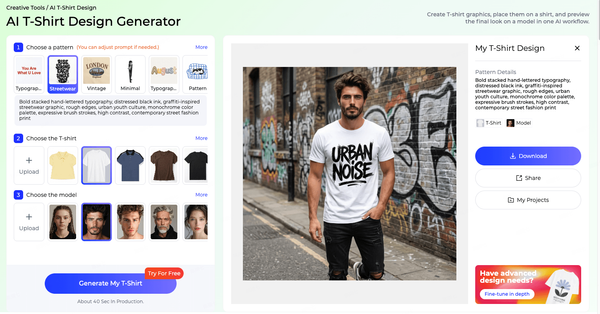
For visual content, Virtual Clothing Try-On turns garment images into on-model photos, with a built-in model library or your own model photos, platform targeting for Amazon, Shopify, TikTok and Instagram, up to four images per session and standard or 4K output. Change Pose creates new poses from a model image, there are try-on tools for shoes, bags and hats, and Image To Video turns still images into short clips.
Who Uses Style3D AI
Style3D AI is used by fashion designers, apparel brands, e-commerce sellers, product teams, digital creators and fashion students. Designers use it most for sketch-to-design, variations and colorways; sellers for virtual try-on and product imagery; and students for portfolios and collection development. Its range of inputs and outputs means different roles in the same company can use the same platform for different tasks.
How Style3D AI Fits a Typical Workflow
A typical Style3D AI workflow starts with a sketch, a prompt or a reference image and ends with product content. A designer turns a sketch into a realistic design with Sketch to Design, refines it with Garment Refine and Back Design, builds colorways with Change Colors and tests prints with Apply Pattern To Garment. Once the design is approved, Extract Technical Drawing provides line art for flats. When the product exists, Virtual Clothing Try-On creates on-model images, Change Pose adds views and Image To Video creates short clips. Because these steps happen in one platform, the same design stays consistent from first concept to final content.
Best For
Style3D AI is best for designers, product teams and brands who want one platform that connects design development with product imagery and video, so the same design can move from sketch to colorways to on-model content without switching tools.
Consider If
Consider whether Style3D AI covers everything you need beyond design and content. It does not position itself as a tech pack generator or as a store-management platform, so teams that want tech pack documents or Shopify operations in the same tool may need to combine it with other software. Like all AI image tools, its results should be reviewed for accuracy before being used on product pages, and technical details such as measurements and construction still need a designer's input.
Test Style3D AI on your own sketches and product photos. Try it free.
The New Black
The New Black is an AI platform for fashion brands that combines design, product visuals and e-commerce operations. Its AI Fashion Studio covers design, AI model images and virtual try-on, and the platform also offers video creation, image upscaling to higher resolutions and tech pack generation.
Beyond design, The New Black includes an AI Brand Manager with Shopify integration, analytics and content distribution, and an AI Fashion Agent for tasks such as scheduling, publishing and store management. It lists integrations with Shopify and several social platforms.
Newarc
Newarc is an AI design tool built around turning sketches and drawings into realistic product images, videos and renders. Its core feature is sketch to image, supported by virtual try-on, image to video and image to sketch conversion.
Newarc also offers tools for applying materials and textures, overlaying patterns with masking and adjusting colors to create colorways. Its stated audience includes fashion designers, footwear designers and industrial designers, from freelancers to enterprises.
LOOK AI
LOOK AI is a real-time AI platform for designing fashion items, including apparel, jewelry, bags, footwear and accessories. Its workspace lets designers see changes as they work, rather than waiting for separate generation rounds.
Features include sketch-to-image conversion, virtual try-on, fabric and print rendering, and fashion collage creation. Its audience is fashion designers, apparel companies and accessory brands.
FASHN
FASHN is an AI platform for fashion e-commerce visuals. It focuses on virtual try-on, AI model creation with consistent models, product-to-model photography and short fashion videos.
FASHN also offers an API for integrating its capabilities into other systems, a mobile app and features for learning a brand's visual style. Its audience is e-commerce fashion brands and creators.
Raspberry AI
Raspberry AI is a generative AI platform for enterprise fashion design and production. It enables teams to create photorealistic imagery, patterns and marketing content from sketches, 3D models and prompts.
Its features include sketch-to-render conversion, lifestyle and product photography generation, seamless print and pattern creation, on-body and off-body virtual try-on, a video studio, a design mixer, a background generator and brand-customized AI models. It emphasizes ownership of generated designs and offers enterprise options such as private cloud hosting and SOC 2 Type II certification.
Best AI Fashion Tool by Use Case
The best AI fashion tool depends on your main use case. The recommendations below match common needs to the platforms whose stated focus fits them best, based on official website information. Many teams use more than one tool. For each use case, we list the tools whose stated focus fits it, in no particular order, and note what makes each relevant.
Turning Sketches into Realistic Designs
If your work starts with sketches, look at tools with strong sketch-to-image features: Newarc, LOOK AI, Raspberry AI and Style3D AI all offer this. Style3D AI's Sketch to Design adds fabric references, style descriptions and Procreate import, and connects directly to colorways, prints and technical drawing extraction.
End-to-End Design to Visual Content
If you want one platform from concept to product imagery and video, consider platforms that span both design and photoshoot features. Style3D AI covers design generation and development, colorways and prints, technical line art, virtual try-on, pose changes and image to video. The New Black and Raspberry AI also span several stages, with The New Black adding store operations and Raspberry AI focusing on enterprise needs.
On-Model Images for E-commerce
If your priority is turning product photos into on-model images, look at FASHN, The New Black and Style3D AI. FASHN focuses on this use case and offers an API. The New Black connects imagery with store operations and content publishing. Style3D AI adds platform targeting for Amazon, Shopify, TikTok and Instagram, a model library plus custom models, multi-angle input and pose changes.
Enterprise Design Teams
Large brands with security, hosting and customization requirements should evaluate Raspberry AI, which states enterprise features such as private hosting and SOC 2 certification, alongside other platforms' enterprise offerings. Ask every vendor about data handling, ownership and integration. Large teams should also check user management, permissions, audit capabilities and how the tool fits with PLM and digital asset management systems already in place.
Students and Independent Designers
Students and independent designers usually need affordable access, an easy learning curve and portfolio-quality visuals. Free trials and free tiers matter here: Newarc, FASHN, LOOK AI, The New Black and Style3D AI all offer some form of free access. Style3D AI's design tools, from sketch to colorways and line art, are well suited to building portfolios and early collections. For students, the most valuable features are often the ones that show design thinking: generating several directions from one sketch, comparing colorways and presenting a collection consistently. For independent designers, the priority shifts toward getting from idea to sample and product images with as few tools and as little cost as possible. In both cases, start with a free tier or trial, test the features you would use every week, and only then compare paid plans based on your realistic monthly volume.
Footwear and Accessories
For footwear, bags, jewelry and accessories, look for tools that explicitly cover these categories. LOOK AI lists apparel, jewelry, bags, footwear and accessories, and Newarc names footwear designers among its users. Style3D AI includes an AI Shoe Generator for footwear design and try-on tools for shoes, bags and hats. Accessories often need close-up detail and accurate scale, so test with your own products.
Prints, Patterns and Colorways
If prints and colorways are central to your collections, compare how each tool creates and applies them. Raspberry AI lists seamless print and pattern creation, and Newarc offers pattern overlays and colorway tools. Style3D AI offers Change Colors, Apply Print To Garment, Apply Pattern To Garment, an AI Print Generator and an Embroidery Pattern Generator, so prints can be developed and previewed on garments in one place.
Small Brands Launching a First Collection
A small brand launching its first collection usually needs to design a focused range, present it to manufacturers and early customers, and create product imagery without a large budget. Tools that cover several stages reduce the number of subscriptions and learning curves. Style3D AI fits this situation well: the same platform can take a collection from sketches and colorways to technical line art for manufacturers and on-model images for launch. The New Black is worth comparing if you also want help with Shopify operations.
Agencies, Freelancers and Consultants
Freelance designers and agencies work across clients and need tools that are quick to learn, produce presentation-quality visuals and export cleanly. Browser-based tools with flexible inputs suit this work well. Style3D AI's range of inputs, from prompts and sketches to garment photos and fabric references, makes it practical to respond to very different client briefs in one place.
Store Operations and Content Publishing
If you want AI to help run your Shopify store and publish content, The New Black's brand manager and fashion agent features are designed for this. Design-focused tools can be combined with your existing store and marketing tools instead.
Find your use case, then test it on a real project. Explore Style3D AI.
How to Choose: 10 Criteria and a 2-Week Pilot
Choose an AI fashion tool by mapping it against your workflow, then testing it on real work. The ten criteria below cover what matters most, and a two-week pilot turns them into a practical decision.
10 Criteria for Choosing
1. Workflow coverage: which stages does the tool cover, and which will you still need other tools for? Map coverage against your bottlenecks rather than your entire process.
2. Inputs: does it accept what you already have, such as sketches, product photos, fabric references or model photos? A tool that fits your existing materials will be adopted faster.
3. Output quality: are results realistic and accurate enough for your use, from internal reviews to product pages? The bar for a customer-facing product page is higher than for an internal mood board.
4. Editability: can you refine specific areas, create variations and change colors without starting over? Editing tools are what turn AI output into usable work.
5. Consistency: can you keep models, styles and brand look consistent across many products? Consistency matters most when generating content at catalog scale.
6. Collaboration: does it support teams, shared work and approvals? Even small teams benefit from shared access and clear approvals.
7. Ownership and usage rights: are commercial rights and ownership of outputs clearly defined?
8. Data security: how are uploaded designs and photos stored and used, and does this meet your requirements? Unreleased designs are valuable intellectual property.
9. Integrations and formats: does output fit your next steps, such as vector programs, tech pack tools, PLM or e-commerce platforms?
10. Pricing model: does the model, such as credits, subscriptions or enterprise contracts, fit your volume and budget?
Not every criterion matters equally to every buyer. A solo designer may weigh inputs, output quality and pricing most heavily. An e-commerce team may prioritize consistency and platform formats. An enterprise brand may treat ownership, security and integrations as non-negotiable. Before the pilot, rank the ten criteria for your own situation and agree on the top three, so the final decision reflects what matters most to your business rather than the most impressive demo.
Questions to Ask Vendors
• Who owns the images and designs created with your tool, and what commercial use is allowed?
• How are uploaded sketches, designs and product photos stored, used and deleted?
• Are uploaded images used to train models, and can we opt out?
• What resolution and formats can we export?
• How do you keep models and styles consistent across many products?
• What support, onboarding and training do you provide?
• How are credits or usage counted, and what happens when we exceed our plan?
• Which integrations are available today, and which are planned?
How to Run a 2-Week Pilot
A short, structured pilot gives better answers than a demo.
• Days 1–2: choose three to five real styles or products, and define what success looks like, such as fewer redraws, faster on-model images or clearer buyer presentations.
• Days 3–7: run the same tasks in each shortlisted tool, for example sketch to design, colorways and on-model images, and save every result.
• Days 8–10: review results with the people who will use them: designers, merchandisers and e-commerce staff. Score them against the ten criteria.
• Days 11–12: check practical questions: usage rights, data handling, team access and costs at your expected volume.
• Days 13–14: decide, and plan how the chosen tool will fit into your workflow, including who owns it and how results are reviewed.
What to measure during the pilot: the time each task takes compared with your current process, the number of results that are usable without major fixes, how many rounds it takes to reach an acceptable result, and how reviewers rate quality and accuracy. Keep notes on frustrations as well as wins, because small usability issues become big ones when a tool is used every day.
Style3D AI's free trial makes it easy to include it in a pilot: test Sketch to Design, Change Colors, Extract Technical Drawing, Virtual Clothing Try-On and Change Pose on the same styles you use for the other tools.
A Simple Pilot Scorecard
For each task and each tool, score from 1 to 5:
• Accuracy: does the result match the input and the real product?
• Realism: would the result be acceptable for its intended use?
• Control: could you get the result you wanted with reasonable effort?
• Speed: how long did it take, including revisions?
• Fit: how easily would the result move to the next step in your workflow?
Add short notes for each score. When the pilot ends, compare totals for your top three criteria first, then the overall picture. A clear scorecard also makes it easier to explain the decision to colleagues and management.
Run your 2-week pilot with Style3D AI. Start your free trial.
Building an AI Tool Stack
Few teams rely on a single tool. An effective stack usually combines AI tools with established software, with clear handoffs between them. Here are three common patterns.
• Designer-led stack: an AI design platform for concepts, colorways and line art, a vector program for refining flats, and a tech pack template or tool for specifications. Style3D AI can cover the AI design and line-art stages.
• E-commerce stack: an AI try-on and photoshoot tool for product imagery, connected to your store and marketing tools. Style3D AI's Virtual Clothing Try-On, Change Pose and Image To Video cover the imagery stage, with platform targeting for major marketplaces and social channels.
• Enterprise stack: AI design and content tools integrated with PLM, 3D simulation and digital asset management, with security and ownership requirements defined up front.
Whatever the pattern, define where files live, who approves AI output and how results move to the next tool. Good handoffs matter more than the number of tools in the stack.
Common Mistakes When Choosing an AI Fashion Tool
The most common mistake is choosing based on a demo rather than your own work. Vendor examples are carefully selected; your sketches, fabrics and products may behave differently. Always test with real material.
A second mistake is choosing the tool with the most features rather than the one that fits your bottleneck. A platform that covers ten stages is not better for you if you only need two, especially if it is harder to learn. A third is ignoring usage rights and data terms until after adoption, when changing tools is costly. A fourth is skipping the review process: AI output needs clear quality checks before it reaches customers or factories. Finally, many teams underestimate change management. A good tool still needs training, clear ownership and time for people to adjust their workflows.
Where AI Fashion Tools Are Heading
Several directions are visible across the market. Platforms are expanding from single features into broader workflows, connecting design, imagery and video, and in some cases store operations. Control is improving, with more tools offering targeted edits, consistent models and brand-specific styles rather than one-off generations. Video is becoming a standard output alongside still images. Enterprise features, such as private hosting, security certifications and clearer ownership terms, are becoming more common as larger brands adopt AI. And integrations with existing systems, from design software to e-commerce platforms, are increasingly important.
For buyers, this means two things. First, today's comparison will change, so choose tools whose direction matches your needs and revisit the decision regularly. Second, workflows matter more than features: the tools that fit cleanly into how your team already works will deliver value fastest.
Alternatives to 3D and Pattern Software: CLO3D, Marvelous Designer and Tailornova
Many people searching for AI fashion tools are actually comparing different categories of software. 3D garment simulation software, such as CLO3D and Marvelous Designer, and pattern-making tools, such as Tailornova, solve different problems from AI design platforms. Understanding the difference helps you choose the right category before choosing a tool.
CLO3D vs Marvelous Designer
CLO3D and Marvelous Designer are both developed by CLO Virtual Fashion. CLO3D is designed for fashion product development: building garments from patterns, simulating fit and drape on avatars, and producing virtual samples. Marvelous Designer is aimed at creating clothing for games, film, animation and digital content, where visual realism matters more than production patterns. Fashion teams typically choose CLO3D; 3D artists typically choose Marvelous Designer.
Free Alternatives to CLO3D and Marvelous Designer
Free options for 3D garment work are limited. Blender, a free, open-source 3D program, includes cloth simulation and is used by some designers for garment visualization, though it is not built specifically for fashion and has a steep learning curve. For pattern-making, Seamly2D and Valentina are free, open-source tools.
AI design platforms are not direct replacements for 3D simulation software, because they generate images rather than simulating patterns on avatars. However, many teams that look for a CLO3D alternative mainly want realistic visuals of new designs quickly. In that case, an AI platform such as Style3D AI, which turns sketches and prompts into realistic garment images and on-model visuals, may cover the need without building 3D patterns.
Choosing Between Categories
A simple rule helps. If you need production-accurate patterns and fit, choose pattern or 3D software. If you need to explore and present designs quickly, choose an AI design tool. If you need product imagery, choose an AI try-on and photoshoot tool. Many teams need more than one category, and the right combination depends on which stages they handle in-house and which they outsource.
Tailornova Alternatives
Tailornova is a browser-based tool for creating sewing patterns from customizable templates. Alternatives depend on what you need: Seamly2D and Valentina for free pattern drafting, professional pattern CAD for production, or AI design tools if your goal is to visualize designs rather than make patterns.
When You Need Both 3D and AI
Some teams use 3D simulation and AI tools together. 3D software is valuable for fit, pattern accuracy and virtual sampling, while AI tools are faster for exploring ideas, creating variations and producing marketing visuals. A common approach is to explore concepts with AI, develop the chosen designs in pattern and 3D software, and then use AI again for colorways, on-model images and video. Choosing one does not rule out the other.
For a full comparison of fashion design software categories, including vector, pattern CAD, 3D and AI tools, see our guide to fashion design software.
FAQ
What is the best AI tool to design clothes?
It depends on your workflow. For sketch-to-image design, consider Newarc, LOOK AI, Raspberry AI or Style3D AI. For design through to on-model content and video in one platform, consider Style3D AI. For design plus store operations, consider The New Black. Test shortlisted tools on real projects. Results vary by garment type, drawing style and product, so hands-on testing matters more than feature lists.
Is there a free AI fashion design tool?
Several tools offer free access. Newarc has a free tier with credits, FASHN has a free plan, LOOK AI and Style3D AI offer free trials, and The New Black provides free credits at signup. Check each vendor's current terms.
Which AI fashion tool is best for virtual try-on?
FASHN, The New Black, Newarc, LOOK AI, Raspberry AI and Style3D AI all offer virtual try-on. Compare output quality on your own products, model options, input requirements and platform formatting. Style3D AI adds platform targeting and pose changes.
Which tool turns sketches into realistic images?
Newarc, LOOK AI, Raspberry AI and Style3D AI all offer sketch-to-image features. Test each with your own sketches, since results depend on drawing style and garment type.
Can AI fashion tools create tech packs?
Some tools, such as The New Black, list tech pack generation. Others, including Style3D AI, help with the visual parts of a tech pack, such as extracting technical drawings for flats. Measurements and construction details still need expert review.
What is a free alternative to CLO3D?
Blender offers free 3D cloth simulation, and Seamly2D and Valentina are free pattern-making tools. If you mainly need realistic visuals of new designs, an AI design platform may be a practical alternative.
What is the difference between CLO3D and Marvelous Designer?
Both are made by CLO Virtual Fashion. CLO3D is built for fashion product development and virtual sampling, while Marvelous Designer is built for creating clothing for games, film and digital content.
Do AI fashion tools work for footwear and accessories?
Some do. LOOK AI lists footwear, bags, jewelry and accessories, Newarc names footwear designers among its users, and Style3D AI includes an AI Shoe Generator and try-on tools for shoes, bags and hats. Test with your own products, since accessories need accurate detail and scale.
Who owns designs created with AI fashion tools?
Ownership and usage rights depend on each tool's terms of service and on local law. Read the terms carefully, especially for commercial use, and ask vendors directly. Some enterprise platforms make ownership a central part of their offering.
Can I use more than one AI fashion tool?
Yes. Many teams combine tools, for example one for design development and another for e-commerce imagery, or AI tools alongside vector, pattern and 3D software. The key is clear handoffs and consistent file management.
How do I choose an AI fashion tool for my brand?
Map tools against your workflow, use criteria such as inputs, output quality, editability, rights, security and pricing model, and run a short pilot with real products before deciding. Involve the people who will use the tool every day, and agree on success measures before the pilot starts.
Conclusion
There is no single best AI fashion design tool for everyone. Newarc and LOOK AI focus strongly on design creation from sketches, FASHN on e-commerce visuals, The New Black on design plus store operations, Raspberry AI on enterprise teams, and Style3D AI on connecting design development with try-on, photoshoot and video. Start from your workflow, shortlist two or three tools, and test them on real work. The tool that saves your team the most time on the stages that matter most is the right one, regardless of which has the longest feature list. Revisit your choice periodically, because this market is changing quickly and new capabilities appear every few months.
Compare for yourself: try Style3D AI on a real design project. Start your free trial.
Written by