
Fashion design software is the set of digital tools designers use to turn an idea into a garment that can be reviewed, sampled and produced. No single program covers that whole journey. A vector program draws clean technical flats, a pattern-making CAD system builds production-ready patterns, 3D software simulates how a garment drapes on a body, and AI fashion design tools generate and vary concepts in minutes. Choosing well means matching each tool to a stage of your workflow, to your skill level and to the output you actually need. Most designers end up with a small stack of two to four tools that hand files to each other.
That is why "what is the best fashion design software?" rarely has a one-word answer. A fashion student sketching a capsule collection, an independent label preparing its first samples and an in-house product team managing hundreds of styles a season all need different combinations of tools.
The choice matters more than it may seem. The wrong tool can lock a team into file formats its suppliers cannot open, spend months of training time on stages the business never reaches, or slow down the creative work that sets a collection apart. The right combination does the opposite: it shortens the time from idea to approved design, reduces unnecessary physical samples and keeps everyone working from the same, accurate files.
This guide gives you a practical way to decide. It explains the five main types of fashion design software, shows where each one fits in the design-to-sample workflow, and sets out six criteria for choosing between them. You will also find a side-by-side comparison of widely used tools, an honest look at what free software can and cannot do, a clear view of where AI helps and where it does not, a step-by-step example of designing a garment with AI, and recommended software stacks for five types of users.
Want to see where AI fits in your design workflow? Explore Style3D AI's fashion design tools with a free trial.
What Is Fashion Design Software?
Fashion design software is any digital application used to create, develop or communicate apparel designs. It covers everything from early concept images and hand-drawn sketches to technical flats, sewing patterns, 3D virtual samples and color or print variations. Most professionals use several programs together rather than relying on one.
Definition and Core Functions
Although tools differ widely, most fashion design software performs one or more of these core functions:
• Concept creation: generating or illustrating design ideas, mood directions and collection themes.
• Technical drawing: producing flat sketches with accurate proportions, seams, stitching and trims.
• Pattern making and grading: drafting the 2D pattern pieces used to cut fabric, and scaling them across sizes.
• 3D simulation: assembling patterns on a virtual avatar to check fit and drape before a physical sample.
• Color, print and material development: building colorways, placing prints and previewing different fabrics.
• Communication: packaging all of this into tech packs, line sheets and presentations for factories, buyers and teams.
When people search for clothing design software or garment design software, they are usually looking for help with one or two of these functions, not all six. Identifying which functions you need is the first step toward a sensible shortlist, and it is the reason this guide is organized by tool type and workflow stage rather than as a single ranked list.
Fashion Design Software vs Apps vs Online Tools
Desktop fashion design software, such as vector editors, pattern CAD and 3D simulation programs, is installed on a computer. It offers the deepest control but usually has the steepest learning curve and the highest cost.
Fashion design apps run on tablets and phones. They are ideal for sketching and quick ideation, especially with a stylus, but they rarely produce production-ready files on their own.
Online tools and clothing design websites run in a browser. They are easy to start with, need no installation and make sharing simple. Many AI fashion design tools fall into this group, because the heavy computing happens in the cloud rather than on your device.
Apparel Design Software, Clothing Design Software and Garment Design Software: Is There a Difference?
In practice, these terms are used interchangeably. "Apparel design software" is more common in brand and manufacturing settings, where it often refers to tools connected to product development and production. "Clothing design software" and "garment design software" are more common among students, independent designers and makers. Whatever the label, the same five categories of tools sit behind it, so the advice in this guide applies to all of them. When you compare apparel design software from different vendors, look past the label and check which workflow stages each tool actually covers.
Who Uses Fashion Design Software
Fashion students and portfolio builders need affordable tools that help them present ideas clearly. Independent designers and small brands need to move from idea to sample quickly without a large team. E-commerce sellers need fast ways to develop new styles and variations that fit their existing range. Brand design and product development teams need apparel design software that scales across many styles, integrates with production systems and keeps everyone working from the same files. Freelance designers and consultants need flexible clothing design software that works across clients and makes it easy to share options and deliver clean files.
The 5 Main Types of Fashion Design Software
Fashion design software falls into five main types: 2D illustration and flats, pattern-making and grading CAD, 3D garment simulation, AI fashion design generators, and tech pack or PLM tools. Each type serves a different stage of product development, so understanding the categories is the fastest way to narrow your options.
2D Illustration and Technical Flats
Vector programs are the long-standing standard for technical flats, the clean line drawings that show a garment's construction from the front and back. Adobe Illustrator is the most widely used option in the industry, and CorelDRAW is common in many manufacturing environments. For freehand fashion illustration, iPad apps such as Procreate are popular.
These tools give designers precise control over line, proportion and detail. Designers typically build libraries of reusable elements, such as collars, pockets, zips and stitch lines, so new flats can be assembled quickly and stay consistent across a range. Vector files are also easy to scale, edit and drop into tech packs and line sheets.
Their limitation is that a drawing is only a drawing: it does not become a sewing pattern or a 3D sample without further work in other software. Producing many variations by hand can also be slow, which is one reason designers increasingly pair vector tools with AI for early exploration.
Pattern-Making and Grading CAD
Pattern-making CAD is where a design becomes something a factory can cut. Programs such as Gerber AccuMark, Lectra Modaris and Optitex are used to draft pattern pieces, add seam allowances, grade patterns across a size range and plan fabric layouts. Seamly2D and Valentina are open-source alternatives used by students, independent makers and small studios.
These tools are built for accuracy and production, and they assume knowledge of garment construction. Typical features include digitizing paper patterns, managing grade rules, calculating fabric consumption and exporting cutting files for factory equipment. Industrial systems are usually licensed to companies rather than individuals and often come with training and support.
For most beginners, pattern CAD is a skill to grow into rather than a starting point. Many independent designers work with a freelance pattern maker until their volume justifies bringing this capability in-house.
3D Garment Simulation Software
3D fashion design software lets designers sew digital pattern pieces onto a virtual avatar and see how a garment drapes, fits and moves. CLO3D and Browzwear VStitcher are widely used in fashion product development, while Marvelous Designer is popular for garments in games, film and digital content. Marvelous Designer and CLO3D are both developed by CLO Virtual Fashion.
3D garment design software can reduce the number of physical samples a team needs, and it produces realistic visuals for internal review, line presentations and, in some cases, marketing. Designers can adjust a pattern, change the fabric settings and see the effect on drape almost immediately.
It does, however, depend on accurate patterns and fabric data, and it takes time to learn. A 3D sample is only as reliable as the pattern and material information behind it, so 3D tools usually sit after pattern making in the workflow rather than before it.
AI Fashion Design Generators
AI fashion design generators create garment concepts from text descriptions, reference images, sketches or fabric swatches. Instead of drawing or building every option by hand, designers describe or upload what they have and generate several visual directions to review and refine.
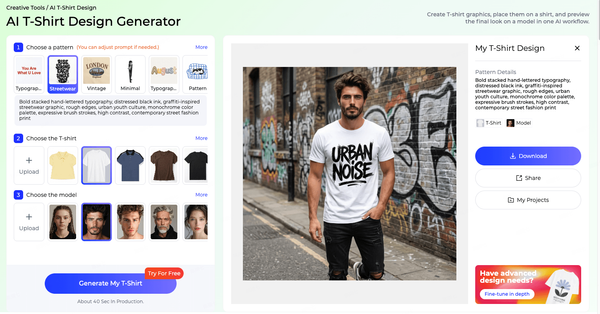
Style3D AI is one example of this category. It runs in the browser and groups its tools into four sets: Inspiration Design, New Design, Redesign and Sketch Tools. Designers can start from a prompt, a garment photo, a sketch or a fabric reference, then generate variations, change colors and materials, and extract clean technical line art from the result. You can explore the full toolset on the Style3D AI fashion design page.
AI generators are strongest at the early, exploratory stages of design, where the goal is to see many possibilities quickly and decide which are worth developing. They are also useful later in the process for color, print and material variations. They do not replace pattern making or physical fit testing, which this guide explains in more detail later.
Tech Pack and PLM Tools
A tech pack is the document that tells a manufacturer exactly how to make a garment: flats, measurements, materials, trims, colorways and construction notes. Tech pack tools such as Techpacker help small teams build these documents, while product lifecycle management (PLM) systems manage tech packs, approvals and supplier communication across a whole range. These tools link design to production, and they usually pull in files created in the other four categories. A clear tech pack reduces misunderstandings with manufacturers, which in turn reduces sampling rounds and delays. Even small brands benefit from a consistent tech pack format, whether it is built in a dedicated tool or a well-organized template.
How Fashion Design Software Fits Your Workflow
Most garments move through six stages, from concept to final color and material variations. Each stage favors a different type of fashion design software, which is why designers combine tools rather than searching for one that does everything. Mapping your own workflow to these stages makes it much easier to see which tools you actually need.
Stage 1–2: Concept, Collection Planning and Sketching
Every garment starts with an idea. Designers gather references, build mood boards and sketch early silhouettes, either by hand, in a tablet app or in a vector program. For brands, this stage also includes collection planning: deciding how many styles to develop, which categories to cover and how new pieces relate to existing bestsellers. The main challenge here is volume. Teams need to see enough options to make good decisions, but drawing every option by hand takes time.
AI tools speed up this stage the most. In Style3D AI, Text to Design turns a written brief into apparel concepts, Style Fusion blends elements from several references, and Hit Collection Proposal extends a bestseller into new style variations while keeping its design language. For designers who prefer to draw first, Sketch to Design converts a hand-drawn sketch into a realistic garment image.
Stage 3: Technical Drawings and Tech Packs
Once a direction is chosen, it needs precise technical flats and, eventually, a tech pack. Flats must show construction clearly enough for a pattern maker or factory to interpret them without guessing. Vector programs such as Illustrator remain the standard here, and tech pack tools or PLM systems collect the flats together with measurements, materials and trims.
AI can shorten the step between a concept image and a clean flat. Style3D AI's Extract Technical Drawing turns a garment image into clean line art and editable vectors, and Sketch Vectorization converts sketches into editable vector graphics. Designers can then refine these files in a vector editor and add them to a tech pack.
Stage 4–5: Pattern Making and 3D Sampling
Patterns are drafted and graded in CAD software, then often tested as virtual samples in 3D simulation tools before a physical sample is made. Fit comments from the virtual or physical sample go back into the pattern, and the cycle repeats until the garment is approved.
These stages depend on measurements, construction knowledge and fabric properties. AI concept tools do not cover them today, so teams still need pattern CAD and, where it is part of their process, 3D software. Smaller brands often outsource this stage to a pattern maker or their manufacturing partner.
Stage 6: Color, Print and Material Variations
After the core style is approved, teams develop colorways, prints and fabric options for the range. This is where one good design becomes several sellable products, so speed and visual accuracy both matter. Teams need to preview options realistically enough to make merchandising decisions without sampling every combination.
Style3D AI handles this stage with Change Colors, which swaps fabric colors and previews multiple clothing colorways; Apply Print To Garment and Apply Pattern To Garment, which place artwork on a garment with a realistic worn result; and Fabric Changer, which previews new materials on the same style.
Mapping Your Own Workflow
To turn these stages into a buying decision, write them down as a simple list and mark each one as "do in-house", "outsource" or "not needed". Next to each in-house stage, note the tool you use today and the biggest problem it causes, such as slow iterations, files suppliers cannot open or too much manual redrawing. The stages with the biggest problems are where new software will pay off first. This exercise usually takes less than an hour and prevents the common mistake of buying an advanced tool for a stage that was never the bottleneck.
How to Choose Fashion Design Software: 6 Criteria
The right apparel design software depends on six factors: the workflow stage you need to cover, your skill level, the output you need, file formats and collaboration, the cost model, and how well the tool can scale with you. Work through them in order and most of the options will rule themselves in or out.
1. Your workflow stage
2. Skill level and learning curve
3. The output you need
4. File formats and team collaboration
5. Cost model
6. Scalability and integration
1. Your Workflow Stage
Start by listing the stages you actually handle. A designer who sells concepts or develops styles for a factory partner may only need concept, sketch and flat tools. A brand that produces in-house will also need pattern CAD and possibly 3D simulation. Buying software for stages you never reach adds cost and complexity without adding value. Ask yourself: which stages do I handle myself, which do I outsource, and which slow me down the most today?
2. Skill Level and Learning Curve
Pattern CAD and 3D simulation assume knowledge of garment construction and can take months to master. Vector programs take weeks to learn well. Browser-based AI tools and tablet sketching apps can usually be used productively on the first day. Match the tool to the skills you have now, and plan to add more advanced tools as those skills grow. Also check the learning resources available: official tutorials, community forums and courses can make a demanding tool far more approachable. Browser-based AI tools such as Style3D AI sit at the easy end of this scale: there is nothing to install, and designers can start from a prompt, a photo or a sketch in their first session.
3. The Output You Need: Concept Image, Vector, Pattern or 3D Sample
Be specific about what the end of your process looks like. If you need images to review ideas or show buyers, AI generators and illustration tools are enough. If you need editable flats, you need vector output. If a factory needs cut-ready patterns, you need pattern CAD. If you want to reduce physical samples, you need 3D simulation. Many teams need more than one of these outputs, which is exactly why they combine tools.
4. File Formats and Team Collaboration
Check which file formats each tool imports and exports, and whether those formats work with the rest of your stack and with your suppliers. Common needs include vector formats for flats, standard CAD formats for patterns and high-resolution images for presentations. Browser-based tools make sharing easier, while desktop tools may need shared drives or a PLM system. Before committing, ask your pattern maker or factory which formats they prefer to receive, and test a full handoff with a single style. If AI is part of your stack, check how its output connects to the next tool. Style3D AI's Extract Technical Drawing and Sketch Vectorization produce editable vector line art, which can be refined in a vector editor and dropped into a tech pack.
5. Cost Model: Free, Subscription or Enterprise License
Fashion design software is sold in several ways: free and open-source, freemium with paid upgrades, monthly or annual subscriptions, one-time purchases and enterprise licenses with onboarding and support. Compare the total cost of ownership, including training time, rather than the headline price alone. A cheaper tool that takes months to learn, or that creates extra work at every handoff, can end up costing more than a subscription that fits your process from the start. Free trials make this easier to judge. Style3D AI, for example, offers a free trial, so teams can test it on a live project before deciding whether it earns a place in the stack.
6. Scalability and Integration
Finally, consider where you will be in two or three years. A tool that works for one designer may not support a team, shared libraries or connections to PLM and production systems. If growth is part of your plan, favor tools that can scale or that export cleanly to the systems you are likely to adopt later. Switching core tools mid-season is disruptive, so it pays to think one step ahead.
Best Fashion Design Software Compared
The table below compares widely used fashion design software by type, best use, learning curve, free availability and main output. Use it to shortlist tools for the stages you identified above, then read the short reviews that follow. The list covers clothing design software for every stage, from sketching and flats to pattern making, 3D sampling, AI concept generation and tech packs. Features and pricing change often, so confirm the current details on each vendor's website before you buy.
Best for Technical Flats: Adobe Illustrator and CorelDRAW
Adobe Illustrator is the most common tool for technical flats and line sheets, with a large ecosystem of brushes, templates and tutorials. Because so many suppliers, freelancers and schools use it, Illustrator files are easy to share across a supply chain. It is sold as part of Adobe's subscription plans. Best for: designers who need precise, editable flats that suppliers recognize. Not ideal for: beginners who want fast results without learning vector drawing.
CorelDRAW offers similar vector capabilities and is widely used in some manufacturing regions. Best for: teams whose suppliers already work in CorelDRAW. Not ideal for: teams whose partners expect Adobe file formats.
Best for Pattern Making: Gerber, Lectra, Optitex and Seamly2D
Gerber AccuMark, Lectra Modaris and Optitex are established pattern CAD systems used by brands and manufacturers for drafting, grading and marker making. Gerber is now part of Lectra, and both product lines remain widely used across the industry. Best for: production teams that make their own patterns at scale. Not ideal for: individuals without pattern-making training or a production budget.
Seamly2D is a free, open-source pattern-making program that supports parametric patterns based on measurements. Best for: students, home sewists and small studios learning pattern construction. Not ideal for: large teams that need industrial integration and vendor support.
Best for 3D Sampling: CLO3D, Marvelous Designer and Browzwear
CLO3D is widely used in fashion for virtual sampling, fit review and realistic renders. Marvelous Designer, from the same company, focuses on garments for games, film and digital content. Browzwear VStitcher is used by many brand teams for virtual product development. All three let designers sew digital patterns onto avatars, adjust fabric properties and review fit from any angle. The main differences lie in their target industries, integrations and licensing, so it is worth requesting a demo with your own patterns before deciding. Best for: teams that want to reduce physical samples and already have pattern skills. Not ideal for: early concept exploration, where building full patterns for every idea is slow.
Best for AI Concept Generation and Variations: Style3D AI
Style3D AI is an AI fashion design tool that turns text, images, sketches and fabric references into apparel concepts. Its tools cover the creative stages of the workflow: Inspiration Design (Hit Collection Proposal, Collection Proposal, Detail to Design, Fabric to Design), New Design (Text to Design, Image to Design, Style Fusion, Back Design, Outfit Design, AI Shoe Generator), Redesign (Garment Refine, Change Colors, Apply Print To Garment, Apply Pattern To Garment, Fabric Changer, Remove Graphic) and Sketch Tools (Sketch to Design, Extract Technical Drawing, Sketch Vectorization).
Best for: designers, sellers and teams who want to explore many directions quickly, build variations around existing styles and move from concept image to editable line art. Not ideal for: pattern drafting, grading or physics-based fit simulation, which still require pattern CAD and 3D software.
Best for Sketching on iPad: Procreate and Adobe Fresco
Procreate is a popular iPad illustration app with natural-feeling brushes and a one-time purchase model. Adobe Fresco offers a free version and connects with other Adobe tools. Best for: freehand fashion illustration and quick ideation away from a desk. Not ideal for: production-ready flats or patterns.
Best for Free Vector Flats: Inkscape
Inkscape is a free, open-source vector editor that can produce clean technical flats. Best for: students and independent designers who need vector output without a subscription. Not ideal for: teams whose suppliers expect native Adobe files, although Inkscape can export to common formats such as SVG and PDF.
Best for Tech Packs: Techpacker and PLM Systems
Techpacker is a browser-based tool for building and sharing tech packs, with templates for flats, measurements, materials and comments. PLM systems take the same idea further for larger brands, connecting tech packs to approvals, costing and supplier workflows. Best for: anyone sending designs to a manufacturer. Not ideal for: early concept work, which happens before a tech pack is needed.
How to Use This Comparison
Do not try to pick a single winner from the table. Instead, choose one tool for each stage you handle yourself, check that their files work together, and test the combination on one real style before rolling it out across a collection.
Add AI concept generation to your stack. Try Style3D AI's Text to Design on your next brief.
Free Fashion Design Software: What You Really Get
Free fashion design software can take you a long way, especially for sketching, vector flats, basic pattern making and early AI concept work. Its limits usually show up in professional file exports, industrial integration, support and collaboration. The question is not whether free software is good enough in general, but whether it covers the stages you need right now.
Open-Source Desktop Tools
Several open-source tools are genuinely free for any use. Inkscape is a capable vector editor for flats. Seamly2D and Valentina support measurement-based pattern making. Blender is a powerful 3D program that can simulate cloth, although it was not built specifically for fashion and has a steep learning curve. Krita is a free painting program suitable for fashion illustration.
These tools are a strong option for students and independent designers on a tight budget. The trade-off is time: you will rely more on community tutorials, and some file formats may need extra steps to work with suppliers.
Free Online Tools and Fashion Design Apps
Many apps that design clothes, and many browser-based clothing design websites, offer free tiers. Tablet apps are useful for sketching on the go, and some online tools let you build basic patterns or garment mockups from templates. Free tiers are a good way to test whether a tool fits your workflow before committing. Pay attention to export limits, watermarks, resolution caps and usage rights on free plans, especially if you plan to share the results with clients or manufacturers.
For a longer list of no-cost options, see our guide to the best free software options for designing clothes.
Free Trials and Freemium AI Tools
Many commercial tools, including vector, 3D and AI fashion design software, offer free trials or limited free plans. Style3D AI offers a free trial, so designers can test text, sketch and image inputs on their own projects before deciding whether a paid plan fits their needs. Current plan details are listed on the Style3D AI website.
When you use a trial, test the tool on a real project rather than a demo. That is the fastest way to see whether its output fits into the rest of your workflow.
Is Free Software Good Enough for Professional Work?
For many tasks, yes. Professional-quality flats can be drawn in Inkscape, and real patterns can be drafted in Seamly2D. What free tools usually lack is not quality but convenience: fewer templates, less integration with supplier systems, slower support and more manual steps. Independent designers often start with free tools, then upgrade the one or two stages where those manual steps cost them the most time.
Limits of Free Software and When to Upgrade
Free tools usually become limiting in four situations: when you need professional export formats for suppliers, when you need several people working on the same files, when you need guaranteed support, and when time spent working around limitations costs more than a subscription. If you hit two or more of these regularly, it is usually time to upgrade the part of your stack that is slowing you down.
AI Fashion Design Software vs Traditional Tools
AI fashion design software and traditional tools solve different problems. AI is fastest at generating and varying concepts, while traditional vector, pattern CAD and 3D tools are built for precision, construction and production. The most effective workflows combine both, using AI to explore and traditional tools to engineer.
What AI Does Well
AI tools are most useful wherever speed and volume of ideas matter:
• Rapid concept generation: Text to Design and Image to Design produce several garment directions from a brief or a reference image in minutes.
• Variations around a proven style: Hit Collection Proposal and Collection Proposal build new options and cohesive collections around bestsellers, and fashion design variations help teams compare alternatives side by side.
• Fast color, print and material changes: Change Colors, Apply Print To Garment and Fabric Changer let teams preview options without redrawing the garment.
• Bridging images and flats: Extract Technical Drawing and Sketch Vectorization turn images and sketches into editable line art.
• Building from small details: Detail to Design turns a single element, such as a neckline, sleeve or pocket, into several complete apparel concepts, and Fabric to Design creates garments that match the color, texture and drape of a fabric reference.
In each case, the benefit is the same: designers spend less time producing options and more time judging them. That shift is where most of the value of AI fashion design software comes from.
What AI Does Not Replace
AI concept tools do not draft or grade sewing patterns, verify fit on a real body, simulate fabric physics with production accuracy, or manage supplier communication. Garment construction knowledge, pattern CAD, physical or 3D fit sampling and tech pack or PLM tools remain essential for anything that will actually be manufactured.
Being clear about this boundary helps teams set realistic expectations. AI shortens the path to a strong design decision; it does not remove the work needed to produce that design.
Design judgment also stays with people. AI can propose many options, but deciding which ones suit the brand, the customer, the price point and the season is still the designer's job. Teams should also review AI-generated concepts for originality and brand consistency before developing them further, just as they would review any other source of inspiration.
How to Combine AI and Traditional Software
A practical combined workflow looks like this:
1. Generate and shortlist concepts in an AI tool. In Style3D AI, this is Text to Design, Image to Design or Sketch to Design.
2. Extract line art from the chosen concept and refine the flat in a vector program. Extract Technical Drawing handles the first half of this step.
3. Draft and grade the pattern in pattern CAD.
4. Check fit in a 3D simulation tool or with a physical sample.
5. Develop colorways and prints, then document everything in a tech pack. Change Colors and Apply Print To Garment cover the colorway and print work.
This approach keeps the speed of AI at the start of the process and the precision of traditional tools where it matters most.
When introducing AI into an existing team, start small. Pick one stage, such as concept rounds or colorway development, run it with AI for a season, and compare the results with your previous process. Agree on where AI output is saved, who approves it and how it is handed to the next tool. A clear handoff matters more than the number of AI features a team uses.
How to Design Clothes with AI: A Step-by-Step Example
Designing clothes with AI follows four steps: start from a prompt, sketch or reference image; explore variations and matching pieces; refine colors, prints and fabrics; and extract a technical drawing to hand off for pattern making. The example below uses a summer midi dress to show how the steps work in practice.
Step 1: Start from a Prompt, Sketch or Reference Image
Begin with whatever you already have. If the idea is still in words, use Text to Design and write a clear brief that covers garment type, silhouette, key details, fabric and mood. If you have a drawing, upload it to Sketch to Design. If you are building on an existing garment, start from a photo with Image to Design.
Example prompts:
• "A sleeveless linen midi dress with a square neckline, tiered skirt and side pockets, in natural off-white, relaxed summer resort style."
• "A fitted cotton poplin midi dress with puff sleeves, a sweetheart neckline and a smocked back, in pale blue."
• "A bias-cut satin slip midi dress with thin straps and a cowl neck, minimal evening style, in deep green."
Specific prompts produce more useful results than vague ones. Name the silhouette, the neckline, the sleeves, the length and the fabric whenever you can. Adding a style reference, such as "resort", "workwear" or "minimal evening", helps set the overall mood. If the first results are close but not right, change one detail at a time rather than rewriting the whole prompt, so you can see which change made the difference.
Step 2: Explore Variations and Matching Pieces
Once you have a promising concept, generate alternatives rather than settling on the first result. Style Fusion blends elements from several references into new options, Back Design generates the matching back view from a front image, and Outfit Design creates coordinating garments from a single top or bottom, which is useful when you are planning a capsule or a styled look.
Shortlist two or three directions and compare them against your brief, your price point and your customer. Useful questions include: Does the design fit the rest of the collection? Can it be made at the target cost? Is the construction realistic for your manufacturer? Would your customer recognize it as your brand?
Step 3: Refine Colors, Prints and Fabrics
Use Garment Refine to adjust specific areas, such as a neckline or hem, without starting again. Then test the dress in different colorways with Change Colors, place artwork with Apply Print To Garment or Apply Pattern To Garment, and preview alternative materials with Fabric Changer. If a reference image includes an unwanted graphic, Remove Graphic clears it while keeping the fabric texture.
Step 4: Extract a Technical Drawing and Hand Off
When the design is approved, use Extract Technical Drawing to turn the final image into clean line art and editable vectors. Refine the flat in your vector program, add measurements and construction notes, and pass it to pattern making and your tech pack. At this point the AI stage is complete, and the traditional production workflow takes over.
In practice, this four-step process lets a designer move from an idea to a reviewed concept, several colorways and an editable flat in a single working session. The time saved can go into the stages that still need careful human attention, such as fit, construction and sourcing.
Design your first garment with AI in minutes. Start with Style3D AI's Sketch to Design or Text to Design.
Recommended Software Stacks by User Type
The best fashion design software stack depends on who you are and what you produce. The combinations below are starting points that balance cost, learning curve and output for five common types of users.
Fashion Students and Portfolio Builders
Pair a tablet sketching app with Inkscape or Illustrator for flats, Seamly2D for learning pattern construction, and Style3D AI for exploring concepts and presenting variations in a portfolio. This stack keeps costs low while covering every stage you are likely to be assessed on. It also shows future employers that you can work across both traditional and AI-assisted workflows.
Independent Designers and Small Brands
Use Style3D AI for concept generation, variations and line art extraction, Illustrator for flats, a tech pack tool such as Techpacker for supplier communication, and a freelance pattern maker or pattern CAD as volume grows. Add 3D simulation once sampling costs justify the investment. The priority for a small brand is speed to a confident decision, so focus spending on the stages where delays cost you the most.
E-commerce Sellers
Sellers who develop their own styles can use Style3D AI to extend bestsellers with Hit Collection Proposal, build colorways with Change Colors and test prints with Apply Print To Garment, then share flats and tech packs with their manufacturing partner. Because many sellers work with a manufacturer that handles patterns, this stack keeps the in-house toolset light while still giving clear direction to the factory.
Brand Design and Product Development Teams
Combine pattern CAD, 3D simulation and PLM for production, and use Style3D AI at the front of the process for collection planning, rapid concept rounds and colorway development. Agree on file formats and handoff points early so that AI output flows cleanly into the rest of the stack. For larger teams, it also helps to define which AI-generated concepts are stored, how they are named and who signs them off, so that the PLM system remains the single source of truth.
Freelance Designers and Design Consultants
Freelancers working for several clients benefit from browser-based tools that need no installation. Style3D AI for concepts and variations, Illustrator for flats and a shared tech pack tool make it easy to present options and deliver clear files. Presenting several well-developed directions early in a project also helps freelancers align with clients faster and reduce rounds of revisions.
FAQ
What software do fashion designers use?
Fashion designers typically use a combination of tools: Adobe Illustrator or CorelDRAW for technical flats, tablet apps such as Procreate for sketching, pattern CAD such as Gerber AccuMark or Lectra Modaris for patterns, 3D software such as CLO3D or Browzwear for virtual samples, and increasingly AI fashion design tools for concept generation and variations.
Is there free fashion design software for beginners?
Yes. Inkscape is a free vector editor for flats, Seamly2D and Valentina are free pattern-making programs, and Krita is free for illustration. Many commercial and AI tools also offer free trials or free plans, which let beginners test professional features before paying.
Can I design clothes online for free?
You can design clothes online for free using browser-based tools with free tiers or trials. These tools are well suited to concepts, mockups and simple patterns. For production-ready patterns and supplier files, you will usually need specialized desktop software or a paid plan. Browser-based AI tools such as Style3D AI offer a free trial for creating garment concepts, variations and line art online.
What is the best fashion design app for iPad?
Procreate and Adobe Fresco are two of the most popular iPad apps for fashion illustration. Both support pressure-sensitive drawing with Apple Pencil. They are excellent for sketching and ideation, but you will need other software for technical flats and patterns.
What is the difference between 3D fashion design software and AI fashion design tools?
3D fashion design software builds virtual garments from patterns and simulates how they fit and drape on an avatar. AI fashion design tools generate garment images from text, sketches or references. 3D tools are built for engineering accuracy; AI tools are built for speed and exploration.
Can AI replace fashion design software?
No. AI speeds up concept generation, variations, color changes and line art extraction, but it does not draft patterns, grade sizes, verify fit or manage production. AI works best as part of a stack alongside vector, pattern CAD, 3D and tech pack tools. Tools such as Style3D AI are designed for the creative stages, from concept to colorways and line art.
What software is used to make tech packs?
Tech packs are often built in Adobe Illustrator or Excel, or in dedicated tools such as Techpacker. Larger brands usually manage tech packs inside a PLM system, which connects design files, measurements, materials and supplier communication.
Do I need 3D software to start designing clothes?
No. Many designers start with sketches, vector flats and AI concept tools, then work with a pattern maker to produce samples. 3D software becomes valuable when you want to reduce physical sampling, review fit virtually or produce realistic renders at scale.
Conclusion
The best fashion design software is the combination that covers your workflow from concept to sample without paying for stages you do not need. There is no single tool that does everything well, and there does not need to be. Start by mapping your process, use the six criteria in this guide to shortlist tools, and build a stack that can grow with you. Vector, pattern CAD and 3D tools remain essential for precision and production, while AI now makes the early creative stages much faster. Whether you call it fashion, apparel or clothing design software, the goal is the same: spend less time on repetitive work and more time on the design decisions that make a garment worth producing.
See how AI fits into your fashion design workflow. Try Style3D AI's AI fashion design tools for free.
Written by