
Print and pattern design is the part of fashion design that creates the artwork, motifs and surface effects that appear on fabric, from all-over florals and seamless geometric repeats to placement graphics on T-shirts and embroidered details. AI print and pattern tools help designers generate these designs faster, test them on garments and develop them into complete print stories.
Prints often decide whether a garment stands out. Two dresses with the same silhouette can feel completely different in a delicate ditsy floral and a bold graphic stripe. For brands, prints are also one of the most efficient ways to refresh a collection, because a proven style can return season after season in new artwork. That makes print design one of the areas where faster exploration pays off most.
This guide covers the whole picture. It starts by separating the three meanings of "pattern" in fashion, then explains the main types of fashion prints and how seamless repeat patterns work, before showing how to create a seamless pattern with AI. It also covers seamless textures, embroidery effects, T-shirt graphics and placement prints, applying prints to garments, print colorways, how to identify fabrics, how to design from a fabric and how to prepare print files for production.
Throughout, the examples use Style3D AI, which offers tools for each stage of print work: an AI Print Generator for prints and graphics, an Embroidery Pattern Generator for stitch and craft effects, Apply Print To Garment and Apply Pattern To Garment for realistic previews, and Fabric to Design for starting from a material.
Design prints and see them on garments in minutes. Try Style3D AI for free.
What Is Print and Pattern Design in Fashion?
Print and pattern design in fashion is the creation of decorative artwork for textiles and garments, including motifs, repeats, placement graphics and surface effects such as embroidery. Print designers decide what a fabric's surface looks like: the motif, its scale, its colors, how it repeats and where it sits on the garment.
Print design sits between graphic design and textile design. It uses drawing, painting, photography and digital tools to create artwork, and textile knowledge to make sure that artwork works on fabric: that it repeats correctly, prints cleanly at the right scale, suits the fabric's drape and can be produced at a sensible cost.
Who Designs Prints
Prints are created by in-house print designers at brands, by freelance designers and studios that sell or license artwork, by textile mills that offer print collections, and increasingly by independent creators and small brands. AI tools are widening this group, because they make it possible for designers without advanced illustration skills to explore print ideas and present them visually, while specialist print designers use AI to explore more directions and spend more time on refinement.
Why Prints Matter Commercially
Prints are one of the most powerful levers in a collection. They create instant differentiation, because two brands can sell similar silhouettes but very different prints. They extend the life of proven styles, because a bestselling dress can return each season in new artwork with little development risk. And they carry a brand's identity: many labels are recognized by their prints before their logos. At the same time, prints add complexity: each one needs artwork, repeat checks, colorways, strike-offs and approvals. Faster exploration and earlier visualization reduce that cost.
The Print Design Process
Most print development follows a similar path. It starts with research and a mood board, moves to motif development through drawing, painting or digital tools, then to building the repeat and choosing scale. Next come colorways, testing the print on garments and selecting the final designs. Finally, files are prepared for production and strike-offs, small printed test samples, are approved before bulk printing. AI can speed up motif development, repeat exploration, colorways and garment previews, while research, judgment and production approval remain in designers' hands.
Print Patterns vs Sewing Patterns vs Knitting Patterns
The word "pattern" means three different things in fashion, and searches often mix them up.
• A print pattern is a decorative design applied to fabric, such as a floral, a check or a geometric repeat. This is what this guide covers.
• A sewing pattern is a set of templates used to cut fabric pieces that are sewn into a garment. It is a construction tool, created by pattern makers in pattern-making software or by hand.
• A knitting pattern is a set of written instructions or charts that tell a knitter how to create a garment or a stitch design.
Style3D AI's print tools work with print patterns: they generate artwork and show it on garments. They do not create sewing patterns or knitting charts. If you are looking for sewing pattern software, our guide to fashion design software covers pattern-making tools.
Types of Fashion Prints
Fashion prints fall into a few broad types based on how they are placed on the garment: all-over prints that repeat across the whole fabric, placement prints positioned on a specific part of the garment, and engineered prints designed to fit a garment's pattern pieces. Within these, motifs range from florals and geometrics to stripes, checks, animal prints and abstracts.
By Placement
• All-over prints: a motif repeats across the entire fabric, which is then cut and sewn. Most florals, ditsy prints and geometrics are all-over prints. They require a seamless repeat.
• Placement prints: a single graphic is printed in a specific position, such as the center chest of a T-shirt, the back of a jacket or the hem of a skirt.
• Engineered prints: the artwork is designed to fit the garment's pattern pieces exactly, so motifs align across seams or frame the body in a planned way. These are common in premium dresses, scarves and swimwear.
• Border prints: a band of design runs along one edge of the fabric, often used at hems or cuffs.
Many garments combine placement types. A dress might use an all-over floral on the body and a border print at the hem, or a T-shirt might pair a small chest placement with a large back graphic. Planning placement types together, rather than one at a time, helps the garment feel designed as a whole.
By Motif
• Florals: from small ditsy flowers to large painterly blooms; a perennial favorite for dresses, blouses and swimwear.
• Geometrics: shapes, grids and abstract forms, popular for modern and minimalist collections.
• Stripes and checks: classic structures, including pinstripes, ginghams, plaids and tartans, often woven but also printed.
• Animal prints: leopard, zebra, snake and other skins, used in both bold and subtle ways.
• Abstracts and painterly prints: brushstrokes, gradients and textures that feel artistic and unique.
• Conversational prints: small objects or icons, such as fruit, stars or symbols, repeated playfully.
• Ethnic and heritage-inspired prints: designs drawn from traditional textile cultures, which require research and respect for their origins.
Whatever the type, seeing the print on a garment is the fastest way to judge it. Style3D AI's Apply Pattern To Garment applies all-over prints with a realistic worn result, so designers can check scale and placement before sampling.
Choosing Prints for Your Customer
The right print depends on who will wear it and where. Customers who buy workwear often prefer subtle prints, such as small geometrics or pinstripes, while resort and occasion customers may welcome bold florals and statement graphics. Scale matters too: larger customers and smaller customers may find different print scales flattering, and children's prints follow their own conventions. Reviewing which prints sold well in past seasons, and which were discounted, is one of the most useful inputs for new print development.
Seasonal Print Directions
Print directions shift with the seasons and with broader trends. Spring and summer collections often lean toward florals, fruit, stripes and light grounds, while autumn and winter favor checks, darker florals, animal prints and richer colors. Rather than following trends literally, many brands keep a few signature print families and refresh them each season with new motifs, scales and colorways. This keeps collections current while building recognizable identity.
How Seamless Repeat Patterns Work
A seamless repeat pattern is a design tile that can be placed next to copies of itself in every direction without visible edges or breaks. All-over fabric prints are built from repeats, so the tile must connect perfectly at its top, bottom, left and right edges.
The Four Main Repeat Types
1. Full drop, also called straight or block repeat: the tile repeats directly side by side and above and below, like a grid. It is simple and orderly, and can look rigid if the motif is strong.
2. Half drop: each column of tiles is shifted down by half the tile's height. This breaks up obvious lines and makes the pattern feel more natural, which is why it is common for florals.
3. Brick repeat: each row of tiles is shifted sideways by half the tile's width, like bricks in a wall. It has a similar softening effect, but horizontally.
4. Mirror repeat: the tile is flipped horizontally, vertically or both, creating symmetrical designs. It is common in damasks, kaleidoscopic prints and some geometric designs.
Repeat Size and Scale
The repeat size is the width and height of one tile on the final fabric. It affects both the look and the cost. Small repeats look busy and can read as texture from a distance; large repeats make bold statements but use more fabric width and may be cut awkwardly across small pattern pieces. Repeat size must also fit the printing method and the fabric width, so it is usually agreed with the printer or mill early.
How to Check a Seamless Pattern
The most common problem with seamless patterns is visible seams: lines, mismatched motifs or color shifts where tiles meet. To check a pattern, tile it at least three by three and look for edges, then look for "tracking", the unwanted lines or diagonals that the eye picks out when the same motif repeats too regularly. Zoom out to see the pattern at the size it will appear on a garment, and zoom in to check the joins. A seamless pattern checker, or simply tiling the design in any image editor, makes these issues easy to spot.
Common Repeat Mistakes
A few mistakes appear again and again. Tracking, where the eye picks out lines or stripes created by repeated motifs, makes a print look mechanical. Gaps or clusters, where motifs bunch together in some areas and leave empty space in others, make a tossed print look uneven. Motifs cut at the tile edge without a matching continuation create visible seams. Scale problems, where a repeat looks right on screen but too large or small on the garment, are also common. Checking at several zoom levels and on the garment avoids most of them.
Once a repeat looks right as a tile, check it on a garment. Previewing the print on a dress or shirt with Apply Pattern To Garment reveals whether the scale and rhythm work on the body, which a flat tile cannot show.
How to Create a Seamless Pattern with AI
To create a seamless pattern with AI, define the theme and color palette, generate print artwork with an AI print generator, check and fix the repeat, set the repeat size, and preview the pattern on garments before finalizing. AI speeds up the exploration stage dramatically, while designers keep control of quality and fit.
Step 1: Define the Theme and Palette
Start with a short print brief: the theme, such as "hand-painted Mediterranean citrus", the motif style, the scale, the mood and the season's color palette. A clear brief keeps AI exploration focused and makes it easier to judge results. If you have reference images, such as a mood board, a vintage textile or a photo, note what you want to keep from them: the motif, the brushwork, the colors or the overall rhythm.
Step 2: Generate Print Artwork with AI
Use an AI print generator to develop print ideas from your brief. Style3D AI's AI Print Generator is designed to develop fashion prints and graphics, and its Graphic Design Agent can guide users through graphic tasks. Generate several rounds and compare directions before refining one. If your starting point is an image, such as a photo of flowers or a painted swatch, describe how it should become a print; this is how an AI pattern generator from an image is typically used.
Write prompts that describe the motif, style, density, background and colors, for example: "small hand-painted lemons and leaves, loose watercolor style, scattered tossed layout, cream background, yellow and olive green, for a summer dress print."
More prompt examples:
• "Ditsy floral print, tiny white daisies with yellow centers, dense tossed layout, navy background, for a blouse."
• "Bold geometric print, overlapping arches in terracotta, sand and rust, mid-century modern style, for a shirt."
• "Painterly abstract brushstrokes in cobalt and ivory, large scale, for a maxi skirt."
• "Subtle tonal leopard print, beige on camel, small scale, for a knit top."
• "Retro fruit conversational print, cherries and lemons, two-tone red and yellow on cream, for a summer dress."
Each of these can be generated in Style3D AI, refined, and then previewed directly on the intended garment.
Step 3: Check and Fix the Repeat
Tile the chosen artwork and check for seams and tracking, as described above. If edges do not match, adjust the artwork at the joins in a design tool, or regenerate with a prompt that emphasizes a tossed, all-over layout. Make sure no motif is cut awkwardly at an edge without its continuation on the opposite side.
Step 4: Set the Repeat Size
Decide how large one tile should be on the final fabric, based on the garment, the motif and the printing method. A ditsy floral for a blouse might repeat every few centimeters; a large-scale botanical for a maxi dress might repeat much larger. Record the repeat size and repeat type in the print file name and specification.
Step 5: Preview on Garments
Before finalizing, apply the pattern to the garments it is intended for. Style3D AI's Apply Pattern To Garment shows all-over prints with a realistic worn result, so you can see the print's scale and placement on the actual style. Testing the same print on two or three silhouettes often reveals which garment suits it best.
Starting from an Image
Many prints start from a photograph, a sketch or a vintage textile. When using an image as the starting point, decide what to carry over: the motif, the color palette, the brushwork or the overall composition. Simplify busy photos into clear motifs, adjust colors to the season palette and change the composition enough that the result is a new design rather than a copy. This is the most common way designers use an image pattern generator, and it works best when the source is your own photography or artwork, or material you have the right to use.
Tips for Better AI Prints
Keep prompts specific about scale and density, because "small", "medium" and "large" motifs produce very different results. Describe the background separately from the motif. Use your brand's color names consistently. Generate more options than you need and choose with the garment in mind. And always review AI artwork for originality: avoid prompts that name other brands or copy recognizable designs.
Building a Print Library
Over time, approved prints become a valuable asset. Keep a print library with each design's artwork, repeat type and size, colorways, the garments it has been used on and its sales performance. A library makes it easy to bring back successful prints, combine motifs into new designs and maintain a consistent print identity across seasons. Storing the prompts and references used to create each AI-assisted print alongside the final files also makes it faster to develop related designs later in Style3D AI.
Seamless Textures vs Seamless Patterns
A seamless texture is a tileable image that reproduces a surface, such as wood, stone or woven fabric, mainly for 3D models, games and digital rendering. A seamless pattern is a tileable decorative design, such as a floral or geometric print, used on fabrics and products. Both tile without visible edges, but they serve different purposes.
Many searches for a seamless texture generator, a 4K seamless texture generator or a seamless texture maker come from 3D artists and game developers who need materials for rendering. These often include extra maps, such as normal and roughness maps, which together form a PBR material. Fashion print designers, by contrast, usually need a single high-resolution artwork tile that a printer can reproduce on fabric. Print designers do sometimes use textures inside their artwork, such as a linen-like background, a watercolor wash or a halftone grain, to make prints feel less flat. In that case, the texture becomes part of the print tile and must repeat seamlessly along with the motifs.
There is overlap: fabric textures are used in 3D garment visualization, and print designers sometimes add texture to make prints feel more tactile. For fashion work, Style3D AI focuses on prints and how they look on garments; Fabric Changer previews the same style in different materials, which covers much of the "texture" question designers actually need to answer. If you do need a seamless fabric texture for 3D visualization, make sure it matches the real fabric's weave, scale and color, so digital previews stay accurate.
Embroidery and Craft Effects
Embroidery and craft effects add dimension and texture to garments that flat prints cannot. They include embroidery, appliqué, beading, cross-stitch and other decorative techniques, and are popular on denim, knitwear, children's clothing, occasion wear and logo placements.
Designing embroidery traditionally means drawing the motif and then digitizing it, converting artwork into stitch instructions for an embroidery machine. Before digitizing, designers need to decide on stitch types, density, thread colors and placement, and see how the effect will look on the garment.
Style3D AI's Embroidery Pattern Generator generates embroidery-inspired patterns and decorative garment artwork with AI. It applies embroidery and craft effects to print patterns, producing stitch and texture artwork for apparel. This makes it quick to explore whether a motif works better as a print or as embroidery, and to present craft-led design ideas before sampling.
Popular embroidery and craft effects include satin-stitch logos, chain-stitch line art, cross-stitch folk motifs, tonal embroidery on knitwear, appliqué patches, beading and sequins on occasion wear, and chenille lettering on varsity styles. Each has a different look, cost and suitability for fabrics, so testing the effect visually before choosing is valuable.
Embroidery vs Print: When to Choose Each
Embroidery adds texture, perceived quality and durability, and suits logos, small motifs and premium details. It is usually more expensive per unit than printing, especially for large areas, and dense embroidery can stiffen light fabrics. Printing suits large areas, detailed artwork, gradients and all-over designs, and is generally more cost-effective at scale. Many collections combine both: a printed all-over pattern with an embroidered logo, or a printed graphic with embroidered accents. Choosing early, based on fabric, price point and the look you want, avoids redesigns later.
A useful workflow is to develop a motif as a print first, test it as an embroidery effect, then preview both versions on the garment with Apply Print To Garment to decide which suits the style and price point. Keep in mind that production embroidery still needs proper digitizing by a specialist or with dedicated embroidery software.
T-Shirt Graphics and Placement Prints
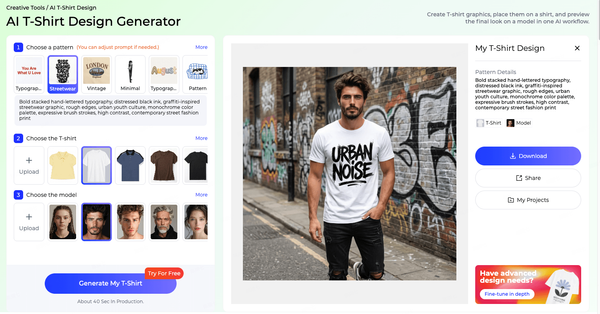
T-shirt graphics are placement prints designed for a specific position on a tee, most often the center chest, the left chest or the back. A good T-shirt design is readable at a glance, works with the shirt color, suits the printing method and fits the brand's identity.
What Makes a Good T-Shirt Design
The strongest T-shirt graphics are simple enough to read from a distance, have a clear focal point and use a limited number of colors. Typography should be legible at the printed size. The design should contrast well with the garment color, which often means creating separate versions for light and dark shirts. And it should feel like it belongs to the brand, whether that means a bold streetwear graphic, a minimal line drawing or a vintage-style badge.
Prompts for T-Shirt Designs
Describe the subject, style, color count, layout and intended shirt color. For example:
• "Vintage-style mountain badge with the text 'Trail Club', two-color screen print style, cream and forest green, for a black T-shirt."
• "Minimal single-line drawing of a coffee cup, black line art, centered, for a white T-shirt."
• "Bold retro sunset with palm trees, three colors, distressed texture, for a back print on a navy T-shirt."
• "Small embroidered-style heart logo for the left chest, red on white."
Prompts like these work with an AI print generator such as Style3D AI's AI Print Generator to create the artwork. Always check that generated text is spelled correctly, and redraw or replace lettering if needed, because text is one of the areas where AI image tools most often make mistakes.
Versions for Light and Dark Shirts
A design that works on a white tee may disappear on black, and vice versa. Most T-shirt graphics need at least two color versions: one for light garments and one for dark garments. Check contrast, line weight and any white or black areas in the artwork, because these change meaning depending on the shirt color. Previewing each version on the actual shirt color with Apply Print To Garment and Change Colors makes these decisions quick.
Placement and Sizing
Common placements include center chest, left chest, full front, upper back, full back, sleeve and hem. Placement size should suit the garment size range; a design that looks balanced on a medium may look too small on an XXL or too large on an XS, so many brands adjust sizes or use two artwork sizes across the range. Previewing placement with Apply Print To Garment helps check position and proportion before samples are made.
Printing Methods
Screen printing suits larger runs and designs with few solid colors, producing durable, vivid prints. Direct-to-garment (DTG) printing suits detailed, full-color designs and small runs, printing directly onto the fabric. Direct-to-film (DTF) transfers print the design onto a film that is heat-pressed onto the garment and work on many fabric types. Embroidery suits small logos and premium details. The method affects how the artwork should be prepared, so decide it early.
Originality and Copyright
Graphics are among the most copied elements in fashion, so originality matters. Avoid using logos, characters, brand names, artwork or photographs you do not have the rights to, and avoid prompts that ask AI tools to imitate specific artists, brands or copyrighted characters. Review AI-generated graphics for similarity to existing designs, especially well-known ones. Check the usage terms of any AI tool you use for commercial products, and seek professional advice for important designs. Original, brand-specific graphics are also simply better for business, because they cannot be found elsewhere.
Building a Graphic Tee Collection
A graphic tee collection works best when the designs share a theme, a color story and a consistent style, so they feel like a set rather than random graphics. Plan a small number of hero designs, add simpler supporting designs such as a small chest logo, and offer each in a few shirt colors. With Style3D AI, designers can generate the artwork, place it on tees with Apply Print To Garment, create shirt color variations with Change Colors and produce on-model images, all from the same starting designs.
Once the design is ready, Style3D AI's Virtual Clothing Try-On can show the finished tee on a model for listings and social media.
Applying Prints to Garments
Applying prints to garments digitally lets designers see how a print looks on the actual style, at the right scale and with realistic folds and drape, before ordering strike-offs or samples. It is the step that turns print artwork into a product decision.
A print can look perfect as a flat tile and still fail on a garment. Motifs may be too large for small pattern pieces, a stripe may look unbalanced across a bodice, or a busy print may hide important design lines. Seeing the print on the garment reveals these issues immediately.
Style3D AI offers two tools for this. Apply Print To Garment places prints or graphics on a garment with a realistic worn result, ideal for placement prints and logos. Apply Pattern To Garment applies all-over prints, showing how a repeat wraps around the body with natural folds.
A third tool helps when starting from an existing design. Remove Graphic removes prints from a garment image while preserving the fabric texture, so a reference style can be reused as a clean base for new prints.
A practical review routine is to apply each candidate print to the target garment, compare them side by side, then test the strongest print on one or two alternative silhouettes. Share the results with merchandisers or buyers as realistic visuals rather than flat swatches, which makes feedback faster and more accurate. Pay special attention to placement on the body: check where large motifs fall on the bust, waist and hips, and whether stripes and checks run straight and match across visible seams.
Presenting Prints to Buyers and Teams
Print reviews go faster when every option is presented the same way: the flat tile, the print on the main garment, the print on an alternative silhouette and the proposed colorways, all on one page. Realistic garment previews help people who are not print specialists, such as buyers, founders and marketing teams, judge prints confidently. With Style3D AI, these visuals can be created from the same artwork in minutes, so presentation boards stay current as prints evolve.
From Preview to Sample
Once a print is approved on screen, the next step is a physical strike-off on the chosen fabric, followed by a sample garment for key styles. Use the digital preview as the reference: compare the strike-off's scale, colors and placement against it, and note any differences for the printer. Because the most important decisions have already been made visually, sampling becomes a confirmation step rather than an exploration step, which usually means fewer rounds.
Apply your prints and patterns to garments with a realistic worn result. Start with Style3D AI.
Print Colorways
A print colorway is one color version of a print. Most commercial prints are offered in two or more colorways, such as blue florals on white and white florals on navy, so the same artwork can serve different customers and seasons.
Developing print colorways means deciding which colors in the artwork change and which stay fixed, then testing each version against the garment's ground color. Strong print colorways usually come from the season palette, keep enough contrast for the motif to read, and feel related to each other. Style3D AI's Change Colors lets designers preview colorways on the garment itself, so print and ground combinations can be compared side by side. For a complete guide to colorways, including how many to offer and how to develop them, see our guide to what a colorway is.
A practical approach is to start with the colorway closest to the original artwork, then create one lighter and one darker version, and one version in a seasonal accent color. Test each on the garment and keep only those that are clearly different and commercially useful. Two to three strong print colorways usually outperform five similar ones.
What Fabric Is This? How to Identify Fabrics
You can identify a fabric by checking the care label, assessing its feel and drape, examining the weave or knit, testing stretch, observing how it reacts to water and, carefully, performing a burn test. Combining several methods gives the most reliable answer, especially for blends.
6 Methods to Identify Fabric
1. Check the label: care and content labels list fiber composition and are the most reliable source when present.
2. Feel and drape: cotton feels soft and breathable, linen crisp with slubs, wool warm and springy, silk smooth and cool, and polyester smooth with a slight synthetic slickness.
3. Look at the structure: woven fabrics show interlaced threads at right angles; knits show interlocking loops and usually stretch. A magnifying glass helps.
4. Stretch and recovery: fabrics with elastane spring back quickly; most natural wovens have little stretch.
5. Water test: natural fibers such as cotton and linen absorb water quickly, while many synthetics bead or absorb slowly.
6. Burn test: natural plant fibers burn like paper and leave soft ash; animal fibers smell like burning hair; synthetics melt, shrink from the flame and leave hard beads. Only test a tiny sample, outdoors or in a well-ventilated area, away from flammable materials, with water nearby. If you are unsure, ask a professional or a fabric supplier instead.
Common Fabrics at a Glance
• Cotton: soft, breathable, absorbent; wrinkles easily; matte appearance.
• Linen: crisp, cool, with visible slubs; wrinkles heavily; strong and breathable.
• Wool: warm, springy and resilient; may feel slightly coarse or very soft depending on the type.
• Silk: smooth, cool and lustrous; drapes fluidly; lightweight.
• Polyester: smooth, wrinkle-resistant, quick-drying; often slightly shiny.
• Nylon: strong, smooth and light; common in activewear and outerwear.
• Viscose and rayon: soft, fluid drape similar to silk, but absorbent and prone to creasing.
• Denim: sturdy cotton twill with a diagonal weave line, usually indigo.
• Jersey: a soft, stretchy knit used for T-shirts and dresses.
• Fleece: brushed, warm and soft, usually polyester.
Why Fabric Knowledge Matters for Print Designers
Print designers need to know their fabrics because fiber content affects which printing methods can be used, how colors appear and how prints wear over time. Reactive and pigment printing suit natural fibers like cotton and linen, while sublimation printing works on polyester. A print designed for silk may need adjusting for cotton jersey. Identifying fabrics accurately is therefore the first step toward predictable print results.
How to Identify Polyester Without a Tag
Polyester usually feels smooth and slightly slippery, resists wrinkles, dries quickly and does not absorb water easily. It often has a subtle sheen. In a careful burn test, polyester melts and shrinks away from the flame, gives off a sweetish chemical smell and leaves a hard, dark bead. Blends can show mixed results, so combine several tests.
Fabric Identification Tools and Finding a Fabric
Some apps and services use image recognition to suggest a fabric type from a photo, and fabric suppliers can often identify a fabric from a swatch. To find a specific fabric you have seen, note its weight, composition, weave, finish and color, then contact suppliers or mills with a sample or close-up photos. Accurate identification is the starting point for sourcing, costing and care instructions.
From Fabric to Design
Once you know what a fabric is, the next question is what to make with it. Designing from a fabric, rather than choosing a fabric for a finished design, is common when a mill offers a new material, when a brand wants to use deadstock or when a sustainable fabric is a priority.
Style3D AI's Fabric to Design creates apparel that matches the color, texture and drape of a fabric reference. Upload a fabric photo and the tool generates garment concepts suited to that material, helping designers see which styles make the most of it before cutting any fabric.
Fabric Changer then previews new materials on the same style, so a designer can compare a design in a fluid viscose and a structured cotton, for example. Style3D AI also lists a Fabric Try-On tool for previewing fabrics on garments. Together, these tools help teams make better material decisions earlier in development.
Designing with Deadstock and Sustainable Fabrics
Many brands now design around fabrics that already exist, such as mill surplus and deadstock, or around a specific sustainable material. These fabrics often come in limited quantities, so the designs need to make the most of what is available. Using Fabric to Design to explore garment ideas for each available fabric, and Fabric Changer to compare options, helps teams match each material to the styles that suit it best before committing scarce fabric. It also helps plan how many units each fabric can support.
Matching Prints to Fabrics
The same print looks different on different fabrics. On crisp cotton poplin, colors look clean and motifs sharp. On fluid viscose or silk, prints soften and move with the drape. On knit jersey, fine details can blur slightly as the fabric stretches. On textured fabrics such as linen, the weave shows through the print. When developing a print, decide on the base fabric early and test the print on it, because fabric choice affects both how the print looks and which printing methods are possible.
Have a fabric? See which garments suit it. Try Style3D AI Fabric to Design.
Preparing Print Files for Production
Print files for production must be high resolution, at the correct repeat size, in the right color mode and format for the printing method, and accompanied by clear specifications. Preparing them properly prevents costly errors and delays at the mill or printer.
Key points to check:
• Resolution: artwork should be high enough resolution for the final printed size; printers often specify their requirements, and many work with around 300 dpi at full scale for detailed prints.
• Repeat: confirm the repeat type and size, and supply the tile so the printer can step it correctly.
• Color: provide color references for each color in the print, ideally from a recognized color system, and approve strike-offs before bulk printing.
• Format: supply the file format the printer requests, such as layered or flattened files, and separate colors where screen printing requires it.
• Specification: include placement measurements for placement prints, fabric details and any special instructions.
Working with Printers and Mills
Share your print files early and ask the printer or mill to confirm the repeat size, colors and method before final artwork is locked. Request strike-offs for every new print and colorway, and review them under consistent lighting on the actual fabric. Keep a record of approved strike-offs as the standard for bulk production. Good communication at this stage prevents most of the costly mistakes in print production. It is also worth asking about the printer's environmental practices, such as water use, ink types and waste handling, since many customers now care about how printed products are made, and digital printing methods can reduce waste for smaller runs.
AI-generated artwork often needs cleaning and preparation before it is production-ready. Treat AI output from tools such as Style3D AI's AI Print Generator as strong design artwork, then finalize it with your design software and your printer's specifications.
FAQ
What is a seamless pattern?
A seamless pattern is a design tile that repeats in every direction without visible edges, so it can cover a whole fabric. It is the basis of all-over prints such as florals, geometrics and conversational prints.
How do I make a seamless pattern with AI?
Define a theme and palette, generate print artwork with an AI print generator, tile it to check and fix the joins, set the repeat size and preview it on garments. Style3D AI combines print generation with Apply Pattern To Garment for realistic previews.
What is the difference between a print pattern and a sewing pattern?
A print pattern is a decorative design printed on fabric. A sewing pattern is a set of templates used to cut fabric pieces for a garment. They are created with different tools and skills.
How can I tell what fabric this is?
Check the label first, then assess feel, drape and structure, test stretch and water absorption, and, carefully, do a burn test on a tiny sample. Combining methods works best, especially for blends.
How do I identify polyester without a tag?
Polyester feels smooth and slightly slippery, resists wrinkles and dries quickly. In a careful burn test it melts, shrinks from the flame and leaves a hard bead.
What is a good T-shirt design generator?
Look for a tool that creates clear, printable artwork from prompts and lets you preview it on garments. Style3D AI combines an AI Print Generator with Apply Print To Garment and Virtual Clothing Try-On, so you can create a design and see it on a tee and a model.
Can AI create embroidery designs?
AI can create embroidery-inspired artwork and preview stitch effects, which helps explore ideas quickly. Production embroidery still needs digitizing into machine stitch files by a specialist or dedicated software.
What is the difference between a half-drop and a full-drop repeat?
In a full-drop repeat, tiles sit directly beside and above each other in a grid. In a half-drop repeat, each column is shifted down by half a tile, which breaks up obvious lines and makes the pattern look more natural.
Can I sell T-shirts with AI-generated designs?
Often yes, but check the AI tool's commercial usage terms and make sure the design does not copy protected logos, characters or artwork. Original, brand-specific designs are the safest and most valuable approach.
What resolution should a print file be?
Follow your printer's requirements. Many printers work with high-resolution artwork, often around 300 dpi at the final printed size, but requirements vary by method and fabric.
Conclusion
Print and pattern design gives fashion its personality, and AI makes it far faster to explore, test and present print ideas. By understanding print types and repeats, using AI to generate artwork, previewing prints on real garments, building print colorways and preparing clean production files, designers can create stronger print stories with fewer samples. Knowing your fabrics, and designing with them in mind, completes the picture. Start with one print you are developing now: generate a few alternative directions, check the repeat, preview it on the garment and create two colorways, and compare the result with your usual process.
From print idea to garment preview, build your next print story with Style3D AI. Explore Style3D AI's design tools.
Written by