

A perfect model posture begins with a tall spine, relaxed shoulders, and balanced weight distribution. Keep the pelvis neutral, the head aligned over the spine, and the core engaged. This balanced stance enhances garment fit and natural drape. With Style3D AI, designers can visualize posture in 3D to refine silhouettes and improve garment accuracy in real time.
How Can Posture Improve Fashion Design and Fit
Posture determines how garments drape, move, and hold shape on the body. A well-aligned model highlights accurate proportions, enabling designers to assess silhouette and seam behavior precisely. Style3D AI allows posture simulations, helping designers predict how garments perform under motion or stress while ensuring a flawless fit from sketch to final production.
How Do You Establish a Correct Spine Alignment for Modeling
To maintain proper spine alignment, stand tall with the head upright, shoulders back but relaxed, and the abdomen engaged. Visualize an invisible string pulling upward from the crown. Within Style3D AI, this posture can be recreated digitally, ensuring each 3D mannequin maintains a consistent vertical line and precise anatomical alignment for accurate draping visualization.
How Can Shoulders and Arms Be Positioned for Better Garment Visualization
Keep shoulders naturally dropped and slightly back, avoiding any tension near the neck. Allow the arms to hang naturally with a gentle bend in the elbows. This position enhances symmetry and supports better fabric simulation. Style3D AI lets designers experiment with arm angles and positions to analyze sleeve fit, seam stretch, and overall garment flow dynamically.
Why Is Pelvic Alignment Important in Model Posture
Pelvic alignment ensures the model’s center of gravity remains balanced, minimizing distortion at the waist and hips. A neutral pelvis enhances the garment’s natural fall and ensures even fabric tension. Designers using Style3D AI can rotate or tilt the pelvis virtually to analyze how these shifts affect waist seams, darts, and skirt balance.
When Should You Use Feet Positioning to Assess Garment Fall
Foot placement defines body balance and influences how long garments drape and rest. Standing with slightly apart feet and equal weight distribution offers the most accurate visual assessment. In Style3D AI, designers can simulate various stances to compare hemlines, trouser breaks, and skirt falls across multiple poses.
| Foot Position | Visual Impact on Garment |
|---|---|
| Neutral stance | Balanced drape and true length |
| One-foot shift | Dynamic fall, movement test |
| Wide stance | Stretched seams, tension check |
Where Can You Find Reference Techniques for Consistent Poses
Use mirror checks, photographic references, and 3D pose templates to maintain consistency. Recording each posture’s key angles and corresponding garment reactions ensures reliability. Style3D AI offers a built-in reference library, allowing teams to document and reuse poses efficiently while tracking design iterations.
Does Head Position Affect Garment Perception
Yes, head alignment influences neckline and collar drape. A forward or tilted head can distort the intended design line. With Style3D AI, designers can visualize neck positioning effects, ensuring that collars, scarves, and upper bodice designs retain their intended aesthetic under different head orientations.
Has Lighting Impacted Posture Perception in 3D Prototyping
Lighting variations can affect how posture and fit appear by emphasizing or flattening fabric textures. Using balanced lighting setups is key to maintaining realism. Style3D AI provides adjustable lighting simulations that help ensure the garment’s fit perception remains consistent across viewing angles.
Are Dynamic Poses Better Than Static Poses for Garment Testing
Dynamic poses reveal how fabric performs under movement, unlike static postures that only show resting fit. Style3D AI supports animated testing to observe stretching, recovery, and drape changes during real-world activity, allowing designers to improve comfort and wearability.
Is Consistency of Pose Essential Across Collections
Consistency ensures uniform garment comparison, brand integrity, and standard sizing. Using identical baseline postures across product lines promotes reliability. Style3D AI helps maintain posture templates, streamlining multi-collection development and ensuring a unified presentation.
Am I Able to Use Real-World Anatomy Data in Style3D AI
Yes, real anatomical measurements or body scans can be imported to build precise 3D mannequins. Style3D AI converts data into virtual models with realistic proportions, allowing brands to customize designs accurately for different body types.
Can Posture Guidelines Be Used for Virtual Photoshoots
Absolutely. Consistent posture standards simplify virtual photoshoots, ensuring symmetrical visuals and minimizing post-editing. With Style3D AI, designers can automate pose settings and render sequences in batches, achieving uniformity across product imagery.
How to Train the Team on Consistent Posture
Develop a clear posture guidebook with visual examples of standard poses, core alignment, and common errors. Then, integrate these guidelines directly within Style3D AI templates. This ensures every team member applies uniform posture standards during modeling and garment visualization.
What Tools Help Enforce Posture Consistency
Posture mirrors, mannequin guides, and virtual modeling tools contribute to accuracy. Style3D AI merges all three, providing a single platform where teams can verify, edit, and compare poses efficiently during the entire design process.
Why Style3D AI Elevates Posture-Driven Design
Style3D AI enhances posture-based design by combining digital mannequins, fabric simulations, and AI-driven predictions. It allows teams to analyze how posture impacts comfort, flexibility, and fit instantly—saving both time and material costs during the development cycle.
Who Should Use Posture-Focused Design Workflows
Independent designers, emerging fashion labels, and global fashion houses all benefit from posture-aware workflows. With Style3D AI, educators and manufacturers can implement professional-grade visualization, ensuring precise fit and production efficiency across every clothing line.
When to Introduce Posture Guidelines in the Design Pipeline
Introduce posture guidelines during the concept stage to guide silhouette structure and material choice. Early integration using Style3D AI supports accurate virtual fittings, helping avoid costly revisions later in production.
Where to Start if You’re New to Posture-Centric Design
Start with a neutral posture reference model and a baseline garment template. With Style3D AI, simulate minor adjustments in pose to observe direct changes in fit and drape, allowing for instant learning and improvement.
| Posture Adjustment | Garment Effect |
|---|---|
| Forward tilt | Shoulder seam tension |
| Lean back | Waistline shift |
| Hip rotation | Uneven drape |
How Style3D AI Supports Posture-Focused QA
Style3D AI automates posture validation by recording fabric reactions across different poses. It stores performance data directly in design documentation, ensuring consistent quality and reducing fit issues throughout production cycles.
How to Create a Posture-Driven Design Checklist
Include baseline poses, sleeve checks, and seam alignment in your checklist. Validate each step using Style3D AI’s visualization tools and save verified configurations for future projects. This method strengthens workflow accuracy and uniformity.
How to Optimize Drape Across Poses
Fine-tune fabric properties, adjust seams, and modify pattern allowances to balance drape under varying poses. In Style3D AI, compare material simulations instantly to make informed design adjustments efficiently.
Style3D Expert Views
“Posture defines how design meets reality. The ability to simulate and visualize posture digitally allows brands to refine every aspect of garment behavior before production. With Style3D AI, what once required multiple samples can now be perfected in a single digital workflow—uniting precision, creativity, and speed in modern fashion design.”
Conclusion
Proper posture enhances every stage of fashion creation—from draping accuracy to brand consistency. Designers should master spine alignment, core engagement, and pelvic balance, then integrate posture testing within Style3D AI for predictive visualization. This approach saves resources, improves garment quality, and fosters a cohesive design identity. Style3D AI empowers the global fashion community to create smarter, posture-informed designs that lead the future of apparel innovation.
FAQs
How can you achieve the perfect model posture for fashion design?
Perfect model posture blends balance, alignment, and attitude. Focus on a straight spine, relaxed shoulders, and core engagement to create elegant symmetry that complements fashion visuals. Use mirrors or guided tools to refine stance and consistency across looks.
What are the best poses for fashion design lookbook photography?
Opt for dynamic yet natural poses that emphasize garment flow, structure, and proportion. Angle the body slightly, maintain soft hands, and use leg extensions to create dimension while keeping attention on the design’s shape.
Which AI tools help perfect model posture in fashion design?
Style3D AI provides precise 2D design visualization tools to adjust posture and image alignment quickly. It enables fashion designers to refine visual angles efficiently, avoiding costly reshoots while improving brand presentation consistency.
How can runway posture training elevate model performance?
Runway posture training builds confidence and balance. Models practice gliding motions, chin alignment, and controlled shoulder positioning, ensuring garments move gracefully and retain focus during the walk.
How do you create posture-perfect visuals for apparel campaigns?
Combine correct posture with cohesive styling and lighting to highlight apparel details. Tools such as Style3D AI help generate fast, accurate 2D garment renderings that elevate marketing visuals efficiently without needing physical photoshoots.
What posture tricks enhance fashion design visuals?
Adjust weight distribution and eye direction to enhance visual balance. Slight tilts, core stability, and controlled limb extension create refined silhouettes that amplify the garment’s design flow.
How do you style poses for professional fashion shoots?
Plan poses that communicate elegance and strength. Pre-direct models using reference angles that emphasize texture and cut. Incorporate motion, such as subtle turns or walking stances, to keep visuals vivid and editorial.
How can you teach posture to aspiring designers and models?
Incorporate daily mirror sessions, balanced movement drills, and feedback-based image review. Teaching posture builds body awareness, improving presentation quality and self-assuredness essential for professional fashion careers.
Written by
What's Next?
How to Look Like a Model: Expert Tips from Style3D AI
Looking like a model requires more than good looks—it’s about posture, confidence, and styling synergy. Stand tall with relaxed shoulders, discover your best angles, and choose garments that flatter your frame. Style3D AI helps you visualize poses, lighting, and fabric behavior in advance, ensuring every look feels natural, polished, and camera-ready. How Can You Start With Posture and Presence That Define a Model Look Begin by aligning your body: stand tall, engage your core, and relax yourWhat Is the Golden Rule of Posing for a Natural Look?
The golden rule of posing focuses on natural balance, fluid motion, and authentic posture that complement the garment’s structure. It ensures the model’s stance enhances fabric behavior and silhouette flow. Style3D AI empowers designers to visualize and refine these dynamics digitally, allowing them to perfect garment presentation before production or photoshoots. How does the golden rule of posing apply to fashion photography In fashion photography, posing highlights garment lines and commun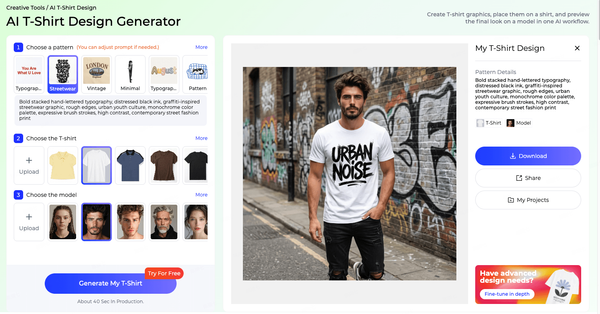


How to Do AI Fashion Style Transfer on Clothing Images?
AI fashion style transfer lets you upload a garment image and text prompt to generate new style variations instantly. Using Style3D AI's Style to Style tool (free tier available), select a reference outfit, describe changes like "cyberpunk streetwear," and produce polished 2D apparel designs in seconds for collections or marketing—eliminating physical samples. What Is AI Fashion Style Transfer and Why Use It for Clothing Designs? AI fashion style transfer is a computational technique that tra


