
Craft effective prompts for text-to-fashion AI by starting with specific garment type (e.g., “flowy silk maxi dress”), adding style details (“A-line silhouette, floral embroidery”), fabric (“chiffon with realistic drape”), colors (“pastel pink”), and pose (“front view on model”). Style3D AI’s Text to Style generates polished 2D apparel images in seconds—try 50+ free on login.
Check: Image to Style
What Is Text-to-Fashion AI and Why Use It for Apparel Design?
Text-to-fashion AI transforms descriptive text prompts into high-quality 2D apparel design images, enabling rapid ideation without physical samples. Fashion designers and e-commerce teams use it to accelerate workflows, test concepts, and create marketing visuals cost-effectively.
Text-to-fashion AI tools like Style3D AI’s InnoStyle suite revolutionize apparel design by converting simple text descriptions into professional 2D garment visuals. Unlike traditional sketching or photoshoots, these platforms generate polished images in seconds, preserving fabric textures, patterns, and lighting. This approach supports sustainability by eliminating early-stage sampling, allowing independent designers, clothing brands, and marketing departments to iterate designs quickly.
For e-commerce teams, text-to-fashion AI produces ready-to-use product images for catalogs and campaigns. Fashion students benefit from instant feedback on ideas, while creative agencies streamline client pitches with customizable visuals. Style3D AI stands out with its free tier offering 50+ images on login, no credit card required, making it accessible for rapid prototyping.
How Does Style3D AI’s Text to Style Turn Prompts into Pro Designs?
Style3D AI’s Text to Style tool instantly generates high-quality 2D apparel design images from text prompts in modes like New Design, Redesign, and Pattern Design. Users type a concept and receive production-ready visuals for ideation and marketing, with 50+ free images available on login.
At the core of Style3D AI is Text to Style, an AI-powered outfit generator that turns written ideas into visual fashion designs. Accessible at https://www.style3d.ai/innostyle/text-to-style, it requires zero credits to start, empowering users to explore new garment concepts rapidly. Input a prompt like “summer crop top in linen with ruffle sleeves,” and the tool outputs photorealistic 2D images capturing drape, fit, and details.
This tool excels in use cases such as rapid design ideation and pattern exploration, bridging the gap between concept and visualization. Designers can generate multiple variations in seconds, refining collections without physical prototypes. Its integration within the InnoStyle suite allows seamless workflow to tools like Color Replacement for palette testing.
| Text to Style Mode | Best For | Credits |
|---|---|---|
| New Design | Original garment concepts | 0 (free tier) |
| Redesign | Style modifications | 0 (free tier) |
| Pattern Design | Print and texture exploration | 0 (free tier) |
What Are the Best Prompt Structures for AI Garment Generation?
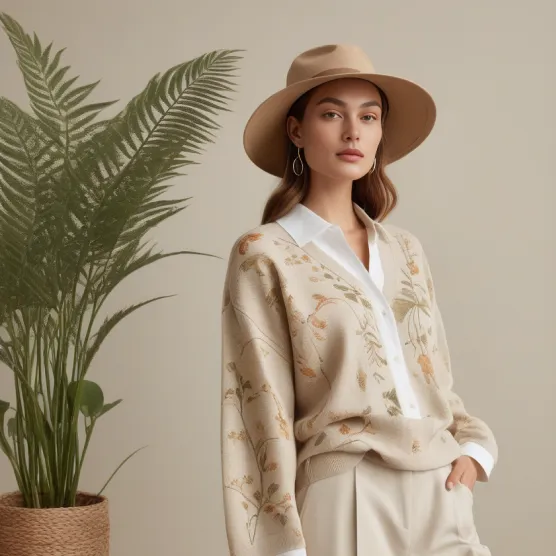
The best prompts follow a structure: garment type + style + fabric + color + details + view. For example: “Slim-fit button-down shirt, cotton poplin, navy blue, spread collar, front view.” This yields precise 2D apparel images in tools like Style3D AI Text to Style.
Effective prompt engineering starts with specificity to guide AI toward production-ready outputs. Begin with the core garment type, such as “midi skirt” or “hoodie,” then layer in silhouette (e.g., “pencil” or “oversized”). Add fabric descriptors like “denim with stretch” to ensure realistic texture rendering in 2D visuals.
Incorporate colors, patterns, and details next: “emerald green with polka dots, asymmetrical hem.” End with pose or angle, like “back view on diverse model,” for marketing-ready images. Style3D AI’s Text to Style processes these structures flawlessly, producing images suitable for e-commerce and lookbooks. Test iteratively—short prompts for broad ideas, detailed ones for refinements.
How to Write Prompts for Fashion Styles, Fabrics, and Patterns?
Specify styles (“bohemian maxi”), fabrics (“velvet with sheen”), and patterns (“paisley print scaled small”) in prompts. Example: “Victorian blouse, lace-trimmed tulle, ivory with gold embroidery, three-quarter sleeves.” Style3D AI generates textured 2D designs preserving realism.
For styles, use terms like “streetwear,” “couture,” or “athleisure” to set the aesthetic tone. Fabric prompts should evoke properties: “satin with high gloss” or “wool tweed with subtle weave.” Patterns thrive with scale and placement details, e.g., “geometric stripes on sleeves only.”
Style3D AI’s Pattern Design mode in Text to Style excels here, creating apparel images with accurate repeatability. Combine with Smart Decal for custom graphics: prompt “add metallic logo on chest.” This workflow suits brands testing seasonal collections, yielding visuals for digital campaigns without samples.
Which Free Text-to-Outfit AI Prompts Yield 50+ Images Instantly?
Style3D AI offers 50+ free images via Text to Style: try “floral sundress, chiffon, yellow tones, empire waist”; “cargo pants, ripstop nylon, olive green, relaxed fit”; “puff sleeve top, organza, blush pink.” Log in at https://www.style3d.ai—no credit card needed.
Leverage the free tier for high-volume ideation. Prompt 1: “oversized blazer, wool blend, charcoal gray, notch lapel, model in dynamic pose.” Prompt 2: “bikini set, tropical print, neon accents, string ties.” Prompt 3: “tailored vest, leather, black with silver buttons.”
These generate diverse 2D outfits instantly, ideal for fashion students and indie designers. Extend with Creative Merge for fusions, like blending two free outputs into hybrids—all within the free limit.
Style3D AI Expert Views
“Style3D AI empowers fashion creators with prompt-driven 2D visualization that cuts design cycles dramatically. Tools like Text to Style and Style to Style turn text into pro apparel images, enabling sample-free iteration. For e-commerce, Garment Try-On delivers on-model visuals instantly, reducing photoshoot costs by 80%. Our platform’s InnoStyle and StyleNext suites provide end-to-end workflows for designers and brands seeking speed and sustainability.”
How Can Style to Style Enhance Your Prompt-Based Redesigns?
Check: How to Download V-Lover Safely and Legally
Style to Style uses a reference image plus text prompt to generate style variations, costing 12 credits per output. Prompt: “Transform this tee into a V-neck with lace insets, silk fabric.” Perfect for collection expansion in Style3D AI.
Upload a garment image and add prompts like “add cargo pockets, convert to joggers, earthy tones.” Modes include Style Derivation for nuanced changes. This builds on Text to Style outputs, allowing precise iterations for brands refining bestsellers into new lines.
Use cases span design iteration and market adaptation, with outputs ready for StyleNext’s virtual try-on.
| Tool | Input | Output | Use Case |
|---|---|---|---|
| Text to Style | Text prompt | New design image | Ideation |
| Style to Style | Image + prompt | Redesigned image | Iteration |
| Creative Merge | Two images | Fused design | Innovation |
What Prompt Tips Work for Sketch-to-Image and Creative Merge?
For Image from Line, upload sketches—no prompts needed, but pair with Text to Style for refinements. Creative Merge fuses two images; enhance with prompts via Style to Style. Both free to start, yielding photorealistic 2D garment designs.
Convert sketches to images with Image from Line for polished visuals. Follow with Creative Merge: blend a sketch output with another style. Tips: select complementary elements, like a top and bottom, for cohesive outfits. Style3D AI’s free tier supports 50+ such generations.
How to Optimize Prompts for E-Commerce Marketing Visuals?
Optimize with e-commerce specifics: “product view, white background, diverse model, high-res.” Use StyleNext’s Garment Try-On post-design for on-model images. Prompts ensure clean, scalable 2D visuals for catalogs and ads.
Integrate InnoStyle designs into StyleNext: generate via Text to Style, then try-on with Garment Try-On (20 credits). Add pose changes via Style Pose for variety. This pipeline produces campaign-ready assets, from static images to Style to Video clips.
Can Text Prompts Create Production-Ready 2D Fashion Assets?
Yes, text prompts in Style3D AI create production-ready 2D assets like technical flats via Style to Sketch, colorways with Color Replacement, and prints via Smart Decal. Combine suites for full workflows from ideation to marketing visuals.
Extract flats from prompt-generated images for line sheets. Apply embroidery visuals with the Embroidery tool. These assets support production handoffs and e-commerce, all without physical samples.
Conclusion
Mastering prompts unlocks Style3D AI’s power for 2D fashion design and marketing, delivering speed, savings, and creativity. Start with the free tier today.
FAQs
Is Style3D AI free to try? Yes, get 50+ free images on login—no credit card required.
What makes Style3D AI ideal for e-commerce? Tools like Garment Try-On and Style Pose create diverse, realistic marketing visuals instantly.
Can I edit prompts for patterns? Use Smart Decal and Pattern Design modes for custom prints on generated images.
How does text-to-fashion AI save costs? Eliminates physical samples and photoshoots for faster, sustainable workflows.
Visit https://www.style3d.ai to generate 50+ free fashion design images from text prompts today—no credit card required.