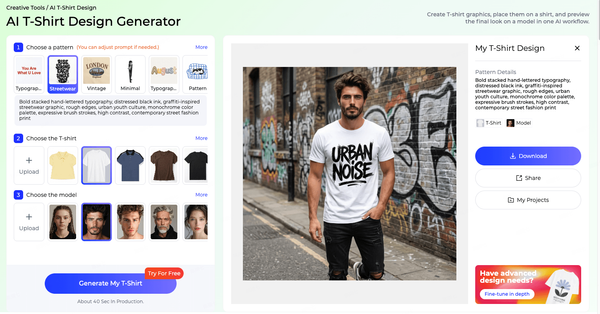

AI fashion design is the use of generative AI to create, vary and refine garment concepts from inputs such as text descriptions, reference images, hand-drawn sketches, design details and fabric swatches. Instead of drawing every idea by hand, a designer describes or uploads what they have and reviews several AI-generated directions in minutes.
That changes one specific part of the design process: producing options. Traditionally, a designer might sketch a handful of ideas for a new style, because each one takes time. With an AI clothing generator, the same designer can explore dozens of silhouettes, details and colorways, then spend their time choosing and improving the strongest ones. The work shifts from "draw one" to "choose one and make it better".
AI does not replace the designer's judgment, pattern making or fit testing. It is a faster way to get from a brief to a design worth developing, and a way to test more ideas before money is spent on samples. For brands under pressure to move faster with smaller teams, that combination of speed and lower risk is the main reason AI fashion design has moved from experiment to everyday tool.
This guide explains how AI fashion design works in plain language. It covers what AI clothing generators actually do, the five main ways to start a design, how to write prompts that produce useful results, what AI can and cannot create, seven practical use cases, a checklist for evaluating AI-generated designs, the limits you should know about, including originality and usage rights, and a simple five-step way to get started.
Turn your next design idea into garment concepts in minutes. Try Style3D AI's AI clothing generator for free.
What Is AI Fashion Design?
AI fashion design is the process of using generative AI to produce garment design concepts from text, images, sketches, details or fabric references, and then to vary, edit and refine those concepts. It sits at the creative front of the design process, before pattern making, sampling and production.
Definition
A useful way to define AI fashion design is by what goes in and what comes out. The input is a design intention: a written brief, a garment photo, a rough sketch, a single detail such as a collar, or a fabric you want to use. The output is one or more realistic images of garments that match that intention, which the designer can then adjust, recolor, combine or turn into technical line art.
The key difference from traditional digital design is that the designer does not construct the image line by line. They direct the result, evaluate it and refine it. Skill still matters, but it shows up in different places: in the quality of the brief, the choice of references, the vocabulary used to describe garments and the judgment applied to the results. A designer who knows construction, fabrics and their customer will consistently get better results from AI than someone who does not. In that sense, AI fashion design rewards fashion knowledge rather than replacing it.
Why AI Fashion Design Matters Now
Fashion calendars have become faster and more fragmented. Brands release smaller drops more often, e-commerce sellers test new styles continuously, and design teams are expected to cover more categories with the same or fewer people. At the same time, sampling remains expensive and slow, and every unsold style is a cost.
AI apparel design responds to both pressures. It increases the number of ideas a team can see without increasing the time spent drawing them, and it helps teams reject weak ideas before they reach the sample room. For smaller brands, it also lowers the barrier to developing original products, because a clear visual brief can be created without a large design team. These are the practical reasons AI in apparel has moved quickly from novelty to working tool.
AI Fashion Design vs Other AI Fashion Tools
"AI in fashion" covers many different tools, and it helps to separate them. AI fashion design tools generate new garment designs. Other AI fashion tools work with garments that already exist: virtual try-on tools show a product on a person, AI model and photoshoot tools create product imagery for e-commerce, and AI styling tools recommend outfits from existing items. Further along the value chain, AI is also used for demand forecasting, sizing recommendations and supply planning.
The distinction matters because the tools answer different questions. An AI clothing generator answers "what could this garment look like?" A virtual try-on tool answers "what does this garment look like on someone?" A styling tool answers "what should I wear with this?" This guide focuses on the first question, which is where design decisions are made.
Who Uses AI Fashion Design
Fashion designers use AI to explore more directions in less time and to test ideas before committing to sketches and samples. Brand design and product development teams use it for collection planning, bestseller extensions and colorway development, often to give merchandisers and buyers something concrete to react to earlier in the season. E-commerce sellers who develop their own products use it to create new styles that fit their existing range. Fashion students and educators use it to visualize ideas, build portfolios and teach design thinking.
Across the AI apparel space, the common thread is the same: AI helps people see more options sooner, so better decisions can be made earlier. The size of the team does not change that benefit. A solo designer gains the ability to explore like a larger studio, and a larger studio gains the ability to explore more widely without adding headcount. Style3D AI is built for this range of users, with tools for designers, sellers and creators that cover inspiration, new design, redesign and sketch-based work in one place.
How AI Clothing Generators Work
AI clothing generators work by learning patterns from large numbers of garment and fashion images, then using those patterns to create new images that match the conditions you give them, such as a text prompt, a reference image or a sketch. You review the results, refine the input and generate again until a design is ready to develop.
You do not need to understand the technology in depth to use these tools well, but a basic picture of what happens behind the scenes makes it much easier to get good results. The process can be described in four parts: what the model has learned, how text guides it, how images guide it, and why iteration matters.
Learning Garment and Style Patterns
Generative image models are trained to recognize relationships in visual data. In fashion, that means relationships between silhouettes and categories, between construction details and garment types, between fabrics and the way they fold and reflect light, and between design elements and recognizable styles. A model that has learned these relationships can produce a new garment image that looks coherent: a shirt collar sits where a shirt collar should, a pleated skirt shows pleats that follow the fabric, and a knit looks like a knit.
The model does not work like a catalog that retrieves stored garments. It learns general patterns and uses them to generate new combinations. That is why the same tool can produce a believable trench coat in a fabric or color you have never seen it in, and why the quality of your input has such a large effect on the quality of the output. The model fills in whatever you leave unspecified with the most typical choice, so the more precisely you describe what you want, the less it falls back on the average.
From Text to Garment: Text Conditioning
When you write a prompt, the generator interprets each part of it as a condition the image should meet. The garment type sets the basic structure. Silhouette words such as "A-line", "boxy" or "fitted" shape the proportions. Details such as "patch pockets", "puff sleeves" or "a shawl collar" add specific features. Fabric and color words guide texture and surface, and style or occasion words, such as "workwear" or "resort", set the overall mood.
Vague prompts leave many decisions to the model. Specific prompts leave fewer, which usually gives you results closer to what you had in mind. Industry vocabulary helps: "raglan sleeve", "yoke", "box pleat" and "welt pocket" are more precise than general descriptions, and generators trained on fashion imagery tend to respond well to them.
From Images and Sketches: Visual Conditioning
When you start from an image or a sketch, the generator uses it as a visual guide. A garment photo can carry over structure, key elements or overall style. A sketch carries over the lines and proportions you drew. A detail image focuses the generator on one feature, and a fabric image guides color, texture and drape.
The art is in deciding what you want to keep and what you want to change. Visual inputs are powerful because they communicate things that are hard to describe in words, such as a particular proportion, the exact angle of a collar or the way a fabric falls. Clear, well-lit references with the garment fully visible give the most reliable results; cluttered backgrounds, heavy filters or partial views make it harder for the generator to read the design.
Why Results Vary and How Iteration Works
Generating from the same input twice will usually give you different results. This is normal and useful: each generation is a new interpretation of your conditions. The most effective way to work is to generate several options, choose the most promising, refine the input or edit the result, and repeat.
Treat the first round as exploration and later rounds as development. In exploration, keep the input open and look for unexpected directions. In development, lock down what works and change one thing at a time. Editing tools that change only part of a garment are especially useful in later rounds, because they let you fix a detail without losing everything else you like about the design. Saving your best results at each round also makes it easy to return to an earlier direction if a later change does not work. In Style3D AI, Garment Refine supports this way of working by editing specific garment areas without restarting the design.
Key Terms in AI Fashion Design
• Prompt: the written description you give the generator, such as a garment type, details and style.
• Reference image: an existing image used to guide structure, elements or style.
• Generation: one round of output produced from your input.
• Variation: an alternative version of a design that keeps some elements and changes others.
• Iteration: the cycle of generating, selecting and refining until a design is ready.
• Targeted edit: a change to one area of a garment, such as a neckline, without regenerating the whole design.
• Line art: a clean drawing of the garment's outlines and construction lines, used as the basis for technical flats.
5 Ways to Start: Text, Images, Sketches, Details and Fabrics
There are five main ways to start an AI fashion design: a text prompt, a reference image, a hand-drawn sketch, a single design detail or a fabric reference. Choose the input that best captures what you already know about the design. You can also combine routes, for example starting from text and then refining from an image.
Text Prompts
Text is the best starting point when the idea is still in words, such as a brief from a buyer, a trend direction or a gap in your range. It is also the most flexible route, because changing a single word can take a design in a new direction. In Style3D AI, Text to Design turns a written description into apparel concept images. It works well for early exploration, when you want to see several interpretations of the same idea before choosing one. The next section explains how to write prompts that give reliable results.
Reference Images
A reference image is the best starting point when you want to build on something that already exists, such as a bestseller, a sample or a piece from a mood board. Images communicate proportion, styling and mood far faster than words. Image to Design creates new style options from an existing garment image, while Style Fusion blends design elements from several references into fresh garment options. This route is especially useful for developing a product family that feels consistent, or for combining two ideas that would be hard to describe together in a prompt.
Hand-Drawn Sketches
Many designers think best with a pencil. If you already have a drawing, there is no need to translate it into words. Sketch to Design converts a hand-drawn sketch into a realistic garment image, keeping the proportions and lines you drew. This makes it easy to test how a quick idea would look as a finished garment, in a real fabric and color, before investing more time in it. It also helps designers communicate early ideas to colleagues who find rough sketches hard to read.
Design Details
Sometimes a design starts from a single element: an unusual collar, a sleeve shape, a pocket or a closure. Signature details are often what make a brand recognizable, so exploring how one detail can work across a range is a valuable exercise. Style3D AI's Detail to Design takes a detail, such as a neckline, sleeve or pocket, and develops it into multiple complete apparel concepts. It is a practical way to build a collection around a recurring design feature.
Fabric References
Fabric-led design is common in fashion: a mill sends a swatch, a team has deadstock to use, or a sustainable material is a priority for the season. Seeing which garment types suit a fabric usually requires samples. Fabric to Design creates apparel concepts that match the color, texture and drape of a fabric reference, so designers can see which garment types suit a material before cutting any of it. This is also a useful way to plan around minimum order quantities, because a team can see how one fabric could be used across several styles.
Combining Inputs and Choosing the Right One
The five routes are not mutually exclusive. A common pattern is to start broad with a text prompt, pick the strongest result, then use it as a reference image for further variations. Another is to sketch a silhouette, generate it with Sketch to Design, then apply a specific fabric or detail in later rounds.
As a quick rule of thumb:
• Use text when the idea exists only as words or a trend direction.
• Use an image when you are building on an existing product or reference.
• Use a sketch when you have already drawn the proportions you want.
• Use a detail when one feature defines the design.
• Use a fabric when the material comes first.
Choosing the input that already holds the most information about your design is usually the fastest way to useful results.
How to Write Prompts for an AI Clothing Generator
A strong prompt for an AI clothing generator names six things: the garment type, the silhouette, the key details, the fabric, the color and the style or occasion. Including all six gives the generator clear direction and makes your results more predictable and easier to refine.
The Prompt Formula
Use this structure as a starting point:
Garment type + silhouette + key details + fabric + color + style or occasion
• Garment type: "trench coat", "midi skirt", "polo shirt"
• Silhouette: "oversized", "A-line", "slim-fit", "cropped"
• Key details: "raglan sleeves", "contrast topstitching", "hidden placket"
• Fabric: "washed cotton twill", "brushed wool", "silk crepe de chine"
• Color: "sand beige", "charcoal grey", "cobalt blue"
• Style or occasion: "minimal workwear", "resort", "streetwear", "evening"
Order matters less than completeness. If an element does not matter to you yet, leave it out on purpose and let the generator explore it. For example, leaving out color in the first round can reveal palette ideas you had not considered, while specifying the silhouette keeps the results relevant.
Prompt Library by Category
The examples below can be adapted for your own range:
• Dresses: "A wrap midi dress with flutter sleeves and a self-tie waist, in printed viscose, terracotta and cream, relaxed summer style."
• Tops: "A boxy cropped shirt with a camp collar and a single chest pocket, in washed linen, olive green, casual resort style."
• Outerwear: "An oversized double-breasted trench coat with raglan sleeves, a storm flap and a belted waist, in cotton gabardine, stone beige, minimal workwear style."
• Knitwear: "A chunky cable-knit cardigan with a shawl collar and horn buttons, in wool blend, oatmeal, cozy winter style."
• Bottoms: "High-waisted wide-leg trousers with front pleats and side slash pockets, in fluid wool crepe, charcoal grey, modern tailoring style."
• Menswear: "A relaxed-fit chore jacket with three patch pockets and contrast stitching, in heavy cotton canvas, navy, utility workwear style."
• Footwear: "A low-top leather sneaker with a chunky gum sole and perforated toe box, white and tan, minimal streetwear style." In Style3D AI, footwear prompts like this one work with the AI Shoe Generator.
The same structure works as an AI dress generator prompt, an outerwear prompt or a knitwear prompt: only the vocabulary changes. Building a shared prompt library like this one also helps teams keep results consistent across designers.
How to Refine a Prompt Step by Step
Start broad, then narrow. First, fix the garment type and silhouette and generate a few rounds until the overall shape is right. Next, add or adjust details one at a time. Changing several things at once makes it hard to see which change helped. Then fine-tune fabric and color, or switch to editing tools once the structure is set.
If results drift away from your brand, add a short style reference that describes your brand's aesthetic in a few consistent words, such as "clean minimal tailoring" or "relaxed coastal casual", and reuse that phrase across prompts. If a detail keeps appearing that you do not want, describe what you want instead, for example "collarless" rather than leaving the neckline unspecified.
A Shared Prompt Template for Teams
When several people use the same AI clothing generator, results can vary widely simply because everyone writes prompts differently. A shared template solves this. Keep a simple document with the six prompt elements as headings, your brand's standard style phrase, a list of approved fabric and color names, and a few example prompts that produced strong results. New team members can then produce on-brand results from their first session, and reviewers can compare designs more fairly because they were generated in the same way.
Common Prompt Mistakes
Four mistakes account for most disappointing results. The first is being too short: "a nice jacket" leaves almost every decision to the generator. The second is contradiction, such as asking for a "fitted oversized blazer", which forces the model to guess. The third is overloading a prompt with too many details, which can produce cluttered designs where nothing stands out; three or four key details are usually enough. The fourth is relying on vague style words alone, such as "cool" or "elegant", without describing the garment itself. Fixing these four issues usually improves results more than any other change.
Put the prompt formula to work. Paste one of these prompts into Style3D AI's Text to Design and compare the results.
What AI Can Create
AI clothing generators can produce concept images and design directions, matching back views and coordinated pieces, color, print and material variations, technical line art, and designs beyond apparel such as footwear. Together, these outputs cover most of the creative work that happens before pattern making.
Concept Images and Design Directions
The core output is a realistic image of a garment that has not been made yet. Concept images let designers, buyers and teams react to an idea visually, which is faster and clearer than discussing it in words or rough sketches. They are useful in design reviews, line planning meetings and early conversations with manufacturers, where everyone needs to picture the same garment. Concept images also help non-designers take part in decisions. Merchandisers, buyers and founders who find technical flats hard to read can react to a realistic image immediately, which shortens feedback loops and reduces the risk of misunderstandings later in development.
Back Views and Coordinated Pieces
A front view alone is rarely enough to evaluate a design. Style3D AI's Back Design generates the corresponding back view from a front image in one step, and Outfit Design generates matching garments from a single top or bottom. This helps designers check a design from more than one angle and see how it works as part of a look, which matters for collections, lookbooks and styled product pages.
Targeted Edits to Part of a Garment
Often a design is nearly right, but one area needs to change: a neckline is too high, a hem is too long or a pocket is in the wrong place. Regenerating the whole garment risks losing everything else that works. Style3D AI's Garment Refine edits specific garment areas without restarting the design, so designers can make focused changes while keeping the rest intact. Targeted editing is what turns AI from a source of random ideas into a practical development tool, because it lets designers move steadily toward a final design instead of starting over each time.
Colorways, Prints and Material Variations
Once a style works, AI can show it in different colors, prints and fabrics without redrawing it. Change Colors swaps fabric colors and previews multiple clothing colorways, Apply Print To Garment and Apply Pattern To Garment place artwork with a realistic worn result, and Fabric Changer previews new materials on the same style. Remove Graphic does the opposite, removing prints while preserving the fabric texture. These tools turn one approved design into a range of options for merchandising decisions.
Technical Line Art
AI can also help bridge the gap between a concept image and the technical flats needed for production. Extract Technical Drawing turns a garment image into clean line art and editable vectors, and Sketch Vectorization converts sketches into editable vector graphics. These files still need a designer's refinement, including construction details and measurements, before they go into a tech pack, but they remove much of the redrawing work.
Beyond Apparel: Footwear
The same principles apply to other product categories. Style3D AI's AI Shoe Generator creates sneakers, boots, heels and sandals from text descriptions and derives multiple design directions from one idea. For brands that sell both apparel and footwear, using the same approach across categories makes it easier to develop coordinated product stories.
7 Use Cases of AI in Fashion Design
AI in fashion design is most useful in seven situations: exploring trends and concepts, extending bestsellers, planning collections, designing from fabrics or details, developing colorways and prints, creating new styles for e-commerce, and supporting education and portfolios. Each use case follows the same pattern: a clear starting point, a fast round of AI options, and a human decision.
The use cases below are described in the same four parts, scenario, approach, tools and result, so you can compare them and pick the one closest to your own situation. Most teams start with one or two of them, usually trend exploration or colorway development, and add others once the workflow is established. None of them requires changing your existing pattern-making or production process.
1. Trend and Concept Exploration
Scenario: a team has a trend direction or a mood board and needs to turn it into wearable ideas. Abstract references, such as colors, textures and imagery, are inspiring but hard to evaluate as products. Approach: translate the direction into prompts and references, generate several rounds, and pin the strongest images to a shared board. Tools: Text to Design and Style Fusion. Result: a style board of concrete garment ideas instead of abstract references, ready for discussion with merchandisers and buyers. Tip: generate at least three rounds per direction before judging it, because the first round rarely shows the full potential of an idea.
2. Extending Bestsellers
Scenario: a style sells well and the team wants new versions without losing what customers like about it. Redesigning a bestseller by hand risks changing the wrong things. Approach: start from the bestseller and generate variations that keep its design language while changing details, lengths or necklines. Tool: Hit Collection Proposal, which extends bestsellers into style variations while preserving their design language. Result: a set of lower-risk new styles rooted in proven demand. Tip: before generating, list the two or three features customers mention most in reviews, and make sure every variation keeps them.
3. Collection Planning
Scenario: a designer needs a cohesive group of styles around a key piece or theme. Building balance across categories, price points and occasions is time-consuming when every option has to be drawn. Approach: define the anchor style and theme, then generate complementary pieces that share color, mood and detailing. Tool: Collection Proposal, which builds cohesive collections around bestsellers with aligned themes. Result: a first-draft collection that can be edited, balanced and costed. Tip: check the draft against your range plan, such as the number of tops, bottoms and outerwear pieces, so the collection is balanced commercially as well as visually.
4. Fabric-Led and Detail-Led Design
Scenario: a team has a fabric to use, or a signature detail to build around. Testing every combination with samples is slow and wasteful. Approach: upload the fabric or the detail and generate garments designed around it. Tools: Fabric to Design and Detail to Design. Result: clear visual options for using a material or feature across several garment types, before any fabric is cut. Tip: use a clear, flat, well-lit photo of the fabric so the generator reads its color and texture accurately.
5. Colorway and Print Development
Scenario: an approved style needs a color and print story for the season. Physical strike-offs and lab dips for every option take time. Approach: apply the season's palette and artwork to the base style and compare the results side by side. Tools: Change Colors, Apply Print To Garment and fashion design variations. Result: faster merchandising decisions, with physical development focused on the options most likely to be approved. Tip: on-screen color is never exact, so confirm final colors with physical standards before production.
6. New Styles for E-commerce Sellers
Scenario: a seller wants to add new products that fit an existing store, but does not have an in-house design team. Approach: start from current best-performing items, generate related styles, and clean up details before sharing with a manufacturer. Tools: Image to Design, Garment Refine and Remove Graphic. Result: a steady pipeline of new style ideas that match the store's look and give the manufacturer a clear visual brief. Tip: send the manufacturer a front view, a back view and line art together, which reduces misunderstandings and back-and-forth.
7. Fashion Education and Portfolios
Scenario: a student or educator wants to visualize ideas quickly and focus on design thinking rather than rendering time. Approach: use AI to visualize concepts and variations, then document the decision process in a portfolio, showing why some options were chosen and others rejected. Style3D AI also offers resources for schools on its education page. Result: portfolios that show both creative range and clear design reasoning. Tip: present AI outputs alongside your own sketches and notes, so reviewers can see your design thinking, not just the final images.
Find the use case that fits your team, then test it on a live style. Explore Style3D AI's design tools with a free trial.
How to Evaluate AI-Generated Designs
Evaluate every AI-generated design on four areas before developing it further: construction realism, detail consistency, brand and customer fit, and producibility. A design that looks good on screen but fails any of these will cause problems later in sampling or production.
Use this 10-point checklist:
1. Can every seam, opening and closure actually be constructed?
2. Do pockets, collars and cuffs sit in realistic positions?
3. Are left and right sides consistent where they should be?
4. Do the front and back views match?
5. Does the fabric behave believably for its type and weight?
6. Are prints and patterns placed in a way a factory could reproduce?
7. Does the design fit your brand's aesthetic and existing range?
8. Would your target customer buy and wear it?
9. Can it be made at your target cost with your current suppliers?
10. Is it sufficiently original, rather than close to an existing design?
Construction Realism
AI can produce garments that look convincing at first glance but would be difficult or impossible to sew, such as seams that do not connect, closures with no clear mechanism or linings that could not be attached. Check construction with the same eye you would use when reviewing a sketch from a junior designer. Ask how each part would be cut, joined and finished. If you cannot answer, the design needs simplifying or clarifying before it goes further. Extracting line art with Extract Technical Drawing can help, because a clean drawing makes construction issues easier to see than a rendered image.
Detail Consistency
Look closely at symmetry, repeated elements such as buttons and stitching, and how details carry from front to back. Count buttons, check that pockets on both sides match, and confirm that topstitching follows seams. Small inconsistencies are easy to fix at this stage, using editing tools or a quick redraw, but expensive to discover at the sample stage. Zoom in on areas where details meet, such as collars, cuffs and waistbands, because that is where generated images most often show errors. Style3D AI's Back Design is useful here: generating the matching back view from a front image makes front-to-back inconsistencies easy to spot, and Garment Refine can then fix the affected area without regenerating the whole garment.
Brand and Customer Fit
A design can be well made and still be wrong for your brand. Compare AI results against your existing range, brand guidelines and customer profile, and reject options that do not fit, however attractive they are. A useful test is to place the AI design next to three of your current bestsellers. If it does not look like it belongs on the same rail, it probably does not belong in the collection.
Producibility and Cost
Finally, consider materials, trims, construction complexity and factory capability. If a design needs techniques your suppliers do not offer, or would exceed your target price, simplify it before moving forward. Involving a product developer or your manufacturer early, with clear AI-generated visuals, often surfaces these issues quickly and saves rounds of sampling later.
Running a Design Review with AI Options
AI changes the design review itself. Instead of discussing two or three sketches, a team may now be choosing from twenty or more options, which can make reviews slower rather than faster if they are not structured. A simple approach works well: the designer pre-filters options using the checklist and presents a shortlist of no more than five per style; the group scores each option on brand fit, customer appeal and producibility; and the top-scoring option moves forward with a short list of edits. Keeping rejected options in a shared folder also helps, because a direction that does not fit this season may fit the next one.
Limitations, Originality and IP
AI fashion design has clear limits. It does not make patterns, verify fit or simulate fabric physics with production accuracy, and its results need to be checked for originality. Questions of ownership and usage rights depend on the tool's terms and your local laws, so they should be checked before commercial use.
What AI Fashion Design Cannot Do
AI clothing generators produce images and line art, not production-ready garments. Pattern drafting and grading, fit testing on real bodies, accurate fabric simulation, costing and supplier communication all remain separate steps that need specialist tools and people. AI images can also show details that look plausible but are not practical, which is why the evaluation checklist above matters.
Generators also tend toward the typical. Because they learn from patterns across many images, results can drift toward familiar, mainstream designs unless the input pushes them elsewhere. Distinctive work usually comes from distinctive inputs: your own sketches, unusual references, specific details and clear brand language.
Understanding this boundary helps teams plan realistic workflows and avoid overpromising what AI can deliver. The most successful teams use AI to make better decisions earlier, then rely on their existing expertise and tools for everything that follows. For the tools that handle these later stages, see our guide to fashion design software.
Checking Originality
Treat AI-generated designs the way you would treat any source of inspiration: review them for similarity to existing designs, especially well-known or protected ones, before developing them. Avoid prompts that name other brands or ask the generator to copy a specific product. Combining AI exploration with your own references, sketches and design decisions also helps keep results distinctive and true to your brand. Keeping a simple record of inputs, selections and edits can also help document how a design was developed. That record is useful internally too: it shows which prompts and references led to approved designs, which helps the team repeat successful approaches in future seasons. Over time, a team's own sketches, fabrics and approved designs become the most valuable inputs it has, because they carry the brand's identity into every new round of AI exploration.
Ownership and Usage Rights
Rules on ownership and commercial use of AI-generated content vary by tool and by country, and they continue to change. Before using AI-generated designs commercially, read the terms of service of the tool you use, paying attention to commercial use, ownership of outputs and how uploaded images are handled. For important collections, seek professional advice. This guide does not provide legal advice.
Confidentiality and Uploaded Images
Design teams often work with unreleased products, supplier fabrics and client briefs. Before uploading sketches, samples or fabric photos to any AI tool, check how the tool stores and uses uploaded content, and follow your company's policy on confidential material. Agreeing on these rules at the start makes it easier for a team to adopt AI with confidence.
How to Start with AI Fashion Design: 5 Steps
You can start with AI fashion design in five steps: write a short design brief, choose the right input, generate and shortlist options, refine colors and details, and extract line art to hand off for pattern making.
1. Write a short brief. Note the garment type, customer, season, price point and two or three must-have features. A brief keeps every round of generation focused and makes it easier to judge results.
2. Choose your input. Use a text prompt for new ideas, an image for building on existing styles, a sketch if you have drawn the idea, or a detail or fabric if the design starts there.
3. Generate and shortlist. Run several rounds, then select two or three options using the evaluation checklist above. Share the shortlist with colleagues or clients before going further.
4. Refine. Adjust specific areas, test colorways and prints, and preview alternative fabrics until the design is ready for approval.
5. Extract and hand off. Turn the final image into technical line art, refine it in your vector tool, and pass it to pattern making and your tech pack.
Start with a single style rather than a whole collection. Once the process feels natural, extend it to collection planning and colorway development, where the time savings add up quickly.
New users often make the same early mistakes: judging a tool after a single round of generation, skipping the brief and generating without direction, trying to fix every detail with prompts instead of editing tools, and treating the first attractive image as finished. Avoiding these makes the first few weeks far more productive. For teams, it also helps to agree on where AI results are saved, how files are named and who approves designs before they move to pattern making, so AI work fits smoothly into the existing process instead of running alongside it.
With Style3D AI, each step maps to a specific tool: Text to Design, Image to Design or Sketch to Design for the start, Garment Refine and Change Colors for refinement, and Extract Technical Drawing for the handoff. You can explore all of them on the AI fashion design page.
FAQ
What is AI fashion design?
AI fashion design is the use of generative AI to create garment design concepts from text, images, sketches, details or fabric references, and to vary and refine those concepts. It speeds up the creative stage of design, before pattern making and sampling.
Can AI design clothes?
AI can generate realistic garment designs and variations, but it does not make patterns, test fit or manage production. In practice, AI designs clothes with a designer, who directs the inputs, evaluates the results and decides what to develop.
How does an AI clothing generator work?
An AI clothing generator learns patterns from many garment images and uses them to create new designs that match your input, such as a text prompt, image or sketch. You review the results, refine the input and generate again until the design is ready. Style3D AI, for example, accepts text, images, sketches, design details and fabric references as inputs.
Is there a free AI clothing generator?
Many AI clothing generators offer free trials or limited free plans, so you can test them on your own projects before paying. Style3D AI offers a free trial of its AI fashion design tools. Check each tool's current plan details and usage terms.
How do I write a good prompt for an AI dress generator?
Name the garment type, silhouette, key details, fabric, color and style. For example: "A wrap midi dress with flutter sleeves and a self-tie waist, in printed viscose, terracotta and cream, relaxed summer style." Then refine one element at a time.
Can AI-generated clothing designs be manufactured?
Yes, once they are developed further. A designer needs to check construction, create technical flats, and work with a pattern maker and manufacturer. AI provides the design starting point, not production files. Tools such as Style3D AI's Extract Technical Drawing help bridge the gap by turning AI designs into editable line art.
Will AI replace fashion designers?
AI changes how designers work rather than replacing them. It produces options quickly, but deciding what fits a brand, a customer and a price point, and turning a concept into a well-made garment, still depends on designers. Designers who learn to direct AI well are likely to find it expands what they can deliver.
Do I need design skills to use an AI clothing generator?
No skills are needed to generate images, but design knowledge makes results far better. Knowing garment vocabulary, construction and fabrics helps you write precise prompts and judge which AI apparel designs are worth developing. Beginners can learn a lot by comparing their prompts with the results.
What is the difference between an AI clothing generator and virtual try-on?
An AI clothing generator creates new garment designs. Virtual try-on shows an existing garment on a person or model. One answers "what could this look like?", the other "how does this look when worn?"
Conclusion
AI fashion design changes how quickly designers can move from an idea to a set of strong options. By understanding how AI clothing generators work, choosing the right input, writing clear prompts and evaluating results carefully, designers and teams can explore more directions and make better decisions earlier, while keeping pattern making, fit and production in expert hands. As these tools continue to improve, the designers who benefit most will be those who combine AI speed with clear creative judgment and a strong sense of what their customers want. The best starting point is simple: choose one real design problem you have today, and test how AI changes the way you solve it.
See how AI fashion design works on your own ideas. Start a free trial with Style3D AI's AI clothing generator.
Written by