AI Poster Makers: What Print Size Does to a Generated Image
Whether a generated image is large enough has no answer until you know how far away it will be seen from. Size alone does not determine what resolution it needs.
A poster is not defined by being large. It is defined by being looked at from somewhere — across a room, from a pavement, at arm’s length in a shop.
That distance determines almost everything about whether a generated image will work, and it is the variable nobody asks about.
The question that has no answer
“Is my image big enough to print as a poster” cannot be answered as asked.
A large format viewed from far away needs very little resolution per unit of surface, because the eye cannot resolve fine detail at that distance. A small poster held at reading distance needs considerably more. The same image can be entirely adequate at one and visibly soft at the other, and the difference is not the print size — it is where the viewer stands.
So the first thing to establish is not the dimensions of the poster. It is how far away it will be seen from, and whether anyone will approach it.
That last part catches people. A poster on a wall in a corridor is viewed from a distance and also from an arm’s length by whoever walks past slowly, and the requirement is set by the closest anyone gets rather than by the average.
There is a related asymmetry in how the failure presents. A poster with more resolution than it needs costs a slightly larger file and nothing else — nobody has ever noticed a poster being unnecessarily sharp. A poster with less than it needs is noticed by exactly the person who stopped to look at it properly, which is the audience it was made for.
What generated output gives you
A generator produces an image at whatever pixel dimensions it works at, and those dimensions are the entire supply. There is no larger version to request, because the image was not captured from something — it was produced at that size.
Enlarging afterward does not recover detail; it redistributes what exists and reconstructs the rest, which is what enlargement does in every context. For a poster viewed at distance, the reconstruction may be entirely acceptable, since the detail being invented is below what anyone will resolve. For one viewed closely, it is the thing they will be looking at.
This produces a useful reframing: generated artwork does not have a maximum print size. It has a maximum print size at a given viewing distance, and stating one without the other is how the wrong file ends up at the printer.
Aspect ratio is decided before you are
Generators produce images in the ratios they produce. Paper comes in its own sizes, and posters are frequently ordered in formats determined by frames, sites, or postal constraints.
The two almost never match. Something has to absorb the difference, and there are only two mechanisms.
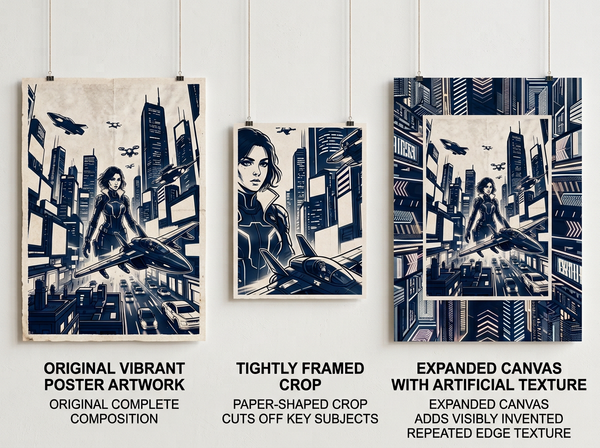
Cropping removes part of the image. On a loosely composed picture this costs little. On a well-composed one — which is what a good poster is — it costs whatever was at the edges, and it shifts the visual center away from where the composition put it.
Extending adds area that was not there. Anything added beyond the original frame is generated rather than recovered, so the new edges contain material invented to fill space. On abstract or textural work this often passes; on anything with structure it produces repetition and continuations that do not make sense.
Neither is a problem when decided in advance. Both are a loss when discovered after the design is approved, which is when they are usually discovered.
Bleed is a margin generated files do not have
Printing trims. The cut is accurate to a tolerance rather than exactly, so artwork intended to reach the edge has to extend past it — a margin that gets cut away and exists only so that a slight misalignment does not leave a white sliver.
A generated image fills its frame exactly. There is nothing outside it, so there is no margin to give up.
The resolutions are the same two as before, applied to a smaller distance: extend the artwork outward to create the bleed, accepting that the extension is generated; or crop inward, accepting that the composition loses its outermost band all the way around.
Designs where something important sits near the edge are the ones that suffer, and they are common in generated work because generators tend to fill the frame rather than leave quiet margins.
That tendency is worth working with rather than against. Asking for a composition with breathing room at the edges produces artwork that survives both the ratio adjustment and the bleed requirement without anything being invented or cut. It is a prompt-side decision that removes two downstream problems at once, and it costs only a slightly less dense image.
The substrate changes what survives
The same file on different materials produces visibly different results, and this is where posters diverge most from screen expectations.
Absorbent stock spreads ink slightly, which softens fine detail and lowers apparent contrast. Coated stock holds detail and reflects, which can make a poster unreadable under certain lighting. Matte finishes reduce reflection and mute color. Large-format substrates for outdoor use behave differently again.
None of this is visible when approving a design on a screen, and the gap is widest for exactly the work generators produce well — richly detailed, high-contrast, saturated images that depend on the material reproducing them faithfully.
The practical response is to see a printed proof on the actual stock before committing to a run, which is ordinary practice in print and frequently skipped when the design came from a generator and the process felt digital throughout.
What to decide before generating
• Where it will be seen from, including the closest anyone will approach, since that sets the resolution requirement rather than the poster’s size.
• The final format, so that the generation ratio can be chosen to match or the crop can be planned deliberately.
• Whether artwork reaches the edge, which determines whether bleed is needed at all — a design with a border does not need it.
• The substrate, since it affects detail, contrast, and color enough to change which designs work.
• Whether it will be reprinted at other sizes, which is a question about the largest use rather than the first one.
Settling these before generating rather than after is the whole point, because they are constraints on how the artwork gets produced rather than adjustments to be applied to it afterward. A ratio chosen up front costs nothing; the same ratio imposed on a finished design costs part of the design.
The first item is the one most often skipped and the one that determines whether the rest of the list matters. A poster that will only ever be seen from across a room has a much wider range of acceptable files than one that will be held.
What generated work is genuinely good at here
Worth stating, since the article so far reads as a list of constraints.
Posters are one of the formats where generated imagery performs best, because a poster is a single image doing a single job. There is no consistency requirement across a set, no need to match a photograph taken elsewhere, and no product whose appearance must be accurate. The image is allowed to be an image.
That freedom is real and it is why the format attracts generated work. The constraints in this article are all physical rather than aesthetic — they are about paper, distance, and ink, and none of them are arguments against generating the artwork itself.
FAQ
How do I know what resolution I need?
Ask the printer, giving them the final size and the viewing distance. They will specify a requirement, and it will differ between a poster for a shop window and one for a trade stand, at identical dimensions.
Can I generate at a larger size instead of enlarging?
Regenerating at different dimensions produces a different image rather than the same one larger, which is a problem once a version has been approved. Deciding the target size before generating avoids the choice entirely.
Should I always add bleed?
Only where the artwork reaches the trimmed edge. Designs with a border or a margin of background do not need it, and adding it unnecessarily means generating edge material for no reason.
What if the generator’s ratio is close but not exact?
Small differences can usually be absorbed by cropping without visible loss. The threshold at which it becomes visible depends on the composition rather than the numbers, which is why looking at the cropped version matters more than calculating the difference.
Does printing method change the requirement?
Considerably, and it interacts with substrate and viewing distance rather than replacing them. This is another reason the resolution question belongs with the printer rather than with a general rule.
Is a printed proof worth the delay? For anything being produced in quantity or displayed prominently, yes. Substrate effects are not predictable from a screen, and a proof costs one print against a run that cannot be corrected.
Where this leaves you
Establish the viewing distance before anything else, including before generating.
Everything downstream follows from it: how much resolution the file needs, whether enlargement is acceptable, how much the crop can take, and whether substrate softening matters. Asked in the other order — image first, then how big can we print it — the answer is a guess, and the file arrives at the printer already committed to whatever it happens to be.
Ask how close anyone will get
Before generating a poster, answer one question: what is the closest distance at which someone will look at it. Not the average distance, the closest. That single number determines the resolution requirement, whether an enlarged file is acceptable, and how much detail the substrate is allowed to absorb. It is also the question printers ask first and the one most briefs do not answer, which is why so many poster files arrive technically correct and visibly soft. See how print artwork gets prepared.
→ https://www.style3d.ai/graphic-print-design/ai-print-generator
Written by