AI T-Shirt Design Generators: From Output to Printable File
Generated artwork arrives flat, in RGB, with a background the model invented. Each of those is a specific problem at the printer, and none of them look like one.
The gap between a good-looking generated design and a file a printer can use is specific, and none of it is visible on screen.
This is not the general observation that an image is not a print file. It is a narrower set of problems that belong to generated output in particular — things a designer’s file does not have because a designer built it a different way.
What arrives, and what a printer expects
A designer working toward print produces a file with structure. Layers separate the elements. Colors are named and chosen from a printable set. The background is transparent because it was never filled. Type is live or converted to outlines deliberately. Vector paths exist wherever an edge needs to be crisp at any size.
A generator produces one flat raster image, in RGB, at a fixed pixel size, with a background it decided on, and no vector data anywhere in it.
Both can look identical in a preview. The second one is missing several things that only become relevant at the moment somebody tries to print it, which is also the moment when changing the design is most expensive.
The background was invented, and it is still in the edges
Every generator has to render something behind the artwork. It cannot leave a region undefined, so it fills it — usually with a pale wash, a texture, or a subtle gradient nobody asked for.
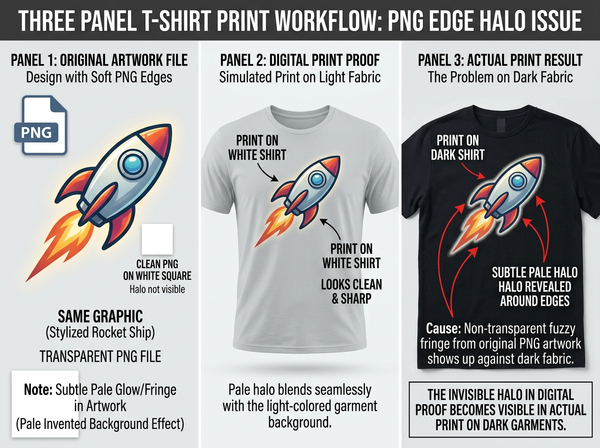
Removing that background is the obvious next step, and it is where the specific problem lives. A cutout edge is not a clean division: pixels along the boundary are part artwork and part background, which is why edges behave as bands rather than lines. Those transitional pixels retain some of the color of whatever they were blended against.
On a white garment this is invisible, because the invented background was usually pale and the shirt is white. On a dark or colored garment it comes back as a halo — a faint outline in a color that was never part of the design, tracing every edge of the artwork.
The uncomfortable part is when it becomes visible. It passes review on screen, because reviews happen against white. It appears on the first physical sample, and if the sample was printed on white and the range includes black, it appears on the production run.
The halo is also worse in exactly the places the design is most detailed. Fine elements have more edge relative to their area, so a design with thin lines, scattered small shapes, or soft brushwork carries proportionally more of the invented background than a design made of solid blocks. Which means the more the generator was allowed to be painterly, the more of a problem this becomes.
Generated color is not printable color
Generation happens in RGB, on a screen, in a color space considerably wider than ink on fabric.
A generator has no concept of a color being unprintable, so it optimizes toward whatever looks striking — and striking, on a screen, means saturated. The colors that make a generated design appealing in a preview are disproportionately the ones that cannot be reproduced.
What arrives instead is duller. Not wrong, not broken, just consistently less than the preview promised, with the vivid areas flattening most. Somebody who approved the design on a screen and receives the sample experiences this as a printing failure, and it is not — it is the design containing colors the process was never going to reach.
The practical response is to look at generated artwork in a preview that reflects the printing process before approving it, rather than after. Which colors survive and how conversion works is a subject in itself.
There is a design-side response as well, and it is more reliable than any correction after the fact. Prompting toward a limited, muted palette produces artwork whose colors survive the process, at the cost of the immediate appeal that makes generated previews impressive. That is a real trade rather than a free improvement, and it is easier to accept before anyone has fallen in love with a version that cannot be printed.
Resolution was fixed at the moment of generation
A designer’s file can be output at any size, because vector elements scale and the raster elements were captured with a target size in mind.
A generated image has the pixel dimensions it was generated at, and that is the whole supply. Enlarging it does not recover detail — enlargement redistributes what is already there and reconstructs the rest. Regenerating at a larger size produces a different image rather than the same one bigger, which is a problem when the design has already been approved.
So a generated design has a maximum print size, and that maximum is not recorded anywhere in the file. Whether it is large enough depends entirely on how big the print will be physically, which is a question worth settling before generating rather than after.
No separations, no layers, no paths
A flat image cannot be taken apart.
For screen printing this matters directly, since the process requires the artwork split into separate colors, one per screen. A layered file separates readily. A flat raster has to be separated by analysis, which works for simple graphics with limited colors and works poorly for the gradients and painterly effects generators produce naturally.
Layers also matter for revision. A design with the text on its own layer can have the text changed. A flat image with text baked in requires regenerating, which produces a different design.
And nothing in a generated file is a vector path, so any element that needed to be crisp at any size — a logo, a hard-edged shape, type — is a raster approximation of one. Whether that matters depends on the printing method and the size, and it is a decision to make deliberately rather than to discover.
Text is the fastest rejection
Generated type is unreliable in a specific way: it looks like text at a glance and falls apart on inspection. Letterforms are inconsistent, spacing is irregular, and words are frequently misspelled in ways that read as correct at small sizes.
This is the most common reason generated designs are refused by print services, and it is also the easiest to avoid. Generate the artwork without text and set the type separately, in a real typeface, as a layer. That single change removes the entire category of failure and produces a file that can be edited afterward.
The exception is where the lettering is meant to be illustrative rather than legible — hand-drawn effects, distressed lettering as texture. Even then, checking the spelling of anything readable is worth the seconds it costs.
What to check before sending to print
• The edges against the actual garment color, not against white, since the halo is invisible on white and obvious on dark.
• The color range, in a preview that reflects the printing process rather than the screen.
• The pixel dimensions against the physical print size, which is the only way to know whether resolution is sufficient.
• Every word, letter by letter, including any text you did not intend to be text.
• Whether the file needs to be separated, which depends on the printing method and should be established before the design is finalized rather than after.
Running that list takes minutes and catches the failures that otherwise appear on printed garments.
FAQ
Can I fix the halo by cutting out more aggressively?
Tightening the cutout removes the transitional pixels along with some of the artwork, which produces a hard, slightly eroded edge. For simple shapes that is acceptable; for soft or painterly edges it changes the design. Regenerating on a background closer to the garment color is often better.
Does generating on a transparent background solve this?
Where a generator supports it, largely yes, since there is no invented background to blend against. Support varies and is worth confirming rather than assuming, because some tools produce a transparent file by removing a background they generated anyway.
Should I convert generated artwork to vector?
Only where the design suits it — flat shapes and limited colors convert well, painterly and photographic ones do not. Vectorizing a gradient-heavy generated image produces a large, complicated file that reproduces the original less faithfully than the original did.
How do I know the maximum print size?
It follows from the pixel dimensions and the physical size the print will occupy, which is a relationship rather than a single number. Establishing the intended print size before generating avoids the problem entirely.
Can text be added back reliably? Yes, and it should be — setting type separately in a real typeface produces better letterforms, correct spelling, and an editable file. This is the single highest-value change to a generated design workflow.
Do print-on-demand services check any of this?
Practices vary, and most check resolution and refuse obviously malformed files. Halos, out-of-gamut colors, and separation problems generally pass automated checks and appear on the printed product.
Where this leaves you
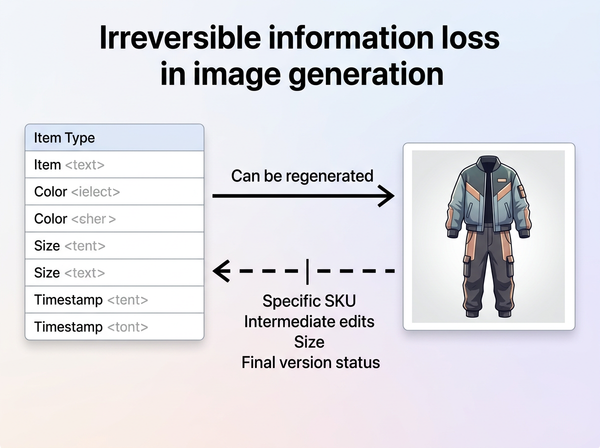
The generator produced an image, and an image is the raw material rather than the deliverable.
What separates it from a printable file is not quality — the artwork may be excellent — but structure: a background that was invented and is still present in the edges, colors chosen without reference to what ink can do, a resolution fixed at generation, and no way to take any of it apart. All four are invisible in the preview and all four appear on fabric.
Look at it on the garment color
Before approving a generated design, place the cut-out artwork on a swatch of the actual garment color rather than on white. Halos from the invented background show up immediately there and nowhere else, which is why they survive every on-screen review and appear on the first dark sample. While you are looking, read every word of any text letter by letter. Those two checks catch most of what goes wrong between a generated image and a printed shirt. See how print artwork is prepared for garments.
→ https://www.style3d.ai/graphic-print-design/ai-print-generator
Written by