Clothes Swapper Workflow: From Flat-Lay to Approved Image
Most clothes swapper problems are intake problems. What to prepare, who owns the reject, and the review sequence that catches defects early.
A team runs a swapper, the output looks fine at review size, the listing goes live, and three weeks later the batch gets redone. The post-mortem lands on the same finding almost every time: nobody owned the gate between the output and the product page. Someone generated, someone else uploaded, and the step where a person with the physical sample in hand says yes or no was never assigned to a name.
What follows is the operating procedure around the tool rather than the tool itself: what has to exist before anyone opens it, the order the steps run in, how files stay identifiable once a batch grows, the checks that stand between a candidate and a live listing, and what to do with the ones that fail.
What has to exist before you open the tool
Intake is the cheapest place to catch a problem and the place teams skip most often. Four things have to be present, and a run that starts without them will produce candidates nobody can approve.
• A garment reference set: front, back, and one construction detail shot, all flat and evenly lit, in the correct colorway (the specific color version of that style).
• A model image with arms clear of the torso, in a pose that suits the garment category rather than a generic standing shot reused from last season.
• The physical sample, or its lab color reference, present in the room for the review step.
• A named reviewer with the authority to reject, which a shared inbox is not.
The garment set carries most of the weight. A single angled hero shot is the weakest reference you can supply, since every surface it fails to show has to be filled in from somewhere. The construction detail shot is the one people leave out and the one that most often prevents a reject.
Colorway discipline matters more than it looks. If the reference is the sample colorway rather than the one being listed, the output is wrong in a way that survives review, because the image is internally consistent and simply describes a product you are not selling.
The run order
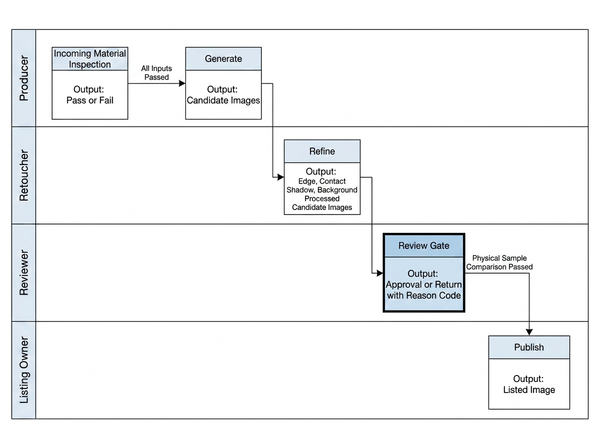
Five stages, each with one owner. Ownership is the point of the table — a stage with two owners has none.
Stage | Input | Output | Owner |
Intake check | Garment set, model image, color reference | Pass or fail on inputs | Producer |
Generate | Approved inputs only | Candidate images | Producer |
Cleanup | Candidates | Edges, shadow contact, background | Retoucher |
Review gate | Cleaned candidates | Approved, or a reject reason code | Reviewer |
Publish | Approved assets | Live listing images | Listing owner |
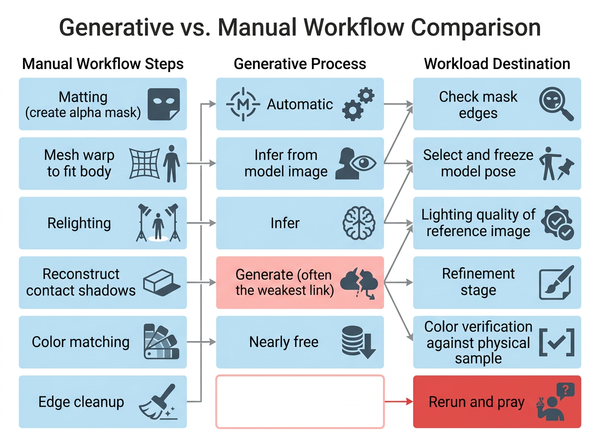
Generation belongs after intake, not beside it. Running a try-on anchored to the garment photograph on a reference that failed intake burns time producing candidates that were never going to pass.
Cleanup is where channel formatting gets handled rather than at upload. Marketplace main images typically have to sit on a pure white field, so isolating the subject belongs in this stage, where a retoucher is already looking at edges and shadow contact. Handling it at upload means a second person re-opens a file that was already signed off, which is how approved and unapproved versions start circulating together.
Naming and version control
This is the part of the workflow nobody writes down and the part that costs the most once a batch passes a few dozen items. A swapper produces many near-identical files, and near-identical files are exactly what a person cannot tell apart at a glance three weeks later.
A workable naming pattern carries four things: the SKU (stock keeping unit, one sellable variant), the colorway code, the shot type, and a status marker. Something like SKU1234_BLK_onmodel-front_v2_APPROVED reads correctly in a file list, sorts sensibly, and makes an unapproved file visibly unapproved without opening it.
Two rules do most of the work. Approved files move to a different location than candidates rather than sitting beside them with a longer filename, and rejected candidates are deleted at the end of the batch rather than archived, since an archived reject eventually gets published by someone who assumed it had passed.
If you run a digital asset management system (the shared library where approved images live), the status marker belongs in a field rather than the filename. Teams without one should not treat the generation tool’s output folder as a substitute, because it has no concept of approval.
The review gate, in order
Run these checks in sequence and stop at the first failure.
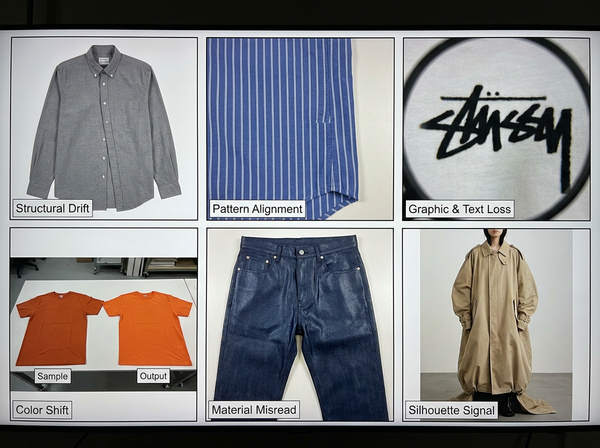
• Structure: placket centered, pockets at the right height, closure direction correct for the category.
• Pattern: view at 100 percent and check where stripes or checks meet a side seam.
• Graphics and type: any logo or printed text legible at the zoom resolution the listing offers.
• Color: compare against the physical sample under one light source, never against memory.
Order matters because structural rejects are cheap to spot and expensive to fix, while color is the opposite. Judging color on an image that will fail on the placket wastes the reviewer twice, and a reviewer who has already spent effort on an image becomes measurably reluctant to reject it.
Two practical constraints on the gate itself. Review at the resolution the customer gets, not at fit-to-screen, since pattern registration failures are invisible at thumbnail size and obvious at full zoom. And review against the physical sample rather than the reference photograph, because the reference has already been through a camera and a screen and carries its own color shift.
What to do with a reject
A reject is only useful if it routes somewhere. Reason codes exist so the fix lands with the person who can make it rather than back on the producer by default.
Reason code | Where it routes | Typical fix |
Structure | Back to intake | Add or reshoot the construction detail reference, then regenerate |
Pattern | Back to intake | Supply a flatter, higher-resolution garment reference |
Type or logo | Retoucher | Composite the mark rather than accepting the generated version |
Color | Retoucher, then re-review against the sample | Correct against the physical sample, not the reference file |
Fit read | Producer | Change the model image or pose; regenerating on the same pose repeats the result |
Material read | Back to intake; persistent cases leave the generative path | Reshoot the reference under controlled, single-source light; if the surface still reads wrong, the garment belongs on the photographic path |
Wrong colorway | Back to intake | Wrong input entirely; the output is unsalvageable |
Regenerating on unchanged inputs is the most common wasted step in the whole process. If nothing about the reference or the pose has changed, a second run gives you a different image with the same problem, and a third run gives you a third. The reason codes above exist mostly to prevent that loop.
Why each of these failures happens, and which ones are recoverable downstream at all, sits outside this checklist. That ground is covered in how a clothes swap is actually computed.
Scaling from one style to a catalog
The workflow above survives a batch of ten without much strain. What breaks at catalog scale is not the generator but the assumptions people start making to move faster.
• Run a pilot batch before committing a season, and record reject reason codes rather than only the count, since the spread of reasons tells you which intake rule to tighten.
• Freeze the model image set per category and per season, because a pose that quietly changes mid-catalog produces a listing page where garments sit differently for no reason a customer can name.
• Keep one reviewer per category rather than distributing review across a team, as consistency of judgment matters more here than throughput.
• Re-run intake when a supplier changes, since a new factory’s flat-lay conventions can differ enough to shift results without anyone noticing the cause.
The reuse that makes this economical is the model image, not the process. One approved model set feeding many SKUs is the realistic description of the payoff, and it holds only while that set stays fixed.
What this workflow will not catch
Fit sits outside the chain entirely. No measurement, size chart or body data passes through any stage above, so an approved image says nothing about how the garment falls on a real customer. Placing it next to a size guide implies a relationship that does not exist.
Screen review cannot settle color. Two uncalibrated monitors disagree with each other, which is why the physical sample belongs in the intake list rather than the nice-to-have list, and why a color reject routes back for comparison rather than being resolved in the review thread.
A reviewer working at fit-to-screen size will miss pattern registration with some reliability. The 100 percent check exists for that reason and stops being a check the moment someone skips it under deadline.
None of this validates the claim your listing makes. The image can be accurate and the copy beside it still wrong about fabric weight, care or origin, and the review gate above will pass it without comment.
Frequently Asked Questions
Who should own the review gate?
Someone who has handled the physical product and can reject without negotiating, which usually means merchandising or product development rather than whoever ran the generation. Splitting production and approval between two people catches more defects than any other process change available to you. A shared inbox is not an owner, and neither is a group chat.
Can the intake check be automated?
Parts of it. Resolution, background uniformity and whether a back-view file exists are all machine-checkable and worth scripting. Whether the colorway is right, and whether the pose suits the category, still needs a person, so automate the file-level checks and keep the judgment manual rather than pretending the whole gate can be scripted.
What reject rate should we expect?
No trustworthy public benchmark exists, so treat any number you are quoted with suspicion. Measure your own across a pilot batch and record reason codes alongside the rate. The spread of reasons tells you which intake rule to tighten, while the rate on its own tells you nothing you can act on.
Do we need a new model image for every colorway?
No, and reusing one across colorways is where most of the saving comes from. The limit is category rather than color: a pose framed for a fitted top produces poor outerwear. Watch for a colorway whose value is very close to the background or the skin tone, since edges get unreliable there and those need closer review.
How many candidates should we generate per garment?
Enough to choose from in one sitting, typically a small handful, then stop. Generating dozens shifts the work to selection and tends to produce a chosen image nobody checked properly, because reviewing many similar candidates dulls attention. If none of the first set passes, the fix is in the inputs rather than in more attempts.
Do we have to disclose that an image was generated?
Requirements vary by market and platform and have been changing, so confirm the current rules for every jurisdiction and marketplace you sell in before launch rather than relying on what was true last season. Some platforms require labelling, some require only that the product be represented accurately. Treat this as a question for whoever handles your compliance, not a decision for the production team.
Where the time actually goes
Most teams evaluating swappers spend their effort comparing generators and almost none defining the gate. That ratio is backwards. The generator decides how often a candidate is usable. The intake rules, the reason codes and the review order decide whether an unusable one reaches a customer, and only that second failure costs returns, listing suppression and a reshoot. Write the gate first, then pick the tool, and expect the tool to change more often than the gate does.
Start from your own garment shots: virtual clothing try-on
Written by