Color Change in Product Photos: Who Signs Off on What
A color change takes minutes to produce and a week to approve. The four owners, the sequence, and the gate teams skip most often.
A color change is easy to produce and hard to approve. The production step takes minutes; the part that takes a week is the loop where merchandising thinks the shade is off, the photographer thinks the file is fine, the retoucher has already moved on, and nobody can say which version is the one to compare against.
Most of that loop is a process problem rather than an image problem. What follows is how a color change runs from one photographed style to an approved range: who holds which decision, in what order, and where the checks belong so that the loop closes instead of repeating.
The four decisions, and who owns each
A color change hides four separate decisions that teams routinely collapse into one.
Which colors the range will run in is a merchandising decision, made against physical references long before any file exists. Whether a given shade is producible is a sourcing decision, answered by the mill rather than by anyone looking at a screen. Whether an image matches its approved shade is a review decision, made by someone holding the sample. Whether the file is technically clean — edges, texture, consistency across the set — is a production decision.
Collapsing these is what produces the loop. When the same person picks the color, produces the image and approves it, there is no point at which a wrong result can be caught, because every stage is being checked against the same assumption.
The practical fix is small: name an owner for each of the four before the first file is generated, and require that the review owner be someone other than whoever ran the production step.
The sequence that avoids rework
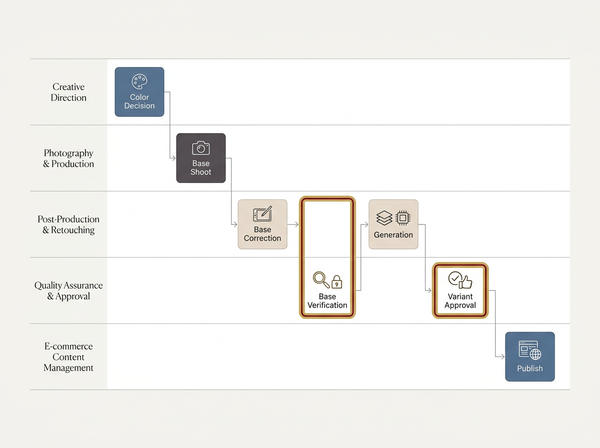
Stage | What happens | Owner | Gate before moving on |
Range approval | Colors chosen against physical references | Merchandising | Every shade has an approved standard |
Producibility check | Mill confirms each shade is achievable in the intended fiber | Sourcing | No shade in the range is aspirational |
Base shoot | Photograph the lightest colorway, lit for detail | Photography | Color reference in frame |
Base verification | Corrected file checked against its own sample | Review | Signed off before anything derives from it |
Variant generation | Remaining colorways produced from the verified base | Production | Each variant traceable to the base |
Variant review | Each variant checked against its own sample | Review | Reject reasons recorded, not just pass or fail |
Publish | Assets released to listings | Listing owner | Set consistency confirmed across images |
The gate that gets skipped most often is base verification, and it is the one that costs the most. An unverified base produces a range that is internally consistent and collectively wrong, which no reviewer catches by comparing variants to each other.
Base verification has a step inside it that gets treated as optional. The file usually needs correcting before it can be verified, since what came out of the camera carries whatever the light did to it, and approving an uncorrected base means approving the lighting rather than the garment. Sorting out whether the job in front of you is a correction or a color change belongs here, before anything derives from the file.
Where the range is approved and the base is verified, producing the colorways from the one photographed style is the mechanical part, and it is not where the risk sits.
Checking against samples, not against each other
Every variant gets compared to its own physical sample. Not to the base image, not to the previous variant, not to the swatch on a monitor.
Chain comparison feels efficient and drifts. Each link introduces a small judgment, the judgments accumulate in one direction, and by the sixth colorway the range has walked somewhere nobody chose. Comparing each variant to a fixed physical reference keeps the errors independent rather than cumulative.
Three conditions make sample comparison reliable. The same viewing light every session, so verdicts do not change with the time of day. The sample and the screen at a similar angle and distance, since both change appearance with viewing geometry. And a calibrated display for whoever signs off, because an uncalibrated screen means two reviewers are disagreeing about different images.
Where a sample does not yet exist — a shade still in development — the honest answer is that the image cannot be approved, only noted as provisional. Publishing a provisional variant is how a customer receives something that does not match what they saw.
Recording rejections in a way that improves the next batch
A rejection that says “color looks off” ends the conversation without teaching anyone anything. A rejection that names what is off routes the fix to the right stage.
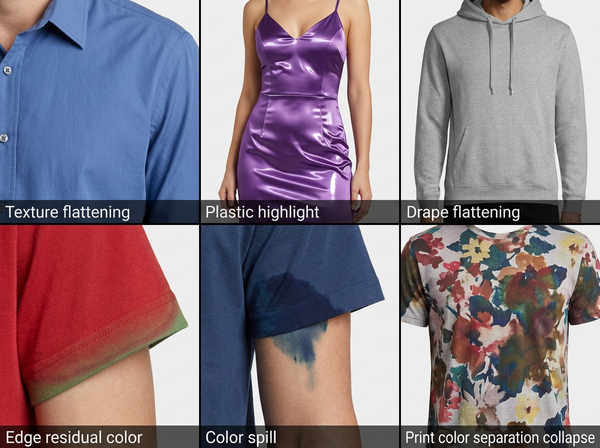
Four reason codes cover most of it. Base error means the parent file was wrong and every variant needs regenerating rather than adjusting. Shade mismatch means this variant missed its own standard and needs reworking alone. Texture loss means the change flattened the fabric and the direction or method has to change. Set inconsistency means the variants disagree with each other across images of the same colorway.
The distribution matters more than the count. A batch that is mostly base errors means the verification gate was skipped. Mostly shade mismatches means the generation step needs attention. Mostly texture loss usually means the range was shot in a dark colorway and everything is being lightened, which is a shoot decision rather than a production one — the reasoning behind that is in what a color changer is actually doing to a garment.
Keeping a set consistent, not just each image
• Generate every image type for a colorway in the same session, since a flat-lay produced weeks after its on-model shot tends to drift.
• Approve a colorway as a set rather than image by image, because a customer sees the images together and reads disagreement between them as a problem with the product.
• Re-verify against the sample when a base image is ever re-edited, as any change to the parent invalidates the sign-off on everything derived from it.
• Keep the approved base file identifiable and separate from working versions, so a later batch derives from the file that was actually signed off.
• Record which sample each variant was approved against, since samples get replaced and a rework a season later needs to know what the target was.
The last item is the one teams add only after being burned by it. Approval without a record of the reference is an opinion with a date on it.
When the change is not the right answer
Some situations should not be handled as a color change at all, and recognizing them early saves a cycle.
Where the shade is the reason someone buys — a signature color, a heritage shade, a color the brand is known for — photograph it. The cost of getting it slightly wrong is not a returned item but a diluted brand asset.
Where the fabric is specular or the range mixes matte and shiny in the same style, treat those pieces separately. A batch setting that suits jersey will not suit satin, and running both through the same process produces one good result and one that reads as plastic.
Where the color decision has not been finalized, wait. Generating a range against provisional shades produces work that has to be redone, and the redo usually arrives when the schedule has less room than it did the first time.
Where a shade is close to the skin tone or the background in the base shot, expect the boundary work to dominate. Reshooting with more separation is usually cheaper than fixing every variant.
What this process cannot do for you
It cannot make a screen-approved shade producible. Approval of an image says the image matches a standard, not that a mill can hit that standard at your price and lead time. Those two approvals are separate and one does not imply the other.
It cannot substitute for physical standards in a supplier conversation. A signed-off image is a production reference for imagery, not a color specification, and a factory matching to a file rather than to a physical standard is a dispute waiting to happen.
It cannot fix disagreement about what the color should be. Where merchandising and design have not settled the shade, the process will faithfully produce and approve whatever it is given, and the argument simply reappears later with more files attached to it.
It cannot compress the review step. Faster generation means more variants arriving at the same number of people holding the same samples, and the review capacity is what actually determines how fast a range ships.
Frequently Asked Questions
Who should sign off on color? Someone holding the physical sample who did not produce the image. Splitting production and approval is the single change that catches the most errors, and it works only if the approver has the sample rather than a reference image or a color name in a spreadsheet.
How many colorways can come from one base shot? As many as the range has, provided the base is verified and the direction of change is workable. The limit is practical rather than technical: every variant needs its own sample check, so review capacity sets the ceiling rather than the generation step.
What if the sample arrives after the images are needed? Mark those variants provisional and hold them out of publication rather than approving them against a screen. Where a launch genuinely cannot wait, publish the colorways that have samples and add the rest when they can be checked.
Do we need to redo the whole range if the base is corrected? Yes. Every variant inherits the base, so a correction to the parent invalidates all of them, and regenerating is faster and safer than adjusting each variant to compensate. This is the main argument for verifying the base before generating anything.
Should each image type be approved separately? Approve them as a set. A flat-lay and an on-model shot that each pass on their own can still disagree with each other, and that disagreement is what a customer notices while scrolling a single product page.
Can approval be done from a shared file rather than in person? Only if every approver has the same sample and a comparable viewing setup, which in practice means the sample travels or the approval does not. Remote sign-off against a screenshot reintroduces exactly the problem the sample was there to solve. Where a team is distributed, sending physical samples to each approver costs less than a range that ships wrong.
How do we handle a colorway that keeps failing review? Look at the reason codes before adjusting anything. Repeated shade mismatch on one colorway often means the shade sits far from the base, in which case a second base shoot for that part of the range costs less than another round of rework.
Approval is the bottleneck, not production
The instinct when a range is late is to speed up the image work, which is already the fastest stage. What determines the schedule is how many people can hold samples under a consistent light and say yes or no, and whether their decisions are recorded well enough that the next batch is easier. A process that names four owners, verifies the base before deriving anything from it, and records what each approval was compared against will ship a range faster than one that generates twice as quickly and argues about the results.
Verify the base before you generate anything
Photograph the lightest colorway in the range with a color reference in frame, correct it, and have someone holding the physical sample sign that one file off. Only then generate the rest. Check each variant against its own sample under the same viewing light rather than against the base image, record which sample it was approved against, and approve each colorway as a complete set rather than image by image.
→ Clothing Colorways — Style3D AI
Written by