T-Shirt Design Generator: From Idea to Print File
A t-shirt design generator gives you a picture, not a print file. Resolution, color mode, garment color and rights decide whether it prints.
A generator gives you a picture. A printer needs a file. Those are not the same object, and the distance between them is where most print-on-demand money is lost — in rejected uploads, muddy first samples, and refunds on shirts that looked right on screen and arrived looking like something else.
The picture is the easy half. What follows is the other half: what a print file has to satisfy, why generated artwork routinely fails those requirements, and which of the failures you can fix after the fact rather than by starting again.
A generated image is not a print file
A print file is a picture plus a set of production constraints. The constraints come from the printer, the print method and the garment, and none of them are visible in the image itself.
An image can look flawless at screen size and still be unusable: too small for the print area, in the wrong color space, with a background that is white rather than transparent, with text too fine for the ink to hold, or with a gradient that will band on the press. None of these are visible when you are admiring the design.
The practical consequence is that the generation step should end with a checklist rather than with a download. Every constraint below has a specification that comes from your print partner, and getting those specifications before you generate is faster than discovering them one rejection at a time.
What the printer needs, and where the spec comes from
Requirement | What it controls | Where to get the number |
Resolution at final print size | Whether edges and detail hold | Your printer’s file spec sheet |
Color mode and profile | How your color translates to ink | Printer’s spec, usually a named profile |
Transparency | Whether the garment shows through where it should | Printer’s spec; usually a flattened or transparent format |
Print area dimensions | Whether the design fits the platen | Product template, per garment and size |
Minimum line weight and text size | Whether fine detail survives | Method-specific, from the printer |
Number of colors | Cost and feasibility for screen printing | Printer’s quote structure |
File format | Whether it can be processed at all | Printer’s spec sheet |
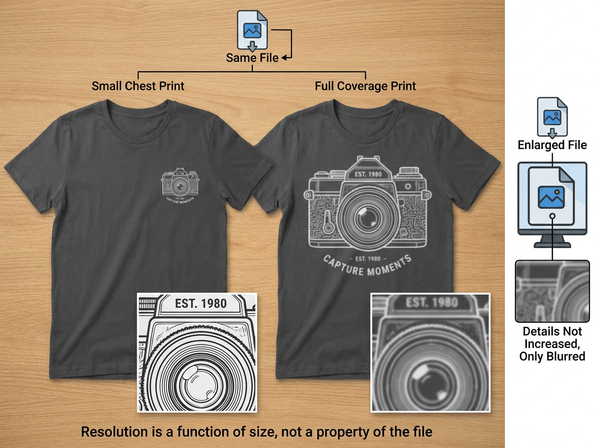
Resolution is the one people get wrong most, and the reason is a misunderstanding rather than carelessness. Resolution is not a property of the file alone; it is a relationship between pixel dimensions and physical print size. A file that is comfortable across a small chest print is thin across a full-front print, and enlarging it afterwards does not add detail, it only makes the missing detail larger.
Work backwards from the largest size you intend to sell. Generating at a size that suits your biggest print area costs nothing extra at generation time and removes the entire category of “it looked fine on the small one.”
Transparency has a similar trap. A design generated on a white background is not the same as a design with no background, and printing the first one on a colored shirt produces a white rectangle around the artwork. Where the artwork needs to sit directly on the garment, removing the background to a true transparent file is a required step rather than a refinement.
Screen color and ink color are different systems
Your screen makes color by emitting light. A press makes color by putting pigment on fabric that then reflects room light. The two systems can reach different sets of colors, and the difference is not evenly distributed.
Bright saturated colors are where the gap shows. Vivid oranges, intense greens and anything approaching neon are easy to display and often unreachable in standard process inks, so a design built around a glowing color will print duller than it appeared and the drop will look like a printing error rather than a physical limit.
Dark, muted and mid-tone palettes translate far more predictably. Designs built in those ranges tend to arrive looking like the file, which is why experienced sellers gravitate toward them without always being able to say why.
The reliable move is to get the printer’s color profile and preview in it before committing a design to a listing. Where that is not available, treat any highly saturated color in a generated design as a risk and test it on a sample before scaling.
The garment color is part of the artwork
Artwork does not sit on a neutral surface. It sits on cotton in a specific color, and on anything other than white that color participates in the result.
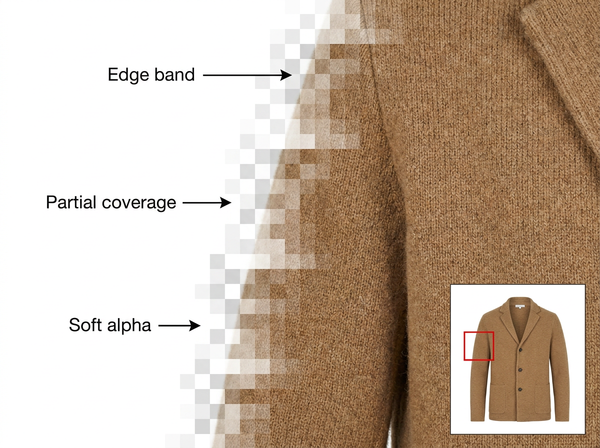
Direct-to-garment printing on dark shirts typically requires a white underbase — a layer of white ink laid down first so the colors above it are not tinted by the fabric. That underbase changes the feel of the print, adds cost, and makes the edges of the artwork more visible, which matters for designs with soft or faded edges that were never intended to have a boundary.
Semi-transparent effects are where this becomes a real problem. A generated design with a soft glow, a subtle shadow or a faded edge assumes a white page. On a black shirt, those areas either disappear into the fabric or acquire a visible white halo, depending on how the underbase is generated.
Designing for a specific garment color, rather than designing once and offering it on twelve colors, avoids most of this. Where a design must run across many garment colors, keeping edges hard and avoiding partial transparency makes it portable.
What each print method forgives
Direct-to-garment handles photographic complexity and gradients well and struggles with very fine lines and the cost of dark garments. It suits detailed, multi-color designs in small quantities.
Screen printing is the opposite. Each color is a separate screen, so cost scales with color count, and gradients have to be reproduced as halftone dots rather than as continuous tone. It rewards bold, flat, few-color artwork and punishes photographic designs.
Direct-to-film sits between them, and is more tolerant of garment type, with a hand-feel and edge quality that depend heavily on the specific setup.
Embroidery is a different discipline entirely. A design must be digitized into stitch paths, and detail below a certain size cannot be stitched at all. A generated image is a starting reference for a digitizer, not an input file.
The mistake worth avoiding is generating a design and then choosing a method. The method’s constraints should shape the design, since a four-color flat design and a photographic gradient design are different briefs even when they express the same idea. Settle the method first, then treat producing the print artwork as work against a known specification rather than as an open creative step followed by a compatibility check.
The rights question
This is the part that closes shops rather than costing a reprint, and it deserves more space than it usually gets in POD advice.
A generated design can reproduce protected material without anyone intending it to. Character likenesses, band logos, sports team marks, film and game iconography, and the distinctive visual identity of a living artist can all appear in output from an innocuous prompt, and appearing accidentally is not a defense.
Text is a particular risk. Slogans and phrases can be registered trademarks within specific categories, and apparel is one of the most heavily registered categories there is. A phrase that seems generic may be owned for use on clothing specifically.
The platform layer adds its own exposure. Marketplaces run automated matching against rights-holder databases, and repeated matches lead to listing removal and account action regardless of whether any individual case would have survived a legal argument. A shop can be closed on pattern alone.
Two habits reduce this materially. Search the phrase and the visual concept against trademark databases before listing, particularly in the apparel class. And keep away from any design that depends on recognizability — if the appeal is that it looks like something, that resemblance is the risk.
None of this is legal advice, and anything involving a recognizable mark, character or artist should go to someone qualified before it goes on a shirt.
What a design generator cannot do
It cannot guarantee a file is printable. Nothing in the generation step knows your printer’s specification, your print area or your garment color, so a beautiful output can fail every requirement simultaneously.
It cannot clear rights. Output is not screened against trademark or copyright databases, and a clean-looking design can contain protected elements the generator had no reason to flag.
It cannot produce true vector artwork from a raster image. Where a method requires vector — some screen printing workflows, most embroidery digitizing — a conversion step with a human decision at every simplification is required, and automatic tracing of a detailed image produces something unusable.
It cannot tell you whether a design will sell. Generation removes the production constraint on trying ideas, which makes selection the scarce skill rather than creation, and no volume of output substitutes for knowing a category.
Frequently Asked Questions
What size should I generate at?
Work backwards from your largest intended print area and generate to suit that, since scaling up afterwards adds no detail. Your printer publishes the pixel dimensions they want for each print area; ask for the spec sheet before you start rather than after a rejection.
Why does my print look duller than my screen?
Because a screen emits light and ink reflects it, and the set of colors each can produce is different. Highly saturated colors are the usual casualty. Preview in the printer’s color profile where possible, and sample before scaling any design built around a vivid color.
Do I need a transparent background?
Wherever the artwork sits directly on the garment, yes. A design generated on white will print its white background onto a colored shirt as a visible rectangle. Confirm the expected format with your printer, since some workflows want transparency and others want it flattened.
Can I sell a design a generator produced?
Commercially, that depends on the generator’s terms, which vary and change. Legally, the bigger risk is what is in the design rather than who made it: protected characters, marks and slogans create exposure regardless of the tool. Check both before listing.
Is screen printing or DTG better for generated artwork?
Neither is better in general, and the choice should shape the design rather than follow it. Photographic and gradient-heavy artwork suits DTG; flat, bold, few-color artwork suits screen printing and costs less at volume. Decide the method first.
How many designs should I test before scaling?
Enough to learn what your category responds to, tested on real listings rather than judged internally. Generation makes creating cheap and leaves selection expensive, so the constraint moves to how quickly you can read results rather than how many files you can produce.
Design for the constraint, not the screen
The useful reframe is that a print file is a design that has already answered a set of production questions: how large it will print, what color system it lives in, what garment color it sits on, which method will reproduce it, and whether anything in it belongs to someone else. Generated artwork arrives having answered none of them. Collecting those answers before generating, rather than after a rejection or a refund, is the difference between a POD operation that scales and one that keeps rebuilding files.
Get the spec sheet before you generate
Ask your print partner for their file specification and the product template for your largest print area, then generate to those dimensions rather than to a default. Confirm the color profile they expect, whether they want transparency or a flattened file, and their minimum line weight for the method you have chosen. Run one sample on your darkest garment color before listing anything, since that is where underbase and soft edges show their problems.
→ AI Print Generator — Style3D AI
Written by