Transparent Background Maker: How to Get Clean Edges
A transparent background maker fails at hair, knit fuzz and sheer fabric. Why edges are bands not lines, and what to fix at the shoot.
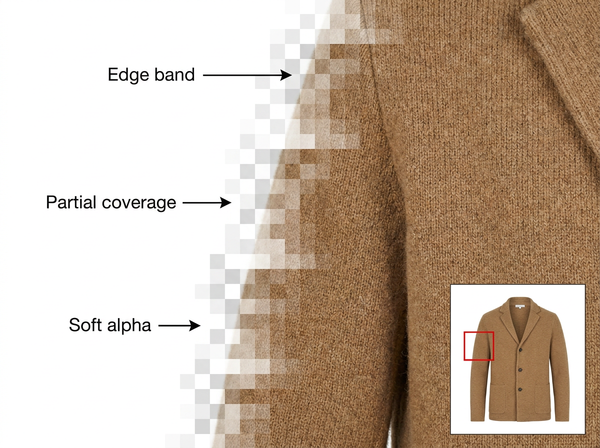
Most cutouts fail at the same three places: hair, knit fuzz, and anything sheer. Everywhere else a garment has a boundary you could trace with a pen. At those three, the boundary is not a line at all — it is a band a few pixels wide where the subject and the background are mixed together inside single pixels, and no selection that treats a pixel as in or out can resolve it.
That is the whole problem in one sentence, and almost every practical technique in this article follows from it.
Transparent is not the same as white
Before anything else, check which one you actually need, because the two get requested interchangeably and they are different deliverables.
A transparent background means a file with an alpha channel — a per-pixel record of how opaque each pixel is — saved as PNG or similar. It lets the same cutout sit on any color, which is what you want for banners, lookbooks, category tiles and anything where the background changes.
A white background means the pixels behind the subject are actually white, usually pure white, saved as JPEG. Marketplace main images typically require this, and a transparent PNG uploaded to a channel expecting white either gets rejected or renders on whatever color the platform decides.
Producing both from one cutout is straightforward and worth doing as a habit: make the transparent version, then composite it onto white for the channels that need it. Doing the reverse — trying to lift a subject back off a white background later — puts you through the hardest part of the job a second time.
What an edge really is
An alpha channel stores a value per pixel, not a yes or no. A pixel at the edge of a wool coat might be seventy percent coat and thirty percent studio wall, and the correct output records exactly that.
This is why a hard selection looks wrong on fabric. Force every edge pixel to fully opaque and you get a jagged outline with a rim of background color baked in. Force them to fully transparent and the garment loses its outermost fibers, which reads as a slightly shrunken, plastic-looking shape.
Three garment features make this acute. Hair on a model, where thousands of strands each occupy partial pixels. Knit and mohair fuzz, where the garment’s own outline is genuinely indistinct. And sheer fabric — chiffon, lace, mesh, organza — where the interior of the garment is partially transparent, not just its edge.
Sheer is the case people underestimate. A lace sleeve is not a shape with a complicated outline; it is a region whose opacity varies across its whole area, and treating it as a shape with holes produces something that looks like a sticker.
There is a practical test for whether an edge is a line or a band. Zoom to full resolution and look at the boundary: if you can point at the pixel where the garment stops, a hard selection will serve. If the transition takes several pixels and each one is a blend, the file needs a soft alpha and any tool or setting that outputs a binary mask will visibly fail on that image regardless of how carefully the outline was drawn.
A garment photographed against white and cut out cleanly will still show a pale rim when placed on a dark background. The instinct is to redo the selection. That rarely helps, because the selection is not wrong — the pixels themselves contain background color, mixed in at capture.
The fix is decontamination: recalculating the color of edge pixels to remove the background’s contribution, rather than moving the boundary. Most competent tooling has a version of this, and it is the difference between a cutout that works on any background and one that only works on backgrounds similar to the original.
This is also an argument for thinking about the final background before the shoot. A garment destined for dark banners is easier to cut from a mid-gray backdrop than from bright white, because there is less contamination to remove and less contrast to give the fringe away.
What makes a subject hard to cut
Feature | Difficulty | Why |
Solid woven garment, plain backdrop | Low | Clear boundary, few partial pixels |
Knitwear with visible fuzz | Medium | Genuine ambiguity in the outline itself |
Model with loose or textured hair | High | Thousands of partial-coverage pixels |
Sheer or lace panels | High | Interior opacity varies, not just the edge |
Garment tonally close to the backdrop | High | Boundary is faint in the source data |
Reflective or glossy fabric picking up the room | Medium | Reflections belong to the environment, not the garment |
Fine chains, fringe, tassels, straps | High | Structures thinner than the sampling grid |
The pattern is that difficulty comes from ambiguity in the original photograph rather than from complexity of shape. An elaborate silhouette with a crisp boundary is easy. A simple silhouette shot against a similar tone is not.
Shooting so the cutout is easy
• Separate the garment from the backdrop tonally, since a gray coat on a gray wall is a hard boundary for any method and an easy one to avoid at capture.
• Light the backdrop separately from the subject so it stays even, because a gradient behind the garment makes the boundary shift in difficulty across the frame.
• Keep the backdrop far enough behind the subject to avoid color bouncing onto the garment edges, which is contamination you would otherwise have to remove.
• Style hair deliberately rather than leaving loose flyaways, as the styling decision costs seconds and the cutout consequence costs minutes per image.
• Shoot sheer garments against a backdrop you can live with showing through, since anything visible behind them will be part of the alpha rather than removable from it.
Tonal separation is the one that matters most. Where it exists, removing the background cleanly is close to automatic; where it does not, every image in the batch inherits the same difficulty.
These are studio decisions rather than post-production ones, which is why they belong in the shoot brief rather than in a retouching brief. A photographer told that the images will be cut out will make different choices about backdrop tone, subject distance and hair than one who is only told to make the garment look good in frame, and the difference shows up as hours saved per batch rather than as anything visible in the raw files.
Where free tools stop
Free tiers of cutout tools tend to restrict output rather than quality of selection, and the restrictions cluster in predictable places.
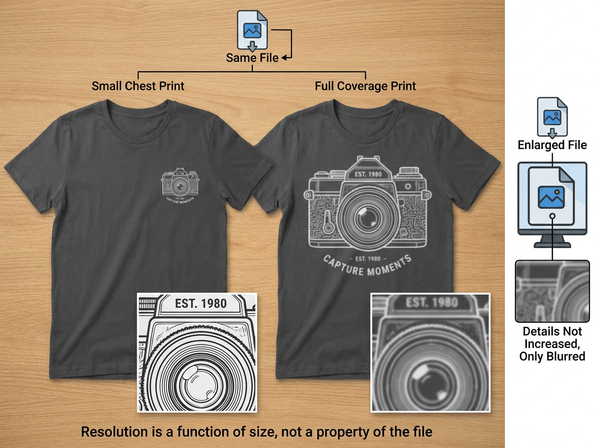
Resolution caps are the most common, and they matter more here than in most image work, because a cutout’s edge quality is judged at the pixel level. A downsampled PNG loses exactly the partial-coverage detail that makes hair and fuzz look real.
Alpha quality is the second, and it is easy to miss. Some free outputs deliver a hard-edged mask rather than a true soft alpha, which looks acceptable against a light background and shows its jagged outline the moment it goes on a dark one. Check a free tool’s output on black before judging it.
Batch limits and watermarks are the visible restrictions, and commercial rights are the invisible one. A cutout used on a listing is commercial use, and free tiers frequently grant personal use only. The terms decide this, not the feature list.
Free tiers are genuinely useful for deciding whether your photography separates well enough to automate, which is a question about your studio rather than about the tool. That test costs nothing and answers more than a feature comparison.
Checking a cutout properly
Review on black, not on the checkerboard. The checkerboard pattern most editors show behind transparency is mid-tone and hides both fringing and lost edge detail, which is why cutouts that looked fine in the editor fall apart on a dark banner.
Then check at full zoom along the hardest boundaries rather than scanning the whole outline. Hairline, shoulder against backdrop, any sheer panel, and the underside of hems where shadow and background meet.
Where the cutout will be composited onto a specific background, check it there. A cutout is not correct in the abstract; it is correct against the range of backgrounds it will actually sit on, and a file approved on white can be unusable on a brand color.
What a background remover cannot do
It cannot invent detail the photograph did not record. Where a garment edge blurred into a similar-toned backdrop, the information to separate them is not in the file, and any result is a guess about where the boundary should have been.
It cannot make a sheer garment look right without a decision about what shows through it. Transparency is content, not absence, and something has to be chosen to sit behind it.
It cannot remove reflections that belong to the environment. A glossy jacket that picked up the color of a studio wall keeps that color after the wall is gone, which reads as a garment that does not match its own description.
It cannot substitute for a reshoot when the separation was never there. Teams often spend more on rescuing a badly separated batch than a reshoot would have cost, and the rescued files still look rescued.
Frequently Asked Questions
PNG or JPEG for product images? PNG where you need transparency, JPEG where the channel requires a solid background. Produce the transparent version first and composite to white for the channels that need it, since going the other direction means redoing the difficult part of the work.
Why does my cutout have a white halo on dark backgrounds? Because the edge pixels contain background color mixed in at capture, not because the selection is misplaced. The fix is edge decontamination rather than reselecting. Shooting against a backdrop closer to the destination background reduces the problem at source.
Can hair be cut out reliably? Usually well enough for commercial use, provided the hair is tonally separated from the backdrop and not blowing across a similar tone. Loose flyaway strands against a matching background are the case that stays hard. Styling for the cutout is faster than fixing it afterwards.
How do I handle lace and mesh? Treat them as varying opacity across a region rather than as a shape with holes, and decide what will sit behind them before finalizing. A lace panel cut as a hard shape reads as a sticker regardless of how accurate the outline is.
Does a transparent background work for marketplace main images? Usually not, since most marketplaces specify a solid, typically pure white background for the main image. Check each platform’s current image policy before publishing, as these requirements are revised periodically.
Should I remove the shadow along with the background? Remove it and rebuild it deliberately, rather than keeping a shadow that belongs to a backdrop you deleted. A garment floating without contact shadow reads as pasted on, and a shadow from the original studio floor rarely suits the new context, so rebuilding contact shadow in a retouching pass is part of finishing a cutout rather than an optional extra.
The boundary was decided at capture
Cutout quality is mostly determined before any tool opens the file. Tonal separation, backdrop distance, even lighting behind the subject and deliberate hair styling do more for the result than any setting, and their absence cannot be recovered later. Where the separation exists, the work is fast and the edge holds up on any background. Where it does not, every image in the batch carries the same defect, and the honest options are a reshoot or a lowered expectation — not a better tool.
Test your separation before you batch anything
Take one image from your hardest setup — a knit or a model with loose hair against your usual backdrop — and cut it out. Place the result on pure black and check the hairline, the shoulder edge and any sheer panel at full zoom. If the edge holds on black, your photography separates well enough to automate the rest. If it does not, adjust the backdrop tone or the lighting before running the batch, because every file will inherit the same problem.
→ Background Remover — Style3D AI
Written by