Raster to Vector: When Apparel Production Actually Needs It
Vector gets requested reflexively. Which apparel processes genuinely need it, what auto-tracing produces, and when redrawing is faster.
Vector files get requested reflexively. A factory asks for vector, a printer asks for vector, and somebody runs an auto-trace and sends back a file that satisfies the request and not the requirement.
The two are different. Vector is a file property; what the factory needs is a file they can separate, cut, stitch or scale from. A traced photograph is technically vector and practically useless for most of those, and knowing which situation you are in saves a round trip that usually costs days.
What actually differs
A raster image is a grid of pixels, each with a color. A vector file is a set of shapes defined mathematically — paths, curves, fills — which the software draws at whatever size is asked for.
The practical consequences follow directly. Vector scales without degrading, because the shapes are recalculated rather than enlarged. Individual elements can be selected and edited as objects. Colors can be separated cleanly, because each shape has an assigned color rather than a blend of neighboring pixels.
Raster handles photographic content and continuous gradients, which vector represents poorly or with enormous complexity. Neither format is better; they answer different questions.
Where apparel production genuinely requires vector
Process | Needs vector | Why |
Screen printing separations | Yes | Each color becomes a separate screen, so colors must exist as discrete shapes |
Embroidery digitizing | Effectively yes | Stitch paths are derived from clean outlines, not from pixel edges |
Laser or blade cutting | Yes | The machine follows a path; there is nothing to follow in a raster |
Technical flats for CAD | Yes | Lines must be editable and assignable to weights and layers |
Large-format printing | Usually | Scaling without degradation matters at size |
DTG and DTF printing | No | The printer rasterizes anyway; a high-resolution raster is fine |
Ecommerce imagery | No | Screens are raster and photographs are raster |
The pattern is that vector is required wherever a machine follows a path or a color becomes a physical separation. Where the output is ink sprayed at a resolution, vector buys nothing.
Which means a large share of vector requests are habit rather than requirement, and asking what the file will be used for takes one message and often ends the conversation.
There is a second question worth asking alongside it: which format specifically. Vector is a category, not a file type, and suppliers want different members of it depending on their equipment. A correct vector in a format the supplier’s software handles poorly still comes back, and the conversion between formats can flatten effects or convert text to outlines in ways nobody wanted. Getting the format named at the same time as the requirement removes a second round trip.
What auto-tracing produces
Tracing analyzes a raster image and generates paths approximating the boundaries it finds. On the right input it works well: a flat, high-contrast logo with clean edges converts almost perfectly, because the source already consists of the discrete shapes vector wants to describe.
On a photograph it produces something else. Every subtle tonal variation becomes a shape, so a traced photograph can contain thousands of paths, many of them fragments a few pixels across. The file is vector in format and unusable in practice: it scales without degrading and it cannot be edited, separated or simplified without starting over.
Compressed sources make this considerably worse. JPEG artifacts are tonal variation the trace has no way to recognize as damage, so the blocks and halos around edges become shapes of their own. A logo pulled from a website and traced often carries a faint outline of its own compression, visible only when printed.
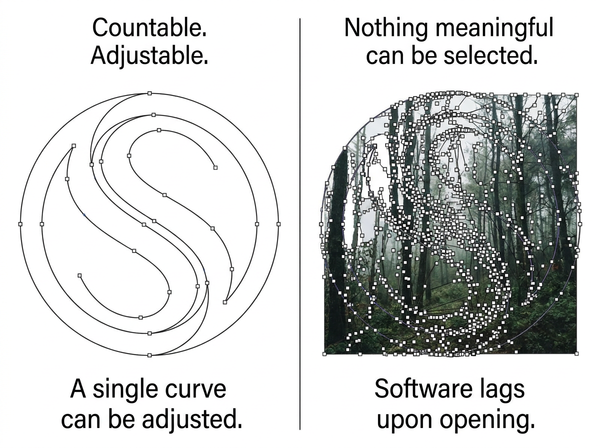
Node count is the diagnostic. A logo traced well has a countable number of anchor points, and a person can adjust a curve. A traced photograph has so many that selecting anything meaningful is impossible, and the file often performs badly in the software that opens it.
Why a traced photo fails the actual requirement
Format is the least of what a production file needs.
Screen printing needs discrete color separations. A traced photograph gives you hundreds of shades where the design has four colors, and reducing them is manual work that a trace does not do for you.
Embroidery digitizing needs clean, closed outlines that describe regions to be filled with stitches. Fragmented paths and open contours produce stitch paths that jam or look wrong, which is why digitizers frequently redraw rather than work from a supplied trace.
A technical flat needs line weight hierarchy and layer structure — silhouette, seam and topstitch distinguished from each other. A trace assigns none of that, since the photograph does not label which line is which, and the requirement is covered in what makes a technical flat usable downstream.
Cutting needs a single continuous path per cut. A trace gives you the outline of what it saw, including any shadow it mistook for an edge.
The common thread is that each process needs the file to be organized in a particular way, and organization is exactly what a trace cannot supply. It reports boundaries. Which boundary is a color break, which is a cut line and which is an artifact of the lighting are distinctions the design carries and the pixels do not, so somebody has to impose them afterwards regardless of how good the trace was.
What to trace and what to redraw
The decision rule is simple enough to apply without thinking about it: trace what was already flat and discrete, redraw what was photographic or ambiguous.
Trace confidently when the source is a logo, an icon, a flat graphic, a line drawing, or artwork that was originally vector and got flattened at some point. These convert cleanly because the trace is recovering shapes that genuinely exist.
Redraw when the source is a photograph, a scan of a hand drawing with variable line weight, artwork with soft edges or gradients, or anything where the shapes have to be interpreted rather than detected. Redrawing sounds slower and usually is not, since cleaning up a bad trace takes longer than drawing the shapes deliberately.
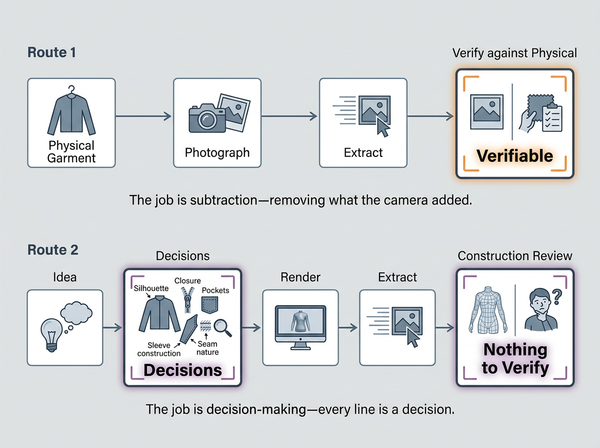
For garment line art specifically, the useful route is not to trace a garment photograph. It is to extract the technical drawing from the garment image as line art built for that purpose, then verify it against the physical piece — which produces a drawing with structure rather than a trace of shadows.
Preparing a file so tracing works
Where tracing is the right approach, the input decides the result more than any setting does.
Start from the highest resolution version available, since tracing amplifies whatever is in the source and a compressed file traces its own artifacts. Flatten transparency and remove drop shadows and glows, because soft edges have no boundary for the trace to find and produce fringed shapes. Increase contrast between elements you want separated. Where the artwork has a defined palette, reduce it to those colors before tracing rather than expecting the trace to work out which shades were meant to be the same.
After tracing, check three things: node count on a representative shape, whether elements can be selected individually, and whether the color count matches the design’s intended palette. If the answer to any is unreasonable, the file will fail downstream regardless of how it looks. Cleanup belongs before this point rather than after, since converting a prepared file to vector can only trace what it is given.
What tracing cannot do
It cannot separate colors by design intent. It separates by what it detects, and a design with four intended colors photographed under uneven light contains far more than four, none of them labeled.
It cannot recover an original vector file. A trace of a flattened logo approximates the original curves; it does not restore them, and the difference shows in the curve quality at large sizes and in any typography.
It cannot produce embroidery-ready output. Digitizing is a separate craft involving stitch type, direction, density and underlay, and a clean vector outline is the input to that process rather than a substitute for it.
It cannot assign meaning. Line weight, layer structure and which shape is which are all information the design carries and the pixels do not, and a trace has no access to any of it.
Frequently Asked Questions
Does the factory really need vector, or do they just always ask?
Ask what the file will be used for. Screen printing, cutting and embroidery genuinely need it; DTG, DTF and ecommerce imagery do not. A high-resolution raster is often the better deliverable for the second group, and the question takes one message.
Can I trace a photograph of a garment to get a technical flat?
Poorly. A trace follows every shadow and fold, producing a drawing that includes things the garment does not have, with no distinction between seam lines and stitching. Line art built for the purpose and verified against the garment is a different and better starting point.
Why does my traced logo look slightly wrong at large sizes?
Because the trace approximated the original curves rather than restoring them. Small deviations invisible at screen size become visible when printed large, and typography suffers most. Where the original vector exists, finding it is worth an hour of searching.
Is SVG the same as vector?
SVG is one vector format among several, and different processes want different ones. Confirm the format your supplier wants rather than assuming, since a correct vector in the wrong format still needs converting and a conversion can flatten things.
How many colors should a design have before tracing?
As few as the design actually uses, established before tracing rather than after. If the artwork is meant to be four colors, reduce it to four in the raster, then trace. Asking a trace to work out which of two hundred shades were meant to be the same color is asking it to make a design decision.
Should we keep vector originals for everything?
Where a design will ever be printed, cut or stitched, yes, and store them somewhere findable rather than in a designer’s local folder. The most common reason teams trace at all is that the original vector exists somewhere and cannot be located, which is a filing problem being solved with software.
What if the trace is nearly right?
Judge by what has to be fixed. Adjusting a few curves is fine; deleting hundreds of stray fragments or manually merging colors is usually slower than redrawing. Teams tend to persist with a bad trace because the sunk time feels wasted, which is what makes it more expensive.
Ask what the file has to do
The vector question is almost never really about format. It is about whether a machine will follow a path, whether a color will become a physical separation, and whether a person will need to edit an element on its own. Where any of those is true, the file needs structure that only deliberate construction provides, and a trace of a photograph does not supply it whatever the extension says. Where none is true, a good raster is the right answer and the request was habit.
Ask what the file is for before converting anything
Send one message to whoever asked for vector and find out which process the file feeds. Screen printing, cutting and embroidery need it; DTG, DTF and web imagery do not. If it is genuinely needed, check whether the source is flat and discrete — a logo or line art traces well — or photographic, in which case redrawing is faster than cleaning up the trace. After any conversion, check node count, whether elements select individually, and whether the color count matches the intended palette.
→ Image to Vector — Style3D AI
Written by