Shopify Product Image Sizes: What the Platform Actually Needs
Shopify does not check your images against a standard. The numbers govern how the platform displays them, which makes the failure mode quiet rather than loud.
Some platforms check your images against a standard and suppress the listing when it fails. This is not one of them. It is your store, and nothing is going to reject a photograph for looking wrong.
Which makes the numbers here a different kind of thing. They are not a compliance threshold. They govern how the platform displays what you give it, and the failure mode is correspondingly quiet.
Nobody is checking, and that is the problem
On a marketplace, non-compliance announces itself: the listing gets suppressed, traffic disappears, somebody investigates. Unpleasant and unambiguous.
On your own store, an image that is too small uploads fine, appears on the page, and looks acceptable in the admin thumbnail. What happens is that a customer hovers to inspect the fabric, sees something soft, and leaves. Nobody logs that, and no report attributes it to an image size.
So the discipline has to come from you, because the platform is not going to supply it.
This cuts both ways and the freedom is worth acknowledging. Nothing here restricts you to a white background, forbids text on an image, or dictates how a product is framed. A store can shoot lifestyle imagery as its primary product photography, put multiple items in one frame, or use illustration instead of photography — all of which would be refused on a marketplace. The constraints that remain are the ones your customers impose, and they are less specific and harder to check.
What the numbers actually govern
Three things, and they are worth separating because they pull in different directions.
The zoom threshold. Zoom activates above a specific size — images must be larger than 800 x 800 pixels for the feature to work at all. Below that, the customer simply does not get to look closely.
Responsive generation. The platform stores what you upload and generates smaller versions from it, which the browser selects according to the device. A phone receives a small variant; a desktop receives a larger one. You are uploading a master rather than a display image.
Page weight. Every image is downloaded by somebody on a connection you do not control, and the file size limit of 20 MB per file is far above anything that belongs on a product page.
The recommended figure sits in the middle of these: 2048 x 2048 pixels for square product images, which is large enough for zoom to hold up and small enough not to burden the page.
Activating and looking good are two thresholds
This is the distinction that catches people who did the research and still ended up with soft zoom.
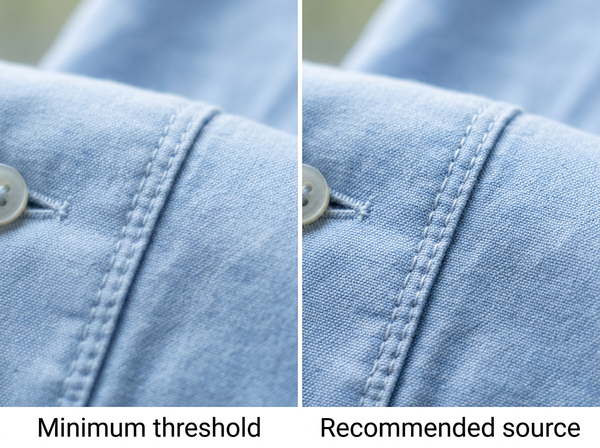
Zoom turns on above 800 x 800. Zoom looks good at considerably more than that. An image just over the activation threshold gives a customer a magnifier that reveals a blurred version of what they were already looking at, which is arguably worse than not offering zoom — it invites inspection and then fails it.
The gap matters most for exactly the products where zoom matters most. Someone checking stitching, a weave, a print registration, or a label is doing the thing the feature exists for, and those are the details that disappear first when there is not enough resolution behind the magnification.
Meeting the minimum is therefore not a goal. It is a floor below which a feature does not function, and functioning is not the same as being useful.
The reason this goes unnoticed for so long is that nobody reviewing a catalog uses zoom. Zoom is what a customer does at the point of deciding, on one product, after everything else has already convinced them. The people who look at these pages daily are looking at grids and thumbnails, where a soft master and a sharp one are indistinguishable.
Upload the master, not the display size
The instinct to resize images to exactly what the page shows is left over from an era when that was necessary. It is now counterproductive.
Because the platform generates its own variants from what you upload, giving it something at display size means every larger context — retina screens, zoom, a wider viewport — is served from an image that has nothing more to give. Giving it a master lets it produce the small versions itself and keeps something in reserve for the ones that need more.
The practical rule is to upload at the recommended size and let the platform handle everything downward from there. What it cannot do is invent detail upward. A master that was captured properly serves every device that exists now and every device that arrives later; one that was resized down to a theme’s display width serves this year’s layout and nothing beyond it.
When upscaling is the right call, and when it is not
Most of the time, upscaling before upload is the wrong move. If your images were captured at or above the recommended size, enlarging them further adds file weight and no detail, and enlargement redistributes the information already present rather than adding any.
There is one situation where it is the right call: a legacy catalog captured below the zoom threshold. Those images do not function, and reshooting an entire back catalog is frequently not viable. Enlarging them to reach the threshold restores a feature that was absent, which is a real gain even though the detail is reconstructed rather than recovered.
Two cautions apply to that case. The result will be softer than a native capture at the same size, so it buys function rather than quality. And enhancement is a different operation from enlargement — sharpening an upscaled image makes the reconstruction more visible rather than less.
Consistency beats resolution
A collection grid shows products side by side, and the eye reads the set before it reads any individual product.
Mixed aspect ratios in a grid produce a layout that looks broken regardless of how good each photograph is. Products cropped differently look like they came from different stores. A single high-resolution image sitting among lower-resolution ones stands out for the wrong reason.
Picking one ratio and applying it to the entire catalog does more for how a store reads than any individual image improvement — which is the same principle that governs how a product page holds together, applied one level up at the collection.
The corollary is that adding a new product means matching the existing standard rather than improving on it. An upgrade applies to the whole catalog or it applies to nothing.
That constraint is easier to accept when the standard is written down somewhere, with the ratio, the dimensions, the format, and the target file size on one line. Most stores hold it as a habit instead, which works while one person is doing the uploads and stops working the moment a second person joins or the first one is busy.
What actually gets refused
Very little. There is a maximum file size of 20 MB and a maximum dimension, and images beyond those are not accepted as uploaded.
Everything else is a judgment you are making about your own store. There is no background requirement, no rule against text on images, no restriction on how many products appear in a frame. Those constraints exist on marketplaces and do not transfer here, which occasionally trips up sellers who run both and assume one standard covers everything.
Which means the checklist for this platform is short and the discipline is long. Nothing enforces consistency across your catalog, nothing prevents a soft zoom, and nothing tells you when a page has become slow. Those are all yours.
FAQ
Should every image be square?
Square is the common default because it fits collection grids and mobile layouts cleanly. What matters more than which ratio you choose is that the whole catalog uses one, since mixed ratios are visible in a grid in a way that a particular ratio is not.
Does file format matter?
It affects file size considerably at equivalent visual quality, which affects page speed. Choosing a format is worth doing deliberately once and applying everywhere rather than leaving it to whatever an editor defaulted to.
Will the platform compress my images?
It generates smaller variants and serves them according to device, so what a visitor receives is usually not the file you uploaded. That is why the upload should be a master rather than a display-sized file.
Is a bigger image always better?
Past the recommended size the returns fall off quickly while file weight keeps rising. The recommendation exists at the point where zoom quality and page speed balance, which is a more useful target than the maximum.
How do I fix a catalog with mixed sizes?
Set the standard first, then re-export everything to it, starting with the products carrying the most traffic. Fixing images individually as they are noticed produces a catalog that is inconsistent in a new way.
Does image size affect search ranking?
Page speed is a factor in how pages perform generally, and oversized images are one of the more common causes of slow product pages. The connection runs through speed rather than through image dimensions directly.
Where this leaves you
The absence of enforcement is the thing to plan around. No process will stop you from publishing an image that is too small, cropped differently from its neighbors, or heavy enough to slow the page.
That makes the standard an internal document rather than a compliance requirement — and internal standards that were never written down tend to drift within a season, product by product, each decision reasonable on its own. The platform will display whatever you give it, faithfully, forever.
Check the oldest products first
Open the products that have been in your catalog longest and check their image dimensions against the current recommendation. Older items are the ones most likely to sit below the zoom threshold, because they were uploaded under whatever standard applied at the time — and nothing has flagged them since, because nothing on this platform does. Fixing those restores a feature customers are already trying to use. See how enlargement works and what it can and cannot recover.
Written by