TikTok Shop Image Requirements: Where Listings Get Rejected
There are two gates here, not one. Passing review gets a listing published; a separate quality assessment decides whether anyone sees it after that.
Most guidance on this platform covers getting a listing approved. Approval is the first of two gates, and the second one is where a compliant listing quietly stops working.
Two gates, not one
The first gate is review. Images that violate the content rules are refused, the listing does not publish, and the seller finds out.
The second gate is quality assessment. Once published, a listing is evaluated on how complete its imagery is, and that evaluation affects how often the product appears in search results and recommendation feeds. Nothing is refused here. Visibility is simply lower.
The difference in how those two failures present is the reason the second one persists. A rejection is loud and gets fixed. A low visibility tier looks exactly like a product that is not selling well, which sellers attribute to price, competition, or the product itself — anything except a listing that has fewer images than the platform wanted.
Passing review is not the same as being seen.
What actually gets rejected
The rejections concentrate in one place, and it is not image quality.
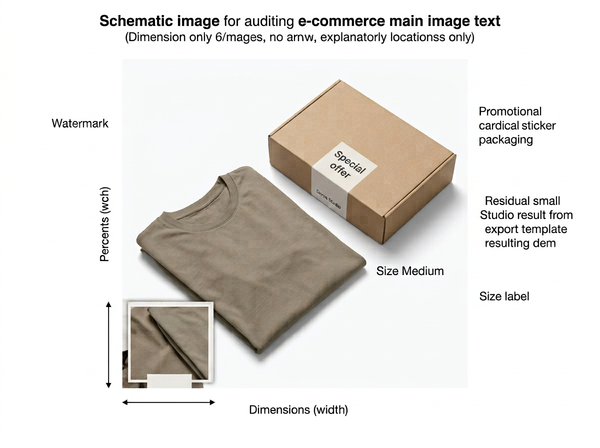
Text on the hero image is the dominant cause. Brand names, marketing copy, and even unobtrusive corner watermarks are grounds for refusal, and this is stated consistently across every account of the platform’s rules.
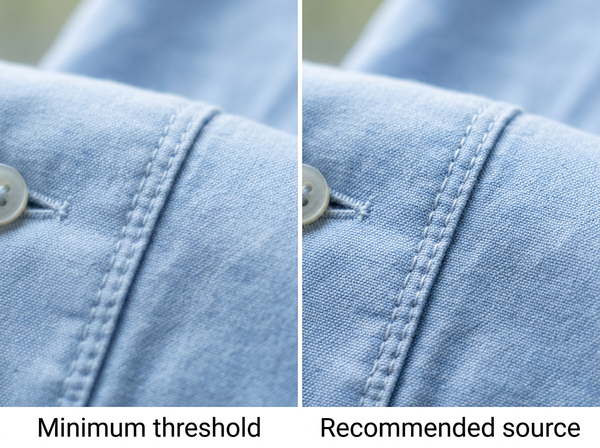
Blurry or low-resolution images hurt conversion and are not the main rejection trigger. There is a resolution floor — images below roughly 600 x 600 pixels do not publish, with 800 x 800 or higher recommended so images hold up on a phone — but sellers rarely fall below it. They fall foul of text.
Which produces a common and frustrating pattern: a seller assumes the rejection was about photographic quality, reshoots at higher resolution, resubmits the same composition with the same corner watermark, and is refused again.
The misdiagnosis is understandable. Rejection messages tend to be brief, and “does not meet image requirements” reads as a comment on the image rather than on its contents. Quality is also the thing a seller has most recently spent money on, so it is the first place attention goes.
Text includes more than sellers think
The reason this cause is so persistent is that “text on the image” covers several things that do not feel like text when you are looking at your own file.
Export watermarks added automatically by an editing tool. Brand marks baked into a template. Promotional stickers that are physically on the product’s packaging rather than added in post. Size annotations. Badges reading new or best seller. Borders and collage frames that carry a label.
Every one of those has been added by somebody who did not think of themselves as putting text on the hero image. The hero image is the one slot on a product page that carries no commentary — everything explanatory belongs in the slots after it, and even there restraint reads better than density.
The packaging case deserves a note because it feels unfair. A product whose box carries promotional text has that text in every photograph of it, and the seller did not add anything. The practical resolutions are to photograph the product outside its packaging where that makes sense, or to angle the shot so the promotional face is not toward the camera. Neither is a workaround; both are just what the rule implies once you accept that the check does not distinguish between text you applied and text that was already there.
The background rule
The first image must sit on a clean white or light background, with no graphics, stickers, or logos.
That requirement is straightforward to state and carries the same practical difficulty it does anywhere else: a photographed backdrop, a visible surface line where the product meets a table, and shadows falling on the backdrop all read as failures of a clean background. A cutout placed on a uniform fill resolves all three at once, which is why it is the standard approach rather than shooting for it directly.
Later slots are far more permissive, and that permission is where this platform differs most in spirit from a conventional marketplace. Lifestyle context, in-use imagery, and scale references are not merely allowed but expected, because the audience arriving at a listing has usually come from video and responds to imagery that feels continuous with it.
The second gate: completeness
A listing with very few images is assessed as lower quality regardless of how good those images are.
The logic is straightforward from the platform’s side: a buyer arriving from a video wants to confirm what the product is, how large it is, what it is made of, and what it looks like in use. A listing with two images cannot answer all of that, so it is a worse result to show someone.
What this means practically is that image count is not a matter of thoroughness but of visibility. Filling the available slots with images that each answer a distinct question is the work; filling them with near-duplicates of the same angle is not, and may not help.
The useful frame is the one that applies to any product page: count the questions answered rather than the images uploaded.
There is a scheduling consequence worth planning for. Because completeness affects visibility rather than approval, a listing published with a partial image set starts accumulating a history at a lower tier, and improving it later means the product has already spent its first weeks with reduced exposure. For a launch that matters, the full set belongs at publication rather than as a follow-up task.
Generated images now require disclosure
The platform requires a visible disclosure label on AI-generated product images.
This is a content policy rather than a quality judgment — the requirement is to label, not to avoid. What it changes is workflow: if generated imagery is part of how a catalog gets produced, the disclosure has to be part of the same process rather than remembered listing by listing.
It also makes the boundary matter. A photograph with a replaced background, a fully generated product image, and a photograph with routine retouching are three different things, and where the requirement begins is worth confirming directly for your own workflow rather than inferring. Requirements in this area are changing across the industry, and anything read here should be checked against current platform documentation before a catalog is built on it.
Why reusing images from elsewhere fails
Sellers extending onto this platform generally start by uploading the images they already have, and the failures follow a predictable pattern.
• Text that was acceptable elsewhere. Secondary-slot infographics from another platform get uploaded into the hero position, or a hero that carried a small logo passes elsewhere and fails here.
• Wrong image count. A catalog built to another platform’s minimum arrives short of what this one’s quality tier rewards.
• Composition built for a different context. Images shot to be scanned in a search grid are entering a page reached from video, where the audience arrived already interested and is checking rather than browsing.
• Framing conventions that differ. Crop and ratio expectations are not identical across platforms, and this is worth confirming per category before a range is reshot rather than after.
None of these are quality problems, which is why the instinct to fix them by reshooting at higher resolution does not work.
The reuse instinct is otherwise sound and worth keeping. A single master image set, produced once and adapted per platform, is far cheaper than shooting each channel separately. What has to be adapted is the hero — cleaned of anything textual, cropped to whatever this platform currently expects — while the supporting images usually travel with fewer changes than sellers assume.
FAQ
What ratio should the hero image be?
Guidance on this has shifted and differs by account, so confirm the current requirement in the platform’s own seller documentation for your category before committing a range. Getting this from a third-party summary is the one item most likely to be out of date.
Can I put my logo on any image?
Not on the hero image. Later slots are more permissive, and even there a logo competes with the information the slot exists to deliver.
Does the platform reject blurry images?
There is a resolution floor below which images do not publish. Above it, blur affects whether the listing sells rather than whether it goes live, which is a slower and less visible penalty.
How many images should a listing have?
Enough that each one answers a different question a buyer arriving from a video would have. Filling slots with variations of one angle satisfies a count without satisfying the intent.
Is a rejection permanent?
Corrected images can be resubmitted. The common mistake is resubmitting a corrected version of the wrong problem, which produces the same outcome and consumes another cycle.
Do I need to label images with replaced backgrounds?
Where the disclosure requirement begins is worth confirming directly with the platform for your specific workflow, since the distinction between editing and generation is exactly where policies differ and change.
Where this leaves you
Check the hero images in your catalog for text before checking anything else. That single pass will resolve most of what gets refused, and it costs an afternoon.
Then count the images per listing and ask what each one answers. That second pass addresses the failure nobody reports — the listing that published cleanly, sits in a lower visibility tier, and looks from the outside like a product that simply did not find its audience. The first gate tells you when you have failed it. The second one never will.
Do a text pass, then a count pass
Two sweeps through your catalog, both cheap. First, look at every hero image for anything textual — corner watermarks, template marks, promotional stickers on packaging, size annotations, new-arrival badges. That is where the refusals concentrate, and most sellers find something they had stopped noticing years ago. Second, count the images on each listing and write down beside each one what question it answers. Anything answering nothing the previous image did not is a slot doing no work, and slots are what the second gate is counting. See how product page image sets get structured.
→ https://www.style3d.ai/ai-photoshoot/ai-fashion-pdp-layout
Written by