What Replaces a Removed Object in a Photo
A fill states what was there. When that region held part of the garment, nothing in the photograph supports the statement. Fill, reshoot, or reframe.
Removing something from a photograph is the easy half. You draw around the clip, the stand, the passerby, the cable, and it goes. The half that decides whether the result is usable is what appears in its place, and that part is not removal at all. It is generation, working from the pixels around the hole and from everything the model has seen about scenes that look like yours.
Which means the useful question is never whether the object can be taken out. It always can. The question is what was behind it, and whether that thing could be worked out from what is still visible.
Removal is a selection problem, filling is a generation problem
The two operations get one button and one name, so they get one level of scrutiny. They deserve different levels. Selection is checkable: you can see the boundary you drew, and an error shows up as a halo or a chewed edge. The fill is not checkable in the same way, because there is nothing to compare it against — the reference for that region was the object you just deleted.
The object remover in Style3D AI takes an image and a selection and returns the image with that region filled from its surroundings. That description sounds modest and is worth taking literally: the surroundings are the entire input. Whatever the object was covering contributed nothing, because it was covered.
The judgment is the same one that governs angles
An earlier piece divided what an image can be asked for into consequences and content. A consequence follows from things that are already visible: the way a plain backdrop continues behind a light stand, the way a floor recedes, the way a soft shadow falls off. Content does not follow from anything: a seam, a pocket opening, a button, a label, the next repeat of a print, the part of a sleeve that a hand was covering.
Fill a consequence and the result is reconstruction. The evidence for what belongs there is present in the frame, and the fill is an inference anyone could check by looking at the surrounding region. Fill content and the result is invention. It will be plausible, it will match the surrounding fabric in color and texture, and it will be a statement about the garment that nothing in your photograph supports.
That distinction survives every phrasing of the task. It does not matter whether the removed object is small, whether the region is in shadow, or whether the fill looks convincing. What matters is whether the covered area held information that exists nowhere else in the image.
What was actually behind it
What you are removing | What it was covering | Fill or reshoot |
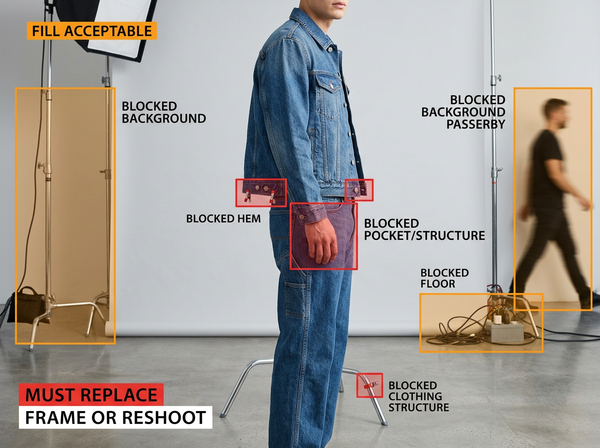
A light stand or reflector against a plain backdrop | More backdrop, lit the same way | Fill, since the continuation is visible on both sides |
A cable, a floor mark, a stray thread on the sweep | Floor or backdrop with a smooth falloff | Fill |
A clip or pin holding the garment back | The garment itself, including whatever seam or drape it distorted | Reshoot or use another frame |
A mannequin arm, a stand, a support behind the garment | The interior, the back, or the shape the garment holds unsupported | Reshoot |
A hand resting on a pocket or hem | The pocket, the closure, the hem finish | Reshoot or use another frame |
A hang tag, a size sticker, a care label in frame | The garment surface beneath it, and sometimes required information | Reshoot, and check what has to stay |
Another garment overlapping in a group shot | The layer underneath, which was never photographed | Reshoot |
A person in the background of a location shoot | Background elements a viewer never studied | Fill |
The pattern is that the low-risk removals are the ones nobody argues about, and the expensive ones are small. A clip at the hem is a two-second removal that quietly changes the hem, which is a claim about how the garment hangs. A hand over a pocket is a two-second removal that produces a pocket you have never seen.
The cheapest fix for most rows in the reshoot column is not a reshoot. It is another frame from the same session, shot with the clip moved, which costs nothing at the time and is unavailable forever afterward.
Watermarks are not clutter
A watermark is not an object in the scene. It is a mark placed on a file to assert a claim over it, and removing it changes the picture without changing anything about who holds that claim. It also removes the only signal that told the next person down the chain to ask the question, which is why the practice creates risk that compounds through every reuse of the file.
Treat this as its own category, separate from every other removal on this page. Platforms and image licenses generally address the removal of rights marks on their own terms, and the terms vary by platform, by license and by market, so a general rule read on a blog is not a substitute for the specific terms attached to the specific file. Route these through whoever holds rights or legal responsibility in your organization before the file is used, not after.
The situations that are actually clear are narrow and worth naming. Your own mark on your own file is yours to remove. A supplier file is safe to use when you hold written permission that names the file and the intended use, and suppliers who have a watermarked version almost always have a clean one — asking for it takes less time than the removal does. Anything else, including a competitor’s product photograph, a marketplace listing image, a press shot or an image found through search, is a licensing question rather than an editing question.
Being straightforward about this is worth more than avoiding it. Every team that edits images has been asked to do this, usually by someone who did not know they were asking for anything unusual, and a stated position is what makes it possible to say no quickly.
What object removal cannot do
• It cannot recover anything the removed object was covering, because that information left the picture at the moment of exposure.
• It cannot tell you whether the region it filled was consequence or content, since the fill looks equally convincing in both cases.
• It cannot resolve the rights attached to an image, and the visual result of a removal is not evidence that a permission exists.
• It cannot repair the loss of evidence when the removed object was holding a garment in an unnatural position, because the fill continues the distorted drape rather than the true one.
There is a compounding version of this problem as well. A filled region that becomes an input to another operation — a swap, a recolor, a set of angles — is treated as fact by everything downstream, and by the third step nothing in the chain can be checked against the garment. Detail shots carry a burden of proof precisely because they are where a buyer looks for construction, and a detail crop taken from a filled region is proof of nothing.
Deciding and reviewing
Before you select anything, name what is behind the object out loud. If the answer is a continuation of something visible elsewhere in the frame, proceed. If the answer is a part of the garment, stop and look for another frame from the same shoot before you look for a better fill.
Keep the untouched original alongside every edited file, under a name that makes the relationship obvious. This is the only way a later reviewer can tell which parts of an image were photographed, and it costs storage rather than judgment.
Review the filled region on its own rather than as part of the picture. Crop to it, look at it at working size, and ask what it asserts about the garment. Then verify against the garment itself where one exists, because a fill and the image it came from will always agree with each other.
Common questions
The fill looks perfect. Is that not enough?
A convincing fill and a correct fill look identical, which is the reason this article exists. Quality of the result tells you the tool worked as designed; it says nothing about whether the region it invented matches the object. The check is what was behind the thing you removed, not how the replacement looks.
Can we remove a mannequin from a product shot?
The stand and the visible support can usually go where they sit against a plain backdrop, and the shape of the garment where the mannequin was is a different matter. Necklines, interiors and the back of a garment on a form are content rather than consequence, so those are shot as a ghost mannequin composite from multiple frames rather than filled. Plan the frames at the shoot.
What about removing a logo from a garment in a photo?
That is a rights question about the garment as much as the image, and it belongs with whoever handles rights in your organization rather than in an editing queue. The editing side is straightforward and the permission side is not, which is the reverse of how the request usually feels. Ask before the file is used anywhere.
We received a watermarked image from a supplier. What is the correct move?
Ask them for the clean file, which they usually have, along with written confirmation of what you may use it for. That request takes a message and resolves both the image and the permission at once. Removing the mark yourself resolves neither and leaves no record that anyone considered the question.
How do we handle clips and pins during a shoot so this stops coming up?
Shoot the frame with the clip, then shoot the same frame without it even if the garment sags, since the second file is what makes the first one repairable by compositing rather than by invention. It takes a moment at the time and removes the whole category of problem later. Where a clip is structural to the shot, note it so the retoucher knows the drape is not the garment’s own.
Does this apply to backgrounds we are going to replace anyway?
Removing clutter from a background you are about to replace is work you can skip, but the same judgment applies to anything overlapping the garment. The garment is the part that has to survive both operations intact, and a fill inside its silhouette will be inherited by the replacement stage rather than corrected by it.
What the empty space is being asked to say
Every fill makes a statement in the voice of a photograph: this is what was there. When the covered area was a continuation of something the camera did record, the statement is supported and the operation is repair. When the covered area was part of the product, the statement is unsupported, no matter how well it matches the surrounding fabric. The tool cannot tell you which case you are in. The only person who can is whoever remembers what was behind the clip, and that memory has a short shelf life, which is the argument for deciding at the shoot rather than at the edit.
Name what is behind it before you select it
Take the last image where your team removed something and ask what the object was covering. If the answer is backdrop, floor or empty scene, the file is fine. If the answer is a seam, a pocket, a hem or a closure, go back to the session and look for a frame without the obstruction — and if there is no such frame, that is the note to give the studio before the next shoot rather than a problem to solve in editing.
→ Object remover: https://www.style3d.ai/image-editing-tools/object-remover
Written by